BedrockPlayerSupport
🟠 Updated over a year ago🖼️ Gallery (4 images)
🔍 Analysis
- 👍 1.2% endorsement rate — high engagement, a strong quality signal
- 🏆 #82 of 169 folia mods in this game by downloads
📋 About This Mod
<div align="center"> <font size="6"><b>BedrockPlayerSupport</b></font><br> <font size="4"><b>Make it easier for bedrock player to use other plugins</b></font> </div> <p align="center"> <img alt="GitHub Repo stars" src="https://img.shields.io/github/stars/DongShaoNB/BedrockPlayerSupport"> <img alt="GitHub Downloads (all assets, all releases)" src="https://img.shields.io/github/downloads/DongShaoNB/BedrockPlayerSupport/total"> <img alt="GitHub Release" src="https://img.shields.io/github/v/release/DongShaoNB/BedrockPlayerSupport"> <a title="Crowdin" target="_blank" href="https://crowdin.com/project/mcbps"><img src="https://badges.crowdin.net/mcbps/localized.svg"></a> <img alt="GitHub License" src="https://img.shields.io/github/license/DongShaoNB/BedrockPlayerSupport"> <br> <img src="https://bstats.org/signatures/bukkit/BedrockPlayerSupport.svg"> </p> --- ## 📖 Introduction **BedrockPlayerSupport** is a plugin designed specifically for Bukkit/Spigot servers. It aims to improve the experience of Bedrock Edition players in Minecraft Java Edition servers, providing a GUI-based interface for commonly used commands and functions, allowing Bedrock Edition players who are accustomed to touch and form interfaces to interact more intuitively, thereby bridging the operational differences between Java Edition and Bedrock Edition. --- ## ✨ Features ### 📦 Teleportation - `/tpgui`: Open the teleport request GUI to select the player to teleport to. - `/warpgui`: Open the warp point GUI to select a warp for teleportation. - When receiving `tpa/tpahere` requests, Bedrock players will see a form to choose accept / reject / ignore. ### 🏠 Home - `/homegui`: Open the personal home list GUI for quick teleportation home. - `/phomegui`: Open the public home list GUI to access other players' public homes. ### 💬 Messaging - `/msggui`: Open the message sending GUI for convenient communication with other players. ### 🎁 Other Features - `/kitgui`: Open the kit claiming GUI. - Bedrock players will automatically register with a random password upon joining the server and log in automatically. - After respawning, a form will automatically pop up to return to the death location. --- ## ⚙️ Installation & Configuration ### 📥 Installation Steps 1. Download the plugin and place it into the server's `plugins` folder. 2. Restart the server to generate the default configuration file. 3. The configuration file contains comprehensive comments; modify it as needed. ### 🔗 Dependencies - Server: Supports Paper and its forks / Folia and its forks. - Plugin: Requires installation of (https://geysermc.org/download#floodgate). > **Note:** When using Geyser, ensure that `auth-type` in its configuration file is set to `floodgate`. > > If using a proxy server (such as BungeeCord or Velocity), set `send-floodgate-data` to `true` in the proxy server's Floodgate configuration file. --- ## 📚 Documentation & Support - 📖 (https://docs.bps.dsnb.cc): Form images, plugin compatibility tables, commands, and permissions. - 🌐 (https://zh.crowdin.com/project/mcbps): Participate in the plugin's localization efforts. --- ## 👥 Community & Communication - 💬 QQ Group: `159323818` - 💬 Discord: (https://discord.gg/bnpzsmPz26) Feel free to join the community to provide feedback, suggest features, or contribute to development!
Make it easier for bedrock player to use other plugins





## 📖 Introduction
BedrockPlayerSupport is a plugin designed specifically for Bukkit/Spigot servers. It aims to improve the experience of Bedrock Edition players in Minecraft Java Edition servers, providing a GUI-based interface for commonly used commands and functions, allowing Bedrock Edition players who are accustomed to touch and form interfaces to interact more intuitively, thereby bridging the operational differences between Java Edition and Bedrock Edition.
## ✨ Features
### 📦 Teleportation
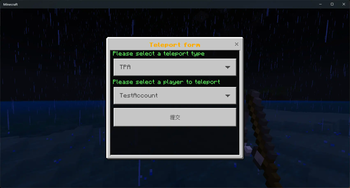
- `/tpgui`: Open the teleport request GUI to select the player to teleport to.
- `/warpgui`: Open the warp point GUI to select a warp for teleportation.
- When receiving `tpa/tpahere` requests, Bedrock players will see a form to choose accept / reject / ignore.
### 🏠 Home
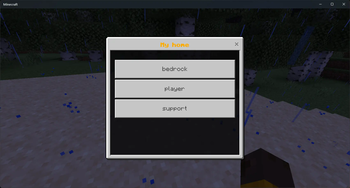
- `/homegui`: Open the personal home list GUI for quick teleportation home.
- `/phomegui`: Open the public home list GUI to access other players' public homes.
### 💬 Messaging
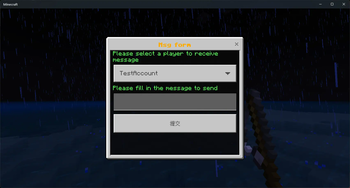
- `/msggui`: Open the message sending GUI for convenient communication with other players.
### 🎁 Other Features
- `/kitgui`: Open the kit claiming GUI.
- Bedrock players will automatically register with a random password upon joining the server and log in automatically.
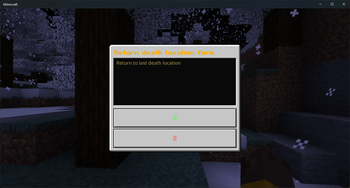
- After respawning, a form will automatically pop up to return to the death location.
## ⚙️ Installation & Configuration
### 📥 Installation Steps
1. Download the plugin and place it into the server's `plugins` folder. 2. Restart the server to generate the default configuration file. 3. The configuration file contains comprehensive comments; modify it as needed.
### 🔗 Dependencies
- Server: Supports Paper and its forks / Folia and its forks.
- Plugin: Requires installation of (https://geysermc.org/download#floodgate).
> Note: When using Geyser, ensure that `auth-type` in its configuration file is set to `floodgate`. > > If using a proxy server (such as BungeeCord or Velocity), set `send-floodgate-data` to `true` in the proxy server's Floodgate configuration file.
## 📚 Documentation & Support
- 📖 (https://docs.bps.dsnb.cc): Form images, plugin compatibility tables, commands, and permissions.
- 🌐 (https://zh.crowdin.com/project/mcbps): Participate in the plugin's localization efforts.
## 👥 Community & Communication
- 💬 QQ Group: `159323818`
- 💬 Discord: (https://discord.gg/bnpzsmPz26)
Feel free to join the community to provide feedback, suggest features, or contribute to development!
📊 Mod Details
- Game
- Minecraft Plugins
- Author
- DongShaoNB
- Version
- 2.1.1
- Downloads
- 3,219
- Endorsements
- 40
- Category
- folia
- Created
- 3/11/2024
- Updated
- 9/17/2025
- Game Versions
- 1.19, 1.19.1, 1.19.2, 1.19.3, 1.19.4
- Tags
- technology, utility
🔧 How to Install Minecraft Plugins Mods
Download from Modrinth. Use Prism Launcher or drop into your mods folder.
📖 Full step-by-step install guide for Minecraft Plugins →
Visit the official mod page for specific installation instructions for this mod.
🎮 Need cheat codes or console commands? Check ur gaming wiki for Minecraft Plugins commands, item IDs, and more.
❓ Frequently Asked Questions
Which Minecraft Plugins versions does BedrockPlayerSupport support?
The author lists 1.19, 1.19.1, 1.19.2, 1.19.3, 1.19.4, 1.20. Other versions may work but are untested by the author.
What is the latest version of BedrockPlayerSupport?
Version 2.1.1, published 2025-09-17 with 3,219 downloads recorded at the source.
Keep browsing — more Minecraft Plugins mods await