BedrockDialog
🟡 Updated this year🖼️ Gallery (2 images)

🔍 Analysis
- 🏆 #23 of 25 library mods in this game by downloads
📋 About This Mod
# BedrockDialog A Paper plugin library that lets you show interactive dialogs to players on both Java Edition and Bedrock Edition (via Geyser/Floodgate) through a single unified API. Intended to be used as a **dependency library** by other plugins. The bundled `/bdialog` command and `config.yml` dialog definitions are provided as a demo and for simple use cases only. ## Requirements - Paper 1.21.8+ - Java 21+ - (https://geysermc.org/) and/or (https://wiki.geysermc.org/floodgate/) (optional, for Bedrock Edition support) ## API Usage See ((https://github.com/f0reachARR/BedrockDialog/blob/main/API.md)) for details on using BedrockDialog as a library in your own plugin. ## Demo / Standalone Usage The plugin ships with a built-in command and `config.yml` for testing dialogs without writing code. This is intended for demonstration and simple use cases. ### Commands | Command | Description | Permission | |-----------------------|-----------------------------------|---------------------------------| | `/bdialog open <id>` | Open a dialog defined in config | `bedrockdialog.dialog.open` | | `/bdialog reload` | Reload `config.yml` | `bedrockdialog.dialog.reload` | Both permissions default to **OP only**. ### config.yml Example ```yaml dialogs: welcome: type: multi_button title: "Welcome!" body: "Welcome, <player>!" buttons: - label: "Go to Spawn" actions: - type: run_as_player command: "spawn" - label: "Check Rules" actions: - type: open_dialog dialog_id: "notice_rules" - label: "Close" actions: confirm_pvp: type: confirm title: "Join PVP?" body: "<player>, do you want to join PVP?" yes_label: "Join" no_label: "Cancel" on_yes: - type: run_as_console command: "pvp join {player}" on_no: notice_rules: type: notice title: "Server Rules" body: "1. No griefing\n2. No cheating\n3. Have fun!" dismiss_label: "Got it" on_dismiss: item_form: type: input title: "Item Distribution Form" body: "Select what you want to receive" submit_label: "Submit" inputs: - type: text key: player_name label: "Target Player Name" placeholder: "e.g. Steve" default: "" - type: slider key: amount label: "Amount" min: 1 max: 64 step: 1 default: 1 - type: boolean key: checkbox label: "Checkbox Test" default: true - type: dropdown key: item label: "Item" default: 0 options: - id: diamond label: "Diamond" - id: gold_ingot label: "Gold Ingot" on_submit: - type: run_as_console command: "give {input.player_name} {input.item} {input.amount}" on_close: ``` ### Config Actions | Type | Description | Fields | |-----------------|--------------------------------------|-------------| | `run_as_player` | Execute a command as the player | `command` | | `run_as_console`| Execute a command as the console | `command` | | `open_dialog` | Open another dialog by config ID | `dialog_id` | **Placeholders**: `{player}` (player name), `{input.<key>}` (input field value, available in `on_submit`) ## License MIT License. See (LICENSE) for details.
# BedrockDialog
A Paper plugin library that lets you show interactive dialogs to players on both Java Edition and Bedrock Edition (via Geyser/Floodgate) through a single unified API.
Intended to be used as a dependency library by other plugins. The bundled `/bdialog` command and `config.yml` dialog definitions are provided as a demo and for simple use cases only.
## Requirements
- Paper 1. 21. 8+
- Java 21+
- (https://geysermc.org/) and/or (https://wiki.geysermc.org/floodgate/) (optional, for Bedrock Edition support)
## API Usage
See ((https://github.com/f0reachARR/BedrockDialog/blob/main/API.md)) for details on using BedrockDialog as a library in your own plugin.
## Demo / Standalone Usage
The plugin ships with a built-in command and `config.yml` for testing dialogs without writing code. This is intended for demonstration and simple use cases.
### Commands
| Command | Description | Permission |
|-----------------------|-----------------------------------|---------------------------------|
| `/bdialog open
Both permissions default to OP only.
### config.yml Example
```yaml
dialogs:
welcome:
type: multi_button
title: "Welcome!"
body: "Welcome,
confirm_pvp:
type: confirm
title: "Join PVP?"
body: "
notice_rules: type: notice title: "Server Rules" body: "1. No griefing\n2. No cheating\n3. Have fun!" dismiss_label: "Got it" on_dismiss: []
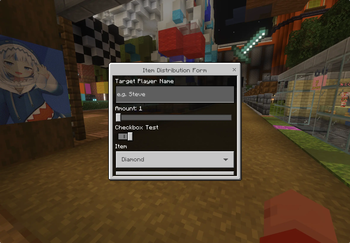
item_form: type: input title: "Item Distribution Form" body: "Select what you want to receive" submit_label: "Submit" inputs: - type: text key: player_name label: "Target Player Name" placeholder: "e.g. Steve" default: "" - type: slider key: amount label: "Amount" min: 1 max: 64 step: 1 default: 1 - type: boolean key: checkbox label: "Checkbox Test" default: true - type: dropdown key: item label: "Item" default: 0 options: - id: diamond label: "Diamond" - id: gold_ingot label: "Gold Ingot" on_submit: - type: run_as_console command: "give {input.player_name} {input.item} {input.amount}" on_close: [] ```
### Config Actions
| Type | Description | Fields | |-----------------|--------------------------------------|-------------| | `run_as_player` | Execute a command as the player | `command` | | `run_as_console`| Execute a command as the console | `command` | | `open_dialog` | Open another dialog by config ID | `dialog_id` |
Placeholders: `{player}` (player name), `{input.}` (input field value, available in `on_submit`)
MIT License. See (LICENSE) for details.
📊 Mod Details
- Game
- Minecraft Plugins
- Author
- f0reachARR
- Version
- 1.0.4
- Downloads
- 181
- Endorsements
- 1
- Category
- library
- Created
- 3/4/2026
- Updated
- 7/1/2026
- Game Versions
- 1.21.8, 1.21.9, 1.21.10, 1.21.11, 26.1
- Tags
- library, utility
🔧 How to Install Minecraft Plugins Mods
Download from Modrinth. Use Prism Launcher or drop into your mods folder.
📖 Full step-by-step install guide for Minecraft Plugins →
Visit the official mod page for specific installation instructions for this mod.
🎮 Need cheat codes or console commands? Check ur gaming wiki for Minecraft Plugins commands, item IDs, and more.
❓ Frequently Asked Questions
Which Minecraft Plugins versions does BedrockDialog support?
The author lists 1.21.8, 1.21.9, 1.21.10, 1.21.11, 26.1, 26.1.1. Other versions may work but are untested by the author.
What is the latest version of BedrockDialog?
Version 1.0.4, published 2026-07-01 with 181 downloads recorded at the source.
Keep browsing — more Minecraft Plugins mods await