AutoUpdatePlugins
🟡 Updated this yearPreview

🔍 Analysis
- 👍 0.1% endorsement rate
- 🏆 #13 of 169 folia mods in this game by downloads
📋 About This Mod
## AutoUpdatePlugins ](https://github.com/ApliNi/AutoUpdatePlugins/blob/main/README.md) -- ](https://github.com/ApliNi/AutoUpdatePlugins/blob/main/README_EN.md) Download: https://modrinth.com/plugin/AutoUpdatePlugins --- ## Functions and commands - `/aup` Show plugin information - `/aup reload` Reload configuration - `/aup update` Run update manually - `/aup log` View full logs - `/aup stop` Stop the current update - Using the `update` directory for plugin updates - Automatically find download links based on plugin release page - `GitHub, Jenkins, Spigot, Modrinth, Bukkit, Ghost Chop Build Station v2, MineBBS, CurseForge`. - Support downloading pre-releases from GitHub. - Supports downloading files in GitHub Actions, enabling login-free downloading through https://nightly.link/ - Support for specifying platforms in Modrinth - Support specifying the version in Modrinth - Support matching different files under the same release - `GitHub, Jenkins, Modrinth`. - Support for file integrity checking - Cache last update, no duplicate downloads. - No duplicate installation of updates - Error retry mechanism - Each update task can be configured individually. - Configurable certificate validation - Customizable output log level - Multi-language support! - Support for running system commands while updating ](https://bstats.org/plugin/bukkit/ApliNi-AutoUpdatePlugins/20629) <a href="https://bstats.org/plugin/bukkit/ApliNi-AutoUpdatePlugins/20629">!(https://bstats.org/signatures/bukkit/ApliNi-AutoUpdatePlugins.svg)</a> **运行日志** ```yaml : The update check will run after 64 seconds and repeat every 14400 seconds. : : Updating... : Version found: https://github.com/EssentialsX/Essentials/releases/download/2.20.1/EssentialsX-2.20.1. jar : Update complete -> : Updating... : Version found: https://github.com/EssentialsX/Essentials/releases/download/2.20.1/EssentialsXChat- 2.20.1.jar : Update complete -> : Updating... : Version found: https://cdn.modrinth.com/data/Lu3KuzdV/versions/w3P6ufP1/CoreProtect-22.2.jar : file is up to date! ... : : - Time consumed: 268 seconds : - Failed: 2, Updated: 22, Completed: 24 : - Network requests: 48, Downloaded files: 40.10MB ``` ### 配置 ```yaml # How long to wait for the first update to run after the server has finished booting (seconds) startupDelay: 64 # After the first run is complete, repeat the update at this frequency (seconds, reboot required after modification). startupCycle: 14400 # 4h # Plugin update directory, set as in bukkit.yml # Note that the path must end with "/" updatePath: './plugins/update/' # Download the cache directory without modification # New .jar files will be downloaded to the cache directory first, then moved to the plugin update directory after validation is complete tempPath: './plugins/AutoUpdatePlugins/temp/' # Directory of plugins or files the server is running, for hash checking filePath: './plugins/' # Enable the last update record and check for updates with this information (temp.yml) enablePreviousUpdate: true # File integrity check, only works on .jar / .zip files. Try to open it as a zip file, if it fails, it is incomplete. zipFileCheck: true # If the file configuration matches this regex, zip integrity checking is enabled, otherwise it is not enabled zipFileCheckList: '\.(?:jar|zip)$' # Do not move to the update directory if the hash of the downloaded file matches the hash of the file to be updated in the update directory (or the file running on the server) (MD5) ignoreDuplicates: true # Whether to enable SSL authentication, usually do not turn it off sslVerify: true # Failed network request retry count fetchErrRetry: 4 # Initial retry delay, +2 seconds per retry fetchErrRetryDelay: 5 # Setting up a web proxy proxy: type: DIRECT # DIRECT | HTTP | SOCKS host: '127.0.0.1' port: 7890 # Control proxy usage for different requests reqApi: true reqDownload: true # Edit request headers in HTTP requests setRequestProperty: - name: 'User-Agent' value: 'Mozilla/5.0 (Windows NT 10.0; Win64; x64) AppleWebKit/537.36 (KHTML, like Gecko) Chrome/142.0.0.0 Safari/537.36' # 启用哪些日志等级 logLevel: - 'DEBUG' # for debugging, can be commented out after testing is complete - 'MARK' # Same as DEBUG, green color, used to mark task completion. - 'INFO' # Output logs - 'WARN' # Output warnings - 'NET
## AutoUpdatePlugins
[[中文文档]](https://github.com/ApliNi/AutoUpdatePlugins/blob/main/README.md) -- [](https://github.com/ApliNi/AutoUpdatePlugins/blob/main/README_EN.md)
Download: https://modrinth.com/plugin/AutoUpdatePlugins
## Functions and commands - `/aup` Show plugin information - `/aup reload` Reload configuration - `/aup update` Run update manually - `/aup log` View full logs - `/aup stop` Stop the current update
- Using the `update` directory for plugin updates
- Automatically find download links based on plugin release page
- - `GitHub, Jenkins, Spigot, Modrinth, Bukkit, Ghost Chop Build Station v2, MineBBS, CurseForge`.
- - Support downloading pre-releases from GitHub.
- - Supports downloading files in GitHub Actions, enabling login-free downloading through https://nightly.link/
- - Support for specifying platforms in Modrinth
- - Support specifying the version in Modrinth
- Support matching different files under the same release
- - `GitHub, Jenkins, Modrinth`.
- Support for file integrity checking
- Cache last update, no duplicate downloads.
- No duplicate installation of updates
- Error retry mechanism
- Each update task can be configured individually.
- Configurable certificate validation
- Customizable output log level
- Multi-language support!
- [ ] Support for running system commands while updating
[](https://bstats.org/plugin/bukkit/ApliNi-AutoUpdatePlugins/20629) 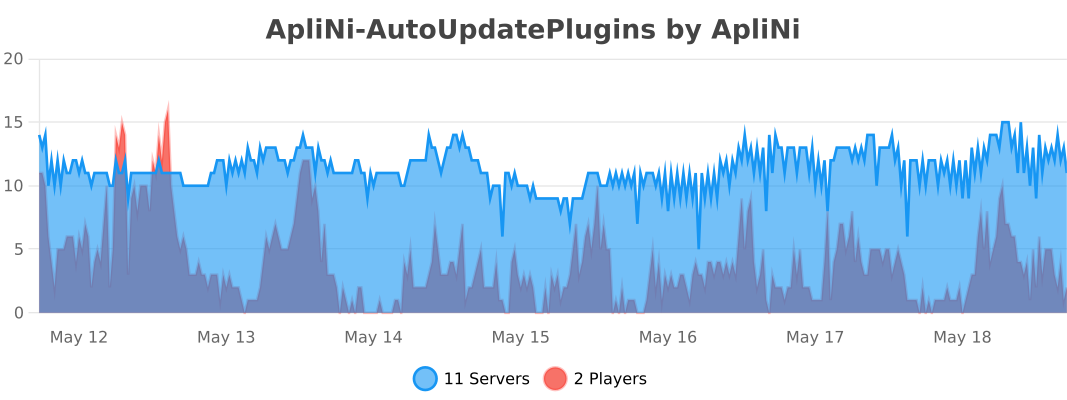
运行日志 ```yaml : The update check will run after 64 seconds and repeat every 14400 seconds. : [## Start running automatic updates ##] : Updating... : Version found: https://github.com/EssentialsX/Essentials/releases/download/2. 20. 1/EssentialsX-2. 20. 1. jar : Update complete -> : Updating... : Version found: https://github.com/EssentialsX/Essentials/releases/download/2. 20. 1/EssentialsXChat- 2. 20. 1.jar : Update complete -> : Updating... : Version found: https://cdn.modrinth.com/data/Lu3KuzdV/versions/w3P6ufP1/CoreProtect-22. 2.jar : file is up to date! ... : [## Update all done ##] : - Time consumed: 268 seconds : - Failed: 2, Updated: 22, Completed: 24 : - Network requests: 48, Downloaded files: 40. 10MB ```
### 配置 ```yaml
# How long to wait for the first update to run after the server has finished booting (seconds) startupDelay: 64
# After the first run is complete, repeat the update at this frequency (seconds, reboot required after modification). startupCycle: 14400 # 4h
# Plugin update directory, set as in bukkit.yml # Note that the path must end with "/" updatePath: './plugins/update/'
# Download the cache directory without modification # New .jar files will be downloaded to the cache directory first, then moved to the plugin update directory after validation is complete tempPath: './plugins/AutoUpdatePlugins/temp/'
# Directory of plugins or files the server is running, for hash checking filePath: './plugins/'
# Enable the last update record and check for updates with this information (temp.yml) enablePreviousUpdate: true
# File integrity check, only works on .jar / .zip files. Try to open it as a zip file, if it fails, it is incomplete. zipFileCheck: true # If the file configuration matches this regex, zip integrity checking is enabled, otherwise it is not enabled zipFileCheckList: '\.(?:jar|zip)$'
# Do not move to the update directory if the hash of the downloaded file matches the hash of the file to be updated in the update directory (or the file running on the server) (MD5) ignoreDuplicates: true
# Whether to enable SSL authentication, usually do not turn it off sslVerify: true
# Failed network request retry count fetchErrRetry: 4 # Initial retry delay, +2 seconds per retry fetchErrRetryDelay: 5
# Setting up a web proxy proxy: type: DIRECT # DIRECT | HTTP | SOCKS host: '127. 0. 0. 1' port: 7890 # Control proxy usage for different requests reqApi: true reqDownload: true
# Edit request headers in HTTP requests setRequestProperty: - name: 'User-Agent' value: 'Mozilla/5. 0 (Windows NT 10. 0; Win64; x64) AppleWebKit/537. 36 (KHTML, like Gecko) Chrome/142. 0. 0. 0 Safari/537. 36'
# 启用哪些日志等级 logLevel: - 'DEBUG' # for debugging, can be commented out after testing is complete - 'MARK' # Same as DEBUG, green color, used to mark task completion. - 'INFO' # Output logs - 'WARN' # Output warnings - 'NET
📊 Mod Details
- Game
- Minecraft Plugins
- Author
- ApliNi
- Version
- 2.9.1
- Downloads
- 35,301
- Endorsements
- 29
- Category
- folia
- Created
- 1/10/2024
- Updated
- 6/5/2026
- Game Versions
- 1.16, 1.16.1, 1.16.2, 1.16.3, 1.16.4
- Tags
- management, optimization, utility
🔧 How to Install Minecraft Plugins Mods
Download from Modrinth. Use Prism Launcher or drop into your mods folder.
📖 Full step-by-step install guide for Minecraft Plugins →
Visit the official mod page for specific installation instructions for this mod.
🎮 Need cheat codes or console commands? Check ur gaming wiki for Minecraft Plugins commands, item IDs, and more.
❓ Frequently Asked Questions
Which Minecraft Plugins versions does AutoUpdatePlugins support?
The author lists 1.16, 1.16.1, 1.16.2, 1.16.3, 1.16.4, 1.16.5. Other versions may work but are untested by the author.
What is the latest version of AutoUpdatePlugins?
Version 2.9.1, published 2026-06-05 with 35,301 downloads recorded at the source.
Keep browsing — more Minecraft Plugins mods await