AutoMod
⚪ Last updated 2024🖼️ Gallery (1 images)
🔍 Analysis
- 🏆 #666 of 1317 bukkit mods in this game by downloads
📋 About This Mod
# AutoMod AutoMod is a Minecraft Spigot plugin designed to enhance in-game chat moderation by using AI, specifically the Perspective API, to censor and block harmful messages. The plugin also blocks links, domains, and IP addresses (both IPv4 and IPv6). Additionally, AutoMod supports multi-instance servers through Redis communication and utilizes caches to speed up the moderation process, with configurable cache expiration. # Docs (https://docs.nextdevv.com/automod.html) ## Features - **AI-Powered Moderation:** Uses Perspective API to detect and censor harmful messages in real-time. - **Link and IP Blocking:** Blocks links, domains, IPv4, and IPv6 addresses to prevent spam and malicious content. - **Multi-Instance Support:** Utilizes Redis to communicate between multiple server instances for synchronized moderation. - **Configurable Caching:** Implements caches to improve performance with customizable expiration settings. - **Smart Anti-Spam Detection:** Employs algorithms to identify and mitigate spam behavior intelligently. - **Anti-Command Spam:** Limits the frequency of command usage to prevent abuse and maintain server stability. - **LiteBans Supported:** Integrates with LiteBans to enhance moderation capabilities with advanced ban management features. ## Installation 1. Download the latest release of AutoMod from the (https://github.com/nextdevv/automod/releases). 2. Place the `AutoMod.jar` file into your server's `plugins` directory. 3. Restart your Minecraft server to load the plugin. ## Configuration After the initial run, a configuration file will be generated in the `plugins/AutoMod` directory. The main configuration options include: - **Perspective API Key:** Obtain an API key from the (https://perspectiveapi.com/) and add it to the configuration file. - **Redis Configuration:** Set up Redis connection details to enable multi-instance communication. - **Cache Settings:** Configure the cache expiration time to balance performance and resource usage. ## Commands - `/automod reload` - Reloads the plugin configuration. - `/automod status` - Checks the status of all services. - `/automod unmute <player>` - Unmutes a player. ## Permissions - `automod.bypass` - Bypasses all AutoMod filters - `automod.staff` - Can see the original message ## Usage AutoMod automatically moderates chat messages, blocking harmful content, links, and IP addresses based on the configuration. There is no need for additional commands to start the moderation process. ## Contributing 1. Fork the repository on GitHub. 2. Create a new branch (`git checkout -b feature-branch`). 3. Make your changes and commit them (`git commit -am 'Add new feature'`). 4. Push the branch (`git push origin feature-branch`). 5. Create a new Pull Request. ## License This project is licensed under the MIT License. See the (LICENSE) file for more details. ## Support For support, please open an issue on the (https://github.com/nextdevv/automod/issues) or contact us via email at support@unilix.it. Or even join the discord server https://discord.gg/hpkF73sGzw --- Thank you for using AutoMod! We hope it helps keep your Minecraft server chat safe and enjoyable for everyone.
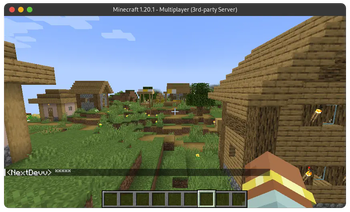
AutoMod is a Minecraft Spigot plugin designed to enhance in-game chat moderation by using AI, specifically the Perspective API, to censor and block harmful messages. The plugin also blocks links, domains, and IP addresses (both IPv4 and IPv6). Additionally, AutoMod supports multi-instance servers through Redis communication and utilizes caches to speed up the moderation process, with configurable cache expiration.
(https://docs.nextdevv.com/automod.html)
## Features
- AI-Powered Moderation: Uses Perspective API to detect and censor harmful messages in real-time.
- Link and IP Blocking: Blocks links, domains, IPv4, and IPv6 addresses to prevent spam and malicious content.
- Multi-Instance Support: Utilizes Redis to communicate between multiple server instances for synchronized moderation.
- Configurable Caching: Implements caches to improve performance with customizable expiration settings.
- Smart Anti-Spam Detection: Employs algorithms to identify and mitigate spam behavior intelligently.
- Anti-Command Spam: Limits the frequency of command usage to prevent abuse and maintain server stability.
- LiteBans Supported: Integrates with LiteBans to enhance moderation capabilities with advanced ban management features.
## Installation
1. Download the latest release of AutoMod from the (https://github.com/nextdevv/automod/releases). 2. Place the `AutoMod.jar` file into your server's `plugins` directory. 3. Restart your Minecraft server to load the plugin.
## Configuration
After the initial run, a configuration file will be generated in the `plugins/AutoMod` directory. The main configuration options include:
- Perspective API Key: Obtain an API key from the (https://perspectiveapi.com/) and add it to the configuration file.
- Redis Configuration: Set up Redis connection details to enable multi-instance communication.
- Cache Settings: Configure the cache expiration time to balance performance and resource usage.
## Commands
- `/automod reload` - Reloads the plugin configuration.
- `/automod status` - Checks the status of all services.
- `/automod unmute
` - Unmutes a player.
## Permissions
- `automod.bypass` - Bypasses all AutoMod filters
- `automod.staff` - Can see the original message
AutoMod automatically moderates chat messages, blocking harmful content, links, and IP addresses based on the configuration. There is no need for additional commands to start the moderation process.
## Contributing
1. Fork the repository on GitHub. 2. Create a new branch (`git checkout -b feature-branch`). 3. Make your changes and commit them (`git commit -am 'Add new feature'`). 4. Push the branch (`git push origin feature-branch`). 5. Create a new Pull Request.
This project is licensed under the MIT License. See the (LICENSE) file for more details.
For support, please open an issue on the (https://github.com/nextdevv/automod/issues) or contact us via email at support@unilix.it.
Or even join the discord server https://discord.gg/hpkF73sGzw
Thank you for using AutoMod! We hope it helps keep your Minecraft server chat safe and enjoyable for everyone.
📊 Mod Details
- Game
- Minecraft Plugins
- Author
- NextDevv
- Version
- 0.3.7-alpha3
- Downloads
- 237
- Endorsements
- 1
- Category
- bukkit
- Created
- 7/6/2024
- Updated
- 7/2/2024
- Game Versions
- 1.17, 1.18, 1.19, 1.20
- Tags
- optimization, social, utility
🔧 How to Install Minecraft Plugins Mods
Download from Modrinth. Use Prism Launcher or drop into your mods folder.
📖 Full step-by-step install guide for Minecraft Plugins →
Visit the official mod page for specific installation instructions for this mod.
🎮 Need cheat codes or console commands? Check ur gaming wiki for Minecraft Plugins commands, item IDs, and more.
❓ Frequently Asked Questions
Which Minecraft Plugins versions does AutoMod support?
The author lists 1.17, 1.18, 1.19, 1.20. Other versions may work but are untested by the author.
What is the latest version of AutoMod?
Version 0.3.7-alpha3, published 2024-07-02 with 237 downloads recorded at the source.
Keep browsing — more Minecraft Plugins mods await