Auto Cart System
🟡 Updated this year🖼️ Gallery (2 images)
🔍 Analysis
- 🏆 #16 of 378 game-mechanics mods in this game by downloads
📋 About This Mod
# AutoCartSystem **Build rail networks that build themselves.** AutoCartSystem turns minecarts into a self-laying, self-mining, self-bridging, driveable train system — so reaching distant places by rail is finally faster than walking there. Lay track, bore tunnels, span chasms, haul resources, and signal stations, all from carts on the rails. Then couple them into trains and drive them with a real engine. > Requires Minecraft 26.x or newer (Paper) --- ## Why? The idea of mining with a minecart to send resources back to your base is enticing, but ultimately impractical. The effort required to build the rail network is many times harder than just mining out a mineshaft on foot and walking back. The preparation needed to bore holes, make bridges, lay the track, and add powered rails is high. Then you start to strip mine near your cart and before you know it you're 1000s of blocks away from your cart in far less time than it took to just get the cart there. This plugin seeks to address those problems and more. --- ## Features - **Coupling carts & trains** — couple carts together into recognised trains (up to 20 long). Coupling variants exist for every vanilla and ACS cart type. - **Auto Track Layer** — lays rail at the front of the train from its own rail storage, so the track grows as you go. - **Auto Bridge Layer** — fills gaps under the rail with blocks from its storage; alternate block types for patterned bridges. - **Drill Cart** — mines ahead of the train in a configurable pattern (1x2, 2x1, 2x2 left/right, 3x2, 3x3), consuming pickaxes from its storage. - **Engine Cart** — a faster, smarter furnace cart that pulls trains of any size up any hill and can be **driven** by a player riding a coupled driver cart. Keeps its chunk loaded so the train keeps moving. - **Driver Cart** — a dedicated rideable cart that hands the rider control of the train and lets you steer the track/drill left and right. - **Long Hopper** — pushes items into any chest up to 20 blocks from the hopper's output end, not just the adjacent block. - **Smart Signs** — `` item filters, `` voiding chests, and `` train signals that slow and stop auto-driven trains until conditions (chest empty/full, timers, clear-track) are met. --- ## Quick start 1. Drop the AutoCartSystem `.jar` into your server's `plugins/` folder. 2. Start (or restart) your Paper 26.x+ server. A default `config.yml` is generated on first run. 3. Give yourself some carts and place them on rails: ``` /acs give engine /acs give track_layer 64 /acs give drill true ``` 4. Couple them up, fuel the engine, hop in the cart behind it, and drive forward. > ACS carts are not creative-menu items — there is nothing new to find in the creative inventory. Get them by crafting (see (#crafting-recipes)) or with `/acs give <type>` (op by default). ### Filling & configuring carts The functional carts (engine, drill, track layer, bridge layer) each carry their own storage. **Sneak + right-click a placed cart to open its storage GUI:** - **Engine** — drop in fuel (coal, a block of coal, lava buckets, etc.). The engine is a furnace minecart you can't sit in; it's driven from a coupled driver cart. *(Right-clicking without sneaking does nothing — it won't accept hand-fed fuel like a vanilla furnace cart.)* - **Drill** — drop in pickaxes; click the **compass button** in the GUI to cycle the mining pattern (1x2 → 2x2 right → 2x2 left → 3x2 → 3x3). - **Track layer** — drop in rails. **Bridge layer** — drop in solid blocks rails can sit on. Each storage only accepts items it can use. Breaking a cart drops whatever it was holding. Need to tweak a setting? Edit `plugins/AutoCartSystem/config.yml`, then run `/acs reload` — no restart required. --- ## Crafting recipes - Every ACS cart can be crafted in a crafting table and appears in the recipe book (auto-discovered the first time you join). Operators can also use `/acs give`. - Recipes are **shapeless** — drop the listed items anywhere in the grid. - Crafted carts are fully tagged and behave identically to ones from `/acs give`. - Recipes can be disabled server-wide with `recipes.enabled: false` (see (#configuration)); carts then remain available via `/acs give` only. - **Note:** because ACS carts are special variants of vanilla minecart items, they cannot be added to the creative-mode item search list (that menu is fixed by the client). In creative, obtain them via the recipe book or `/acs give`. - Every recipe includes one **Iron Chain** — the "coupler" hardware that lets the cart link into a train. | Cart | Ingredients | | --- | --- | | Minecart | Minecart + Iron Chain | | Driver Cart | Minecart + Lever + Iron Chain | | Chest Minecart | Chest Minecart + Iron Chain | | Hopper Minecart | Hopper Minecart + Iron Chain | | Furnace Minecart | Furnace Minecart + Iron Chain | | TNT Minecart | TNT Minecart + Iron Chain | | Auto Track Layer | Minecart
# AutoCartSystem
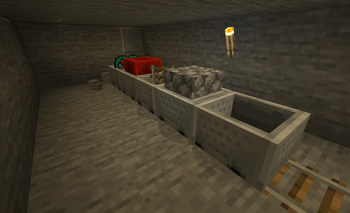
Build rail networks that build themselves. AutoCartSystem turns minecarts into a self-laying, self-mining, self-bridging, driveable train system — so reaching distant places by rail is finally faster than walking there.
Lay track, bore tunnels, span chasms, haul resources, and signal stations, all from carts on the rails. Then couple them into trains and drive them with a real engine.
> Requires Minecraft 26.x or newer (Paper)
The idea of mining with a minecart to send resources back to your base is enticing, but ultimately impractical. The effort required to build the rail network is many times harder than just mining out a mineshaft on foot and walking back.
The preparation needed to bore holes, make bridges, lay the track, and add powered rails is high. Then you start to strip mine near your cart and before you know it you're 1000s of blocks away from your cart in far less time than it took to just get the cart there. This plugin seeks to address those problems and more.
## Features
- Coupling carts & trains — couple carts together into recognised trains (up to 20 long). Coupling variants exist for every vanilla and ACS cart type.
- Auto Track Layer — lays rail at the front of the train from its own rail storage, so the track grows as you go.
- Auto Bridge Layer — fills gaps under the rail with blocks from its storage; alternate block types for patterned bridges.
- Drill Cart — mines ahead of the train in a configurable pattern (1x2, 2x1, 2x2 left/right, 3x2, 3x3), consuming pickaxes from its storage.
- Engine Cart — a faster, smarter furnace cart that pulls trains of any size up any hill and can be driven by a player riding a coupled driver cart. Keeps its chunk loaded so the train keeps moving.
- Driver Cart — a dedicated rideable cart that hands the rider control of the train and lets you steer the track/drill left and right.
- Long Hopper — pushes items into any chest up to 20 blocks from the hopper's output end, not just the adjacent block.
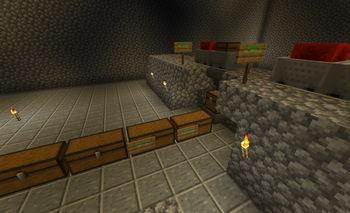
- Smart Signs — `` item filters, `` voiding chests, and `` train signals that slow and stop auto-driven trains until conditions (chest empty/full, timers, clear-track) are met.
## Quick start
1. Drop the AutoCartSystem `.jar` into your server's `plugins/` folder. 2. Start (or restart) your Paper 26.x+ server. A default `config.yml` is generated on first run. 3. Give yourself some carts and place them on rails:
``` /acs give engine /acs give track_layer 64 /acs give drill true ```
4. Couple them up, fuel the engine, hop in the cart behind it, and drive forward.
> ACS carts are not creative-menu items — there is nothing new to find in the creative inventory. Get them by crafting (see (#crafting-recipes)) or with `/acs give
### Filling & configuring carts
The functional carts (engine, drill, track layer, bridge layer) each carry their own storage. Sneak + right-click a placed cart to open its storage GUI:
- Engine — drop in fuel (coal, a block of coal, lava buckets, etc.). The engine is a furnace minecart you can't sit in; it's driven from a coupled driver cart. (Right-clicking without sneaking does nothing — it won't accept hand-fed fuel like a vanilla furnace cart.)
- Drill — drop in pickaxes; click the compass button in the GUI to cycle the mining pattern (1x2 → 2x2 right → 2x2 left → 3x2 → 3x3).
- Track layer — drop in rails. Bridge layer — drop in solid blocks rails can sit on.
Each storage only accepts items it can use. Breaking a cart drops whatever it was holding.
Need to tweak a setting? Edit `plugins/AutoCartSystem/config.yml`, then run `/acs reload` — no restart required.
## Crafting recipes
- Every ACS cart can be crafted in a crafting table and appears in the recipe book (auto-discovered the first time you join). Operators can also use `/acs give`.
- Recipes are shapeless — drop the listed items anywhere in the grid.
- Crafted carts are fully tagged and behave identically to ones from `/acs give`.
- Recipes can be disabled server-wide with `recipes.enabled: false` (see (#configuration)); carts then remain available via `/acs give` only.
- Note: because ACS carts are special variants of vanilla minecart items, they cannot be added to the creative-mode item search list (that menu is fixed by the client). In creative, obtain them via the recipe book or `/acs give`.
- Every recipe includes one Iron Chain — the "coupler" hardware that lets the cart link into a train.
| Cart | Ingredients | | --- | --- | | Minecart | Minecart + Iron Chain | | Driver Cart | Minecart + Lever + Iron Chain | | Chest Minecart | Chest Minecart + Iron Chain | | Hopper Minecart | Hopper Minecart + Iron Chain | | Furnace Minecart | Furnace Minecart + Iron Chain | | TNT Minecart | TNT Minecart + Iron Chain | | Auto Track Layer | Minecart
📊 Mod Details
- Game
- Minecraft Plugins
- Author
- nathanhoel
- Version
- 1.11.1
- Downloads
- 76
- Endorsements
- 2
- Category
- game-mechanics
- Created
- 6/20/2026
- Updated
- 6/14/2026
- Game Versions
- 26.1, 26.1.1, 26.1.2
- Tags
- game-mechanics, storage, transportation
🔧 How to Install Minecraft Plugins Mods
Download from Modrinth. Use Prism Launcher or drop into your mods folder.
📖 Full step-by-step install guide for Minecraft Plugins →
Visit the official mod page for specific installation instructions for this mod.
🎮 Need cheat codes or console commands? Check ur gaming wiki for Minecraft Plugins commands, item IDs, and more.
❓ Frequently Asked Questions
Which Minecraft Plugins versions does Auto Cart System support?
The author lists 26.1, 26.1.1, 26.1.2. Other versions may work but are untested by the author.
What is the latest version of Auto Cart System?
Version 1.11.1, published 2026-06-14 with 76 downloads recorded at the source.
Keep browsing — more Minecraft Plugins mods await