Auditor
🟠 Updated over a year ago🖼️ Gallery (3 images)
🔍 Analysis
- 🏆 #1177 of 1224 bukkit mods in this game by downloads
📋 About This Mod
<div align="center"> <img src="https://i.imgur.com/6RtQ35R.png" alt="Auditor Banner" width="900" /> <br> <br> <h1>Advanced Economy Monitoring & Analysis</h1> <p><em>Monitor, Analyze and Secure Your Server Economy</em></p> </div> <br/> <br> <br/> <br/> <br> <br/> <div align="center"> <img src="https://i.imgur.com/dPeA1iW.png" alt="Divider" width="900" /> </div> <br/> <br> <br/> Auditor is a comprehensive economy monitoring plugin designed to help server administrators track, analyze, and manage their server's economic health. With advanced transaction monitoring, player behavior analysis, and real-time alerts, Auditor provides the tools needed to maintain a balanced and fair economy. <br/> <br> <br/> <br/> <br> <br/> <div align="center"> <img src="https://i.imgur.com/3O1w0De.png" alt="Feature Divider" width="900" /> </div> <br/> <br> <br/> ## Real-Time Monitoring - **Transaction Tracking** – Monitor all economy transactions in real time - **Player Profiles** – Automatic profile creation for every player with economic activity - **Risk Assessment** – Automatic risk scoring based on transaction patterns - **Live Alerts** – Instant notifications for suspicious activities <br/> ## Advanced GUI System - **Dashboard** – Comprehensive overview of server economy health - **Player Analysis** – Detailed player profiles with transaction history - **Alert Management** – Interactive alert system with resolution tracking - **Settings GUI** – Full configuration through intuitive interfaces - **No Chat Spam** – All features accessible through GUIs, keeping chat clean <br/> ## Security Features - **Fraud Detection** – Automatic detection of suspicious transaction patterns - **Flag System** – Mark players with customizable flags (SUSPICIOUS, BOT_SUSPECTED, TRUSTED, etc.) - **Admin Notes** – Add private notes to player profiles for staff reference - **Permission-Based Access** – Granular permission system for different staff levels <br/> ## Analytics & Reporting - **Economy Health Metrics** – Track inflation, wealth distribution, and market trends - **Player Rankings** – View top players by various metrics - **Transaction Volume Analysis** – Monitor server-wide economic activity - **Data Export** – Export data to CSV for external analysis <br/> ## Administration Tools - **Monitoring Toggle** – Enable enhanced monitoring for specific players - **Maintenance Mode** – Temporarily disable monitoring during maintenance - **Database Management** – Built-in cleanup and optimization tools - **Integration Support** – Works with Vault, DiscordSRV, PlaceholderAPI, and more <br/> <br> <br/> <br/> <br> <br/> <div align="center"> <img src="https://i.imgur.com/buyqQfo.png" alt="Requirements Divider" width="900" /> </div> <br/> <br> <br/> ## Requirements - **Minecraft:** 1.13.2 or higher - **Vault:** Required for economy integration - **Economy Plugin:** Any Vault-compatible economy plugin (EssentialsX, CMI, etc.) - **Java:** 8 or higher <br/> <br> <br/> <br/> <br> <br/> <div align="center"> <img src="https://i.imgur.com/XSddOMN.png" alt="Install Divider" width="900" /> </div> <br/> <br> <br/> ## Installation 1. Download `Auditor.jar` 2. Place it in your server's `plugins` folder 3. Ensure **Vault** is installed 4. Restart your server 5. Configure using `/auditor settings` or edit `config.yml` <br/> <br> <br/> <br/> <br> <br/> <div align="center"> <img src="https://i.imgur.com/RF0seP1.png" alt="Commands Divider" width="900" /> </div> <br/> <br> <br/> <details> <summary><strong>Click to view commands</strong></summary> ```bash /auditor # Open the main dashboard /audit # Alias for /auditor /auditor player <name> # Analyze specific player /auditor alerts # View active alerts /auditor settings # Open settings GUI /auditor reload # Reload configuration /auditor help # Show help message ``` </details> <br/> <br> <br/> <br/> <br> <br/> <div align="center"> <img src="https://i.imgur.com/EDZVKPt.png" alt="Permissions Divider" width="900" /> </div> <br/> <br> <br/> <details> <summary><strong>Click to view permissions</strong></summary> ``` auditor.admin # Full administrative access auditor.moderator # Staff access for monitoring auditor.dashboard # Access to main dashboard auditor.player.view # View player analysis auditor.player.others # Analyze other players auditor.alerts.view # View alerts auditor.alerts.manage # Manage and resolve alerts auditor.export # Export data auditor.monitor # Toggle player monitoring auditor.flag # Manage player flags auditor.note # Manage admin notes auditor.settings # Access settings auditor.reload # Reload configuration auditor.bypass # Bypass transaction monitoring ``` </details>

Advanced Economy Monitoring & Analysis
Monitor, Analyze and Secure Your Server Economy

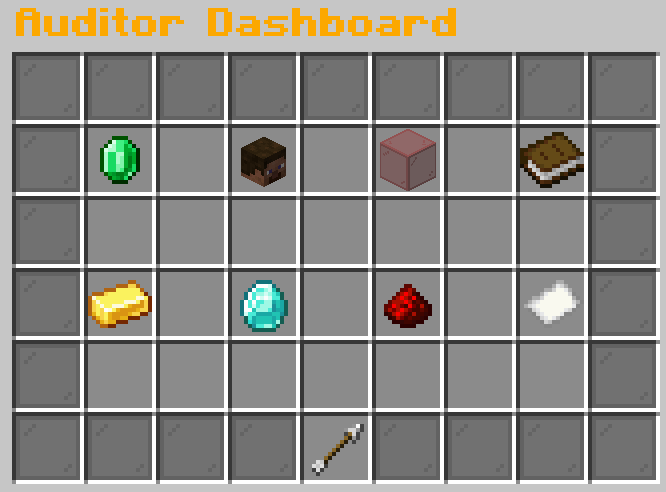
Auditor is a comprehensive economy monitoring plugin designed to help server administrators track, analyze, and manage their server's economic health. With advanced transaction monitoring, player behavior analysis, and real-time alerts, Auditor provides the tools needed to maintain a balanced and fair economy.

## Real-Time Monitoring
- Transaction Tracking – Monitor all economy transactions in real time
- Player Profiles – Automatic profile creation for every player with economic activity
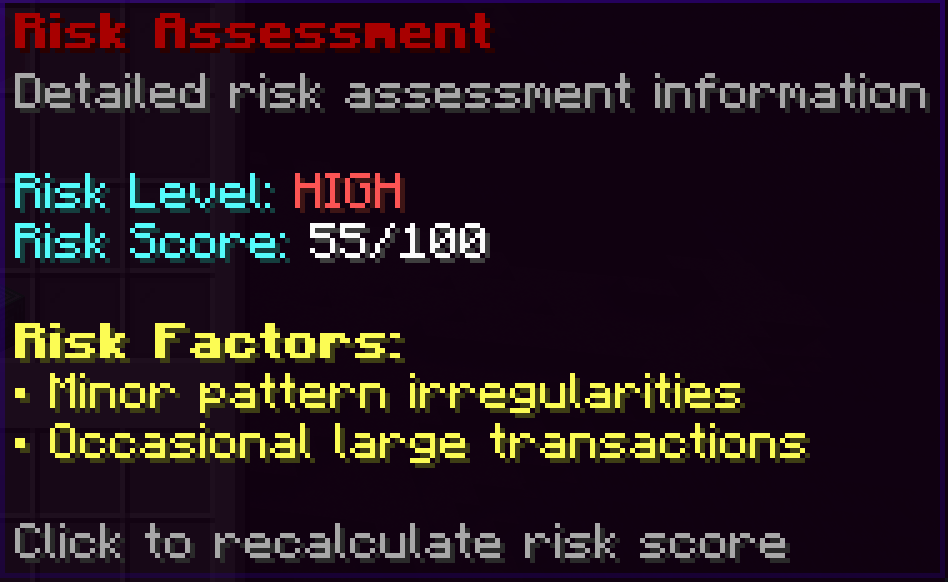
- Risk Assessment – Automatic risk scoring based on transaction patterns
- Live Alerts – Instant notifications for suspicious activities
## Advanced GUI System
- Dashboard – Comprehensive overview of server economy health
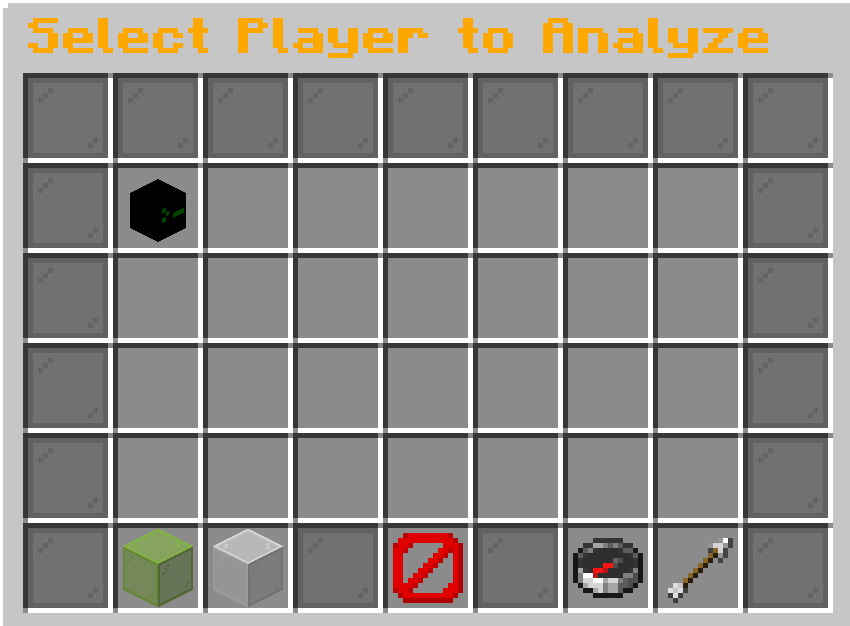
- Player Analysis – Detailed player profiles with transaction history
- Alert Management – Interactive alert system with resolution tracking
- Settings GUI – Full configuration through intuitive interfaces
- No Chat Spam – All features accessible through GUIs, keeping chat clean
## Security Features
- Fraud Detection – Automatic detection of suspicious transaction patterns
- Flag System – Mark players with customizable flags (SUSPICIOUS, BOT_SUSPECTED, TRUSTED, etc.)
- Admin Notes – Add private notes to player profiles for staff reference
- Permission-Based Access – Granular permission system for different staff levels
## Analytics & Reporting
- Economy Health Metrics – Track inflation, wealth distribution, and market trends
- Player Rankings – View top players by various metrics
- Transaction Volume Analysis – Monitor server-wide economic activity
- Data Export – Export data to CSV for external analysis
## Administration Tools
- Monitoring Toggle – Enable enhanced monitoring for specific players
- Maintenance Mode – Temporarily disable monitoring during maintenance
- Database Management – Built-in cleanup and optimization tools
- Integration Support – Works with Vault, DiscordSRV, PlaceholderAPI, and more

## Requirements
- Minecraft: 1. 13. 2 or higher
- Vault: Required for economy integration
- Economy Plugin: Any Vault-compatible economy plugin (EssentialsX, CMI, etc.)
- Java: 8 or higher

## Installation
1. Download `Auditor.jar` 2. Place it in your server's `plugins` folder 3. Ensure Vault is installed 4. Restart your server 5. Configure using `/auditor settings` or edit `config.yml`

Click to view commands
```bash
/auditor # Open the main dashboard
/audit # Alias for /auditor
/auditor player

Click to view permissions
``` auditor.admin # Full administrative access auditor.moderator # Staff access for monitoring auditor.dashboard # Access to main dashboard auditor.player.view # View player analysis auditor.player.others # Analyze other players auditor.alerts.view # View alerts auditor.alerts.manage # Manage and resolve alerts auditor.export # Export data auditor.monitor # Toggle player monitoring auditor.flag # Manage player flags auditor.note # Manage admin notes auditor.settings # Access settings auditor.reload # Reload configuration auditor.bypass # Bypass transaction monitoring ```
📊 Mod Details
- Game
- Minecraft Plugins
- Author
- WiiZARDD
- Version
- 1.0.0
- Downloads
- 81
- Endorsements
- 0
- Category
- bukkit
- Created
- 8/16/2025
- Updated
- 8/16/2025
- Game Versions
- 1.13, 1.14, 1.15, 1.16, 1.17
- Tags
- economy, management, utility
🔧 How to Install Minecraft Plugins Mods
Download from Modrinth. Use Prism Launcher or drop into your mods folder.
📖 Full step-by-step install guide for Minecraft Plugins →
Visit the official mod page for specific installation instructions for this mod.
🎮 Need cheat codes or console commands? Check ur gaming wiki for Minecraft Plugins commands, item IDs, and more.
❓ Frequently Asked Questions
Which Minecraft Plugins versions does Auditor support?
The author lists 1.13, 1.14, 1.15, 1.16, 1.17, 1.18. Other versions may work but are untested by the author.
What is the latest version of Auditor?
Version 1.0.0, published 2025-08-16 with 81 downloads recorded at the source.
Keep browsing — more Minecraft Plugins mods await