AstraRedstoneSystems
🟡 Updated this year🖼️ Gallery (2 images)
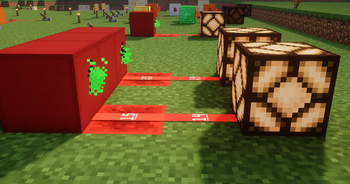
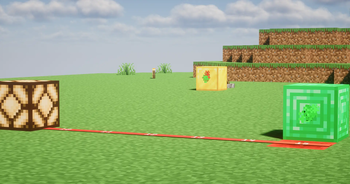
🔍 Analysis
- 🏆 #922 of 1224 bukkit mods in this game by downloads
📋 About This Mod
# 🌌 AstraRedstoneSystems **Build complex redstone systems without cables using logic blocks, memory, timers, wireless signals and data processing.** Created and maintained by **DawcoU** 👨💻 AstraRedstoneSystems is a powerful tool for technical players and map makers, allowing you to create complex Redstone mechanisms using dedicated logic blocks. Written in **Java 17** and optimized specifically for **Paper** (and its forks) to ensure maximum performance and tick-accuracy. ⚡ --- ### 🚀 Key Features * **Core Logic Gates:** Includes all basic gates like **NOT, AND, OR, XOR, NAND, NOR, XNOR**. 🧩 * **Data Processing:** Advanced gates for math, variables, and comparisons. 🔢 * **Wireless Data Link:** Transfer numbers and signals between gates without cables using `/alg link` or wireless channels. 🔗 * **Memory & Timing:** RS-Latch, T-Flip-Flop, and enhanced repeaters with delays up to several seconds. ⏱️ * **Long-Range Sensing:** Motion sensors that work at a distance. 📡 --- ### 🛠️ Commands & Permissions | Command | Description | Permission | | :--- | :--- | :--- | | `/bramka <category> <type>` | Receive a specific logic gate block | `astrars.gates` | | `/bramka <category> <type> <param>` | Receive a gate with parameter (e.g. `DECODER 5`) | `astrars.gates` | | `/alg link` | Link two gates to transfer data wirelessly | `astrars.admin` | --- ### 📖 Full Gate List & Documentation All blocks have a predefined output direction (Front) based on where you look during placement. Inputs come from the Back, Left, or Right sides. #### ⚙️ 1. Logic Category (`/bramka logic <type>`) * **NOT** 🔴: Inverts the input signal from the back. * **NOR** 🔴: Output ON only if all inputs sides are OFF. * **AND** 🟡: Output ON only if both side inputs are ON. * **OR** 🟡: Outputs ON if at least one input (Back or Sides) is ON. * **BUFFER** 🟡: Isolates and passes the signal from the back forward. * **PULSER** 🟡: Monostable circuit. Detects the rising edge from the back and triggers a clean **1-tick pulse** output, then instantly shuts down. * **NAND** 🟠: Inverted AND. Output OFF only if both sides are ON. * **XNOR** 🟠: Output ON if both side inputs are identical (both ON or both OFF). * **NIMPLY** 🟠: NOT IMPLY. Output ON only if Sides are OFF. * **XOR** 🟢: Exclusive OR. Output ON if side inputs are different. * **IMPLY** 🟢: Output OFF only if Back is ON and Sides are OFF. * **MUX** 🟢: Multiplexer. Passes the signal from the left or right side, depending on the status of the rear input. If the rear input is OFF, it takes the signal from the left side, and if ON, it takes the signal from the right side. * **SYNCHRONIZER** 🟤: Synchronizes signals. Outputs ON only when inputs from specified sides arrive at the exact same tick. #### 💾 2. Memory Category (`/bramka memory <type>`) * **LATCH** 🔵: RS-Latch memory cell. Set input on one right side and Reset on the left side. * **TFF** 🔷: Toggle Flip-Flop. Changes its output state (Toggles ON/OFF) every time it receives a short pulse from the back. * **MEMORY_CELL** 🟦: It stores the binary signal at the back, takes the redstone signal at the right input, writes it to the middle of the gate and at the left input reads it and turns on the output #### 🔢 3. Numbers Category (`/bramka numbers <type>`) * **MATH** 🟦: Core calculator block. Takes numbers from Left and Right inputs, performs actions (`ADD`, `SUB`, `MUL`, `DIV`, `POW`), and sends the result forward. * **DECIMAL_ACCUMULATOR** 🟦: Accumulates digits to form larger numbers (e.g., typing 1 then 2 creates 12). Resets immediately on side pulse. * **COUNTER** ⬜: Increases/decreases its internal stored number based on side inputs. * **COMPARATOR** 🔲: Compares two numbers from Left and Right sides. Supports `==`, `>`, `<`, `>=`, `<=`, `!=`. Outputs a redstone signal if true. * **DECODER** 🔲: Outputs a Redstone signal if the incoming number from the back matches the preset target parameter. * **RANDOM_BOOLEAN** 🔵: Generates a random true/false state when triggered. * **RANDOM_NUMBER** 🔵: Generates a random number within a specified range. * **NUMBER_GATE** 🟤: Constant provider. Outputs a preconfigured number when powered from the back. * **BOOLEAN_GATE** 🟤: Converts Redstone to Data. Outputs `1` if powered, and `0` if unpowered. #### 🔤 4. String Category (`/bramka string <type>`) * **STRING_COMPARATOR** 🔲: Compares two text strings from the sides. * **STRING_DECODER** 🔲: Outputs a Redstone signal if the incoming text matches the decoder's text parameter. * **STRING_GATE** 🟤: Constant text provider. Outputs a preset piece of text when powered. #### 📊 5. Data Category (`/bramka data <type>`) * **CABLE_DATA** ⚫: The universal data highway. Transfers text and numbers between data blocks without mixing them up with normal Redstone. Includes anti-echo protection! * **DISPLAY** ⬜: Text hologram display. Renders any incoming string/number from the back dynamically in the air. * **TRANSISTOR** 🔴: Data valve. Pass
# 🌌 AstraRedstoneSystems Build complex redstone systems without cables using logic blocks, memory, timers, wireless signals and data processing.
Created and maintained by DawcoU 👨💻
AstraRedstoneSystems is a powerful tool for technical players and map makers, allowing you to create complex Redstone mechanisms using dedicated logic blocks. Written in Java 17 and optimized specifically for Paper (and its forks) to ensure maximum performance and tick-accuracy. ⚡
### 🚀 Key Features Core Logic Gates: Includes all basic gates like NOT, AND, OR, XOR, NAND, NOR, XNOR. 🧩 Data Processing: Advanced gates for math, variables, and comparisons. 🔢 Wireless Data Link: Transfer numbers and signals between gates without cables using `/alg link` or wireless channels. 🔗 Memory & Timing: RS-Latch, T-Flip-Flop, and enhanced repeaters with delays up to several seconds. ⏱️ Long-Range Sensing: Motion sensors that work at a distance. 📡
### 🛠️ Commands & Permissions
| Command | Description | Permission |
| :--- | :--- | :--- |
| `/bramka
### 📖 Full Gate List & Documentation
All blocks have a predefined output direction (Front) based on where you look during placement. Inputs come from the Back, Left, or Right sides.
#### ⚙️ 1. Logic Category (`/bramka logic
#### 💾 2. Memory Category (`/bramka memory
#### 🔢 3. Numbers Category (`/bramka numbers
#### 🔤 4. String Category (`/bramka string
#### 📊 5. Data Category (`/bramka data
📊 Mod Details
- Game
- Minecraft Plugins
- Author
- DawcoU
- Version
- 1.5.2
- Downloads
- 94
- Endorsements
- 0
- Category
- bukkit
- Created
- 4/29/2026
- Updated
- 8/17/2026
- Game Versions
- 1.19.4, 1.20, 1.20.1, 1.20.2, 1.20.3
- Tags
- game-mechanics, technology, utility
🔧 How to Install Minecraft Plugins Mods
Download from Modrinth. Use Prism Launcher or drop into your mods folder.
📖 Full step-by-step install guide for Minecraft Plugins →
Visit the official mod page for specific installation instructions for this mod.
🎮 Need cheat codes or console commands? Check ur gaming wiki for Minecraft Plugins commands, item IDs, and more.
❓ Frequently Asked Questions
Which Minecraft Plugins versions does AstraRedstoneSystems support?
The author lists 1.19.4, 1.20, 1.20.1, 1.20.2, 1.20.3, 1.20.4. Other versions may work but are untested by the author.
What is the latest version of AstraRedstoneSystems?
Version 1.5.2, published 2026-08-17 with 94 downloads recorded at the source.
Keep browsing — more Minecraft Plugins mods await