AntiFreecam
🟡 Updated this year🖼️ Gallery (1 images)
🔍 Analysis
- 👍 0.2% endorsement rate
- 🏆 #162 of 214 game-mechanics mods in this game by downloads
📋 About This Mod
AntiFreecam — Anti-Freecam & Anti-ESP protection for Paper 1. 21.x
📖 OVERVIEW AntiFreecam is a lightweight, server-side anti-cheat that shuts down Freecam and ESP/X-ray vision cheats. It hides every block below a configurable Y-level from players who are on the surface, so a freecam or ESP camera flying underground sees nothing but solid stone — while normal underground gameplay stays completely vanilla. No client mod required; everything runs on the server through PacketEvents.
✨ FEATURES Freecam blocker — surface players are sent stone for everything below your Y-threshold. Anti-ESP — caves, bases, ores and entities underground are invisible from the surface. Vanilla-like reveal — when a player actually goes underground, the area around them is revealed smoothly. Auto re-mask — areas are hidden again the moment the player returns to the surface. Entity hiding — mobs and players below the threshold are hidden from surface players. Mod detection — best-effort client-brand check (Wurst) with auto-kick and admin alerts. Staff bypass — give your staff full vision with a single command. Clean, reloadable configuration.
⚙️ HOW IT WORKS 1. The server intercepts outgoing chunk packets. 2. For surface players, all blocks below hideBelowY are rewritten to stone before reaching the client. 3. When a player descends, nearby chunks are re-sent un-masked so mining looks normal. 4. When they climb back up, those chunks are re-masked.
📦 REQUIREMENTS Paper / Purpur 1. 21.x Java 21 PacketEvents plugin installed (required dependency)
🚀 INSTALLATION 1. Install PacketEvents into your plugins/ folder. 2. Drop AntiFreecam.jar into plugins/. 3. Restart the server — a config.yml is generated. 4. Tune the settings and run /antifreecam reload.
🔧 COMMANDS & PERMISSIONS /antifreecam reload — reload the config (antifreecam.reload) /antifreecam bypass — toggle masking bypass for staff (antifreecam.bypass)
🛠️ KEY CONFIG OPTIONS hideBelowY — hide everything below this Y from surface players revealBelowYWhenUnder — Y at which a player counts as "underground" lazyUnmask.distance — how far ahead is revealed underground (set near view-distance × 16 for full vanilla feel) maskEntities — hide below-Y entities from surface players modDetection — enable/disable Wurst detection, auto-kick and alerts
This plugin requires PacketEvents to run.
PacketEvents (free, required): Modrinth: https://modrinth.com/plugin/packetevents GitHub: https://github.com/retrooper/packetevents
Install PacketEvents into your plugins/ folder before using AntiFreecam.
Why "Invisible Walls" After Freecam Are Expected
This is not lag or a server bug — it is an intentional part of the protection system.
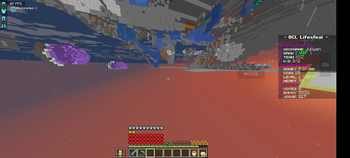
The server only reveals real blocks around a player's actual position. Any area below the protected Y-level that the player has not legitimately reached is sent as fake stone. When a freecam mod moves only the camera, the server still sees the player standing in the original location and continues sending masked block data.
Because of this, a player may appear to discover caves, ores, or tunnels with freecam, but those locations are not actually revealed by the server. Attempting to mine there will fail because the client's view does not match the server's real block data.
In some cases, even after moving the real character to that location, the affected chunks may remain desynced because they were previously loaded through freecam. The player may see missing terrain, void-like areas, or blocks that cannot be mined.
How to Fix It
There are only two ways to refresh those chunks:
1. Move far enough away for the affected chunks to unload, then return without using freecam. 2. Reconnect to the server, which forces a complete chunk resynchronization.
Once the chunks are refreshed normally, the real terrain will be revealed and mining will work as expected.
In short, freecam can show areas that the player has not legitimately reached, but those areas remain inaccessible until the server properly refreshes the chunk data.
📊 Mod Details
- Game
- Minecraft Plugins
- Author
- sajid07008
- Version
- 1.0.6
- Downloads
- 1,564
- Endorsements
- 3
- Category
- game-mechanics
- Created
- 6/22/2026
- Updated
- 7/12/2026
- Game Versions
- 1.21, 1.21.1, 1.21.2, 1.21.3, 1.21.4
- Tags
- game-mechanics, management, utility
🔧 How to Install Minecraft Plugins Mods
Download from Modrinth. Use Prism Launcher or drop into your mods folder.
📖 Full step-by-step install guide for Minecraft Plugins →
Visit the official mod page for specific installation instructions for this mod.
🎮 Need cheat codes or console commands? Check ur gaming wiki for Minecraft Plugins commands, item IDs, and more.
❓ Frequently Asked Questions
Which Minecraft Plugins versions does AntiFreecam support?
The author lists 1.21, 1.21.1, 1.21.2, 1.21.3, 1.21.4, 1.21.5. Other versions may work but are untested by the author.
What is the latest version of AntiFreecam?
Version 1.0.6, published 2026-07-12 with 1,564 downloads recorded at the source.
Keep browsing — more Minecraft Plugins mods await