AntiF5
🟡 Updated this year🖼️ Gallery (1 images)

🔍 Analysis
- 🏆 #854 of 1224 bukkit mods in this game by downloads
📋 About This Mod
<div align="center"> <h1>🛡️ AntiF5</h1> <b>A lightweight and effective way to block third-person camera abuse on your server.</b><br><br> <img src="https://raw.githubusercontent.com/ladakx/Ladakx/main/bukkit.svg" alt="Bukkit" /> <img src="https://raw.githubusercontent.com/ladakx/Ladakx/main/spigot.svg" alt="Spigot" /> <img src="https://raw.githubusercontent.com/ladakx/Ladakx/main/paper.svg" alt="Paper" /> <img src="https://raw.githubusercontent.com/ladakx/Ladakx/main/purpur.svg" alt="Purpur" /> <img src="https://raw.githubusercontent.com/ladakx/Ladakx/main/folia.svg" alt="Folia" /> </div> --- <h3 align="center">📖 OVERVIEW & HOW IT WORKS</h3> **AntiF5** is a clean server-side solution for servers that want to reduce camera peeking and keep gameplay fair without requiring client-side mods. If your server depends on fair positioning, limited vision, and cleaner PvP/PvE gameplay, this plugin gives you a practical way to discourage third-person camera usage. **How Does It Work?** Instead of trying to detect the F5 key directly, AntiF5 places a massive custom **TextDisplay** directly above the player's head. Because the display follows the player and is only shown to them, switching to third-person becomes practically unusable. The default configuration uses a large black overlay, but you can fully customize how it looks! --- <h3 align="center">✨ PLUGIN FEATURES</h3> * **Effective Blocking:** Blocks useful third-person vision by covering the player's view. * **Modern Tech:** Uses Minecraft's modern **TextDisplay** entity system. * **Client-Side Rendering:** Visible *only* to the affected player. * **Highly Configurable:** Customize text, scale, translation, opacity, background, and billboard mode. * **Persistent Data:** Player toggle state is saved using **PersistentDataContainer**. * **Seamless:** Handles join, respawn, and world changes automatically. * **Optimized:** Lightweight and simple to configure. --- <h3 align="center">⚙️ COMMANDS & PERMISSIONS</h3> | Command | Permission | Description | | :--- | :--- | :--- | | `/antif5` *or* `/antif5 toggle` | `antif5.command.self` | Toggle AntiF5 for yourself | | `/antif5 toggle <player>` | `antif5.command.other` | Toggle AntiF5 for another player | | `/antif5 reload` | `antif5.command.reload` | Reload the plugin configuration | | *None* | `antif5.bypass` | Bypass the AntiF5 overlay automatically | --- <h3 align="center">🛠️ CONFIGURATION & COMPATIBILITY</h3> **Compatibility** AntiF5 uses **TextDisplay**, so it is intended for modern Minecraft server versions that support display entities. **Configuration** You have full control over the overlay. Customize the following: * Default enabled state & All plugin messages * Displayed text & Text opacity * Translation offsets, Scale & View range * Shadow, See-through mode & Billboard mode * Default background & ARGB background color --- <h3 align="center">🎥 VIDEO SHOWCASE</h3> <div align="center"> <a href="https://www.youtube.com/watch?v=_G2F0VwNQTQ"> <img src="https://img.youtube.com/vi/_G2F0VwNQTQ/0.jpg" alt="Video Showcase" /> </a> </div> --- <h3 align="center">🔗 LINKS & SUPPORT</h3> <div align="center"> <p>If you encounter any issues, feel free to reach out! I aim to respond as quickly as possible.</p> <a href="https://discord.gg/EzXaxQCFQR"><img src="https://raw.githubusercontent.com/ladakx/Ladakx/main/discord.svg" alt="Discord" /></a> <a href="https://github.com/ladakx/AntiF5/wiki"><img src="https://raw.githubusercontent.com/ladakx/Ladakx/main/doc.svg" alt="Documentation" /></a> <br><br> <h4 style="color:#E53935"><b>SUPPORT THE PROJECT</b></h4> <a href="https://ko-fi.com/ladakx"><img src="https://raw.githubusercontent.com/ladakx/Ladakx/main/kofi.svg" alt="Ko-fi" /></a> <a href="https://www.patreon.com/posts/155880131"><img src="https://raw.githubusercontent.com/ladakx/Ladakx/main/patreon.svg" alt="Patreon" /></a> <p><b>PayPal:</b> emsockz1@gmail.com</p> </div> --- <div align="center"> <b><a href="https://bstats.org/plugin/bukkit/antif5/30755">Plugin Statistics</a></b><br><br> <a href="https://bstats.org/plugin/bukkit/antif5/30755"> <img src="https://bstats.org/signatures/bukkit/antif5.svg" alt="bStats" /> </a> </div>
🛡️ AntiF5
A lightweight and effective way to block third-person camera abuse on your server.




📖 OVERVIEW & HOW IT WORKS
AntiF5 is a clean server-side solution for servers that want to reduce camera peeking and keep gameplay fair without requiring client-side mods. If your server depends on fair positioning, limited vision, and cleaner PvP/PvE gameplay, this plugin gives you a practical way to discourage third-person camera usage.
How Does It Work? Instead of trying to detect the F5 key directly, AntiF5 places a massive custom TextDisplay directly above the player's head. Because the display follows the player and is only shown to them, switching to third-person becomes practically unusable.
The default configuration uses a large black overlay, but you can fully customize how it looks!
✨ PLUGIN FEATURES
Effective Blocking: Blocks useful third-person vision by covering the player's view. Modern Tech: Uses Minecraft's modern TextDisplay entity system. Client-Side Rendering: Visible only to the affected player. Highly Configurable: Customize text, scale, translation, opacity, background, and billboard mode. Persistent Data: Player toggle state is saved using PersistentDataContainer. Seamless: Handles join, respawn, and world changes automatically. Optimized: Lightweight and simple to configure.
⚙️ COMMANDS & PERMISSIONS
| Command | Permission | Description |
| :--- | :--- | :--- |
| `/antif5` or `/antif5 toggle` | `antif5.command.self` | Toggle AntiF5 for yourself |
| `/antif5 toggle
🛠️ CONFIGURATION & COMPATIBILITY
Compatibility AntiF5 uses TextDisplay, so it is intended for modern Minecraft server versions that support display entities.
Configuration You have full control over the overlay. Customize the following: Default enabled state & All plugin messages Displayed text & Text opacity Translation offsets, Scale & View range Shadow, See-through mode & Billboard mode Default background & ARGB background color
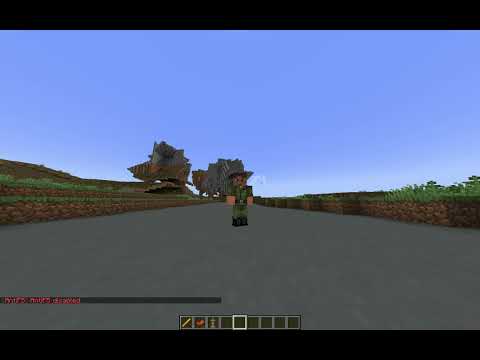
🎥 VIDEO SHOWCASE
🔗 LINKS & SUPPORT
If you encounter any issues, feel free to reach out! I aim to respond as quickly as possible.


SUPPORT THE PROJECT


PayPal: emsockz1@gmail.com
📊 Mod Details
- Game
- Minecraft Plugins
- Author
- Ladakx
- Version
- 1.2
- Downloads
- 98
- Endorsements
- 2
- Category
- bukkit
- Created
- 4/25/2026
- Updated
- 4/26/2026
- Game Versions
- 1.19, 1.19.1, 1.19.2, 1.19.3, 1.19.4
- Tags
- utility
🔧 How to Install Minecraft Plugins Mods
Download from Modrinth. Use Prism Launcher or drop into your mods folder.
📖 Full step-by-step install guide for Minecraft Plugins →
Visit the official mod page for specific installation instructions for this mod.
🎮 Need cheat codes or console commands? Check ur gaming wiki for Minecraft Plugins commands, item IDs, and more.
❓ Frequently Asked Questions
Which Minecraft Plugins versions does AntiF5 support?
The author lists 1.19, 1.19.1, 1.19.2, 1.19.3, 1.19.4, 1.20. Other versions may work but are untested by the author.
What is the latest version of AntiF5?
Version 1.2, published 2026-04-26 with 98 downloads recorded at the source.
Keep browsing — more Minecraft Plugins mods await