Amend
🟡 Updated this yearPreview

🔍 Analysis
- 👍 1.1% endorsement rate — high engagement, a strong quality signal
- 🏆 #52 of 131 management mods in this game by downloads
📋 About This Mod
!(https://amend.mrtron.dev/images/amendfullcolor.png) # Amend A plugin that auto updates **paper** or **purpur** to the newest version based on the Minecraft version. ### The plugin updates your server right before shutdown and has a SUPER LOW CHANCE of causing any problems, but just incase please use at your own risk. *(there have been no problems though so far based on different types of sized worlds and what else I have tested. Still, be careful anyways :D)* # Download Currently as of now you can download it on our new website @ (https://amend.mrtron.dev/download) # Windows **Windows is NOT fully supported**, this is because of the way Windows handles files compared to Linux. If you would like to use this on Windows, **the only support Amend has is through Crafty's Executable URL**. You can place `https://api.tronmc.com/amend/versions/(SERVER TYPE HERE)/1.21.7/download/` into the executable URL and click **`Update Executable`** to download the latest version of the server jar. !(https://cdn.tronmc.com/img/git/crafty_update.png) # How to make it work You can use either **paper** or **purpur**. It grabs the latest version from our API and just replaces the server jar. If you would like to use it there are a few things you need to do. - First make sure purpur/paper is installed and name the jar to whatever you'd like. Please make sure to change it in the config though, so the system can find your jar file. - Second choose your server type. WE have AUTO (which detects it for you) or if you would like to force one, you may type it in. ### Automatic Detection Amend now has Automatic Server Detection. **AUTO** (Automatic Updating Type Observer __) is now the default setting for the plugin. This allows the plugin to read the jar file and determine the type of server it is. ```yml # # ╭━━━╮╱╱╱╱╱╱╱╱╱╱╭╮ # ┃╭━╮┃╱╱╱╱╱╱╱╱╱╱┃┃ # ┃┃╱┃┣╮╭┳━━┳━╮╭━╯┃ # ┃╰━╯┃╰╯┃┃━┫╭╮┫╭╮┃ # ┃╭━╮┃┃┃┃┃━┫┃┃┃╰╯┃ # ╰╯╱╰┻┻┻┻━━┻╯╰┻━━╯ # --YOU MAY EDIT THIS WHILE THE SERVER IS ON, DO NOT WORRY!...THE CONFIG REFRESHES TO SEE THE CHANGES YOU MADE AUTOMATICALLY-- # This changes the jar file name. PLEASE MAKE SURE IT MATCHES THE JAR FILE NAME OR ELSE IT WILL CREATE A NEW JAR FILE. # Also make sure to include ".jar". jar-name: "server.jar" # This how you can customize the type of server you would like. It is defaulted to "AUTO". # AUTO allows the server to read the JAR file and determine for itself the type of server. However, you can override this. # The current options for selecting the server jar are "purpur" or "paper". server-type: "AUTO" # Config Version. Like every spigot dev, we ask that you DO NOT CHANGE THIS PLEASE. config-version: 9 ``` - Then place the (plugin) jar in and it will automatically update it to the newest version, ***please note as of now the plugin is updating the latest `1.21.7` builds and will continue to update until a new release comes out, then you will need to come back here to get the newest plugin update.*** Update checks for the plugin are currently unavailable to switch off, but we only create the update notification if it's a critical update, not a fancy one. ###### © 2025 mrtron.dev. All Rights Reserved.

# Amend A plugin that auto updates paper or purpur to the newest version based on the Minecraft version. ### The plugin updates your server right before shutdown and has a SUPER LOW CHANCE of causing any problems, but just incase please use at your own risk. (there have been no problems though so far based on different types of sized worlds and what else I have tested. Still, be careful anyways :D)
# Download Currently as of now you can download it on our new website @ (https://amend.mrtron.dev/download)
# Windows Windows is NOT fully supported, this is because of the way Windows handles files compared to Linux. If you would like to use this on Windows, the only support Amend has is through Crafty's Executable URL. You can place `https://api.tronmc.com/amend/versions/(SERVER TYPE HERE)/1. 21. 7/download/` into the executable URL and click `Update Executable` to download the latest version of the server jar.
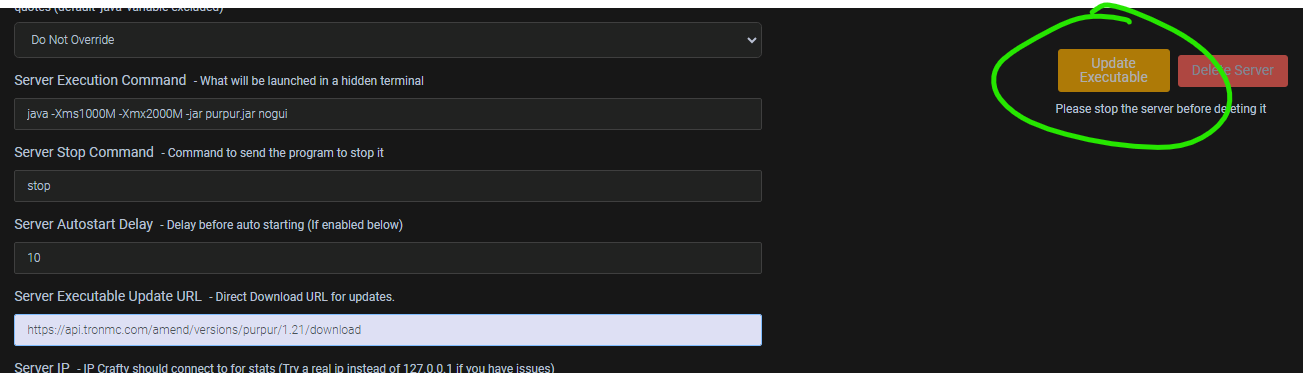
# How to make it work You can use either paper or purpur. It grabs the latest version from our API and just replaces the server jar.
If you would like to use it there are a few things you need to do. - First make sure purpur/paper is installed and name the jar to whatever you'd like. Please make sure to change it in the config though, so the system can find your jar file. - Second choose your server type. WE have AUTO (which detects it for you) or if you would like to force one, you may type it in. ### Automatic Detection Amend now has Automatic Server Detection. AUTO (Automatic Updating Type Observer __) is now the default setting for the plugin. This allows the plugin to read the jar file and determine the type of server it is.
```yml # # ╭━━━╮╱╱╱╱╱╱╱╱╱╱╭╮ # ┃╭━╮┃╱╱╱╱╱╱╱╱╱╱┃┃ # ┃┃╱┃┣╮╭┳━━┳━╮╭━╯┃ # ┃╰━╯┃╰╯┃┃━┫╭╮┫╭╮┃ # ┃╭━╮┃┃┃┃┃━┫┃┃┃╰╯┃ # ╰╯╱╰┻┻┻┻━━┻╯╰┻━━╯
# --YOU MAY EDIT THIS WHILE THE SERVER IS ON, DO NOT WORRY!... THE CONFIG REFRESHES TO SEE THE CHANGES YOU MADE AUTOMATICALLY--
# This changes the jar file name. PLEASE MAKE SURE IT MATCHES THE JAR FILE NAME OR ELSE IT WILL CREATE A NEW JAR FILE. # Also make sure to include ".jar". jar-name: "server.jar"
# This how you can customize the type of server you would like. It is defaulted to "AUTO". # AUTO allows the server to read the JAR file and determine for itself the type of server. However, you can override this. # The current options for selecting the server jar are "purpur" or "paper". server-type: "AUTO"
# Config Version. Like every spigot dev, we ask that you DO NOT CHANGE THIS PLEASE. config-version: 9
``` - Then place the (plugin) jar in and it will automatically update it to the newest version, please note as of now the plugin is updating the latest `1. 21. 7` builds and will continue to update until a new release comes out, then you will need to come back here to get the newest plugin update. Update checks for the plugin are currently unavailable to switch off, but we only create the update notification if it's a critical update, not a fancy one. ###### © 2025 mrtron.dev. All Rights Reserved.
📊 Mod Details
- Game
- Minecraft Plugins
- Author
- MrTronMan
- Version
- 1.9.0--V.26.1.2
- Downloads
- 2,797
- Endorsements
- 31
- Category
- management
- Created
- 8/28/2022
- Updated
- 5/8/2026
- Game Versions
- 26.1.2
- Tags
- management, optimization, utility
🔧 How to Install Minecraft Plugins Mods
Download from Modrinth. Use Prism Launcher or drop into your mods folder.
📖 Full step-by-step install guide for Minecraft Plugins →
Visit the official mod page for specific installation instructions for this mod.
🎮 Need cheat codes or console commands? Check ur gaming wiki for Minecraft Plugins commands, item IDs, and more.
❓ Frequently Asked Questions
Which Minecraft Plugins versions does Amend support?
The author lists 26.1.2. Other versions may work but are untested by the author.
What is the latest version of Amend?
Version 1.9.0--V.26.1.2, published 2026-05-08 with 2,797 downloads recorded at the source.
Keep browsing — more Minecraft Plugins mods await