All Items
🟡 Updated this year🖼️ Gallery (4 images)
🔍 Analysis
- 👍 0.9% endorsement rate
- 🏆 #16 of 24 minigame mods in this game by downloads
📋 About This Mod
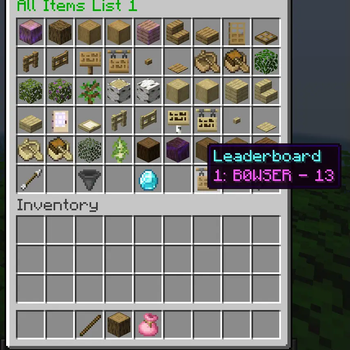
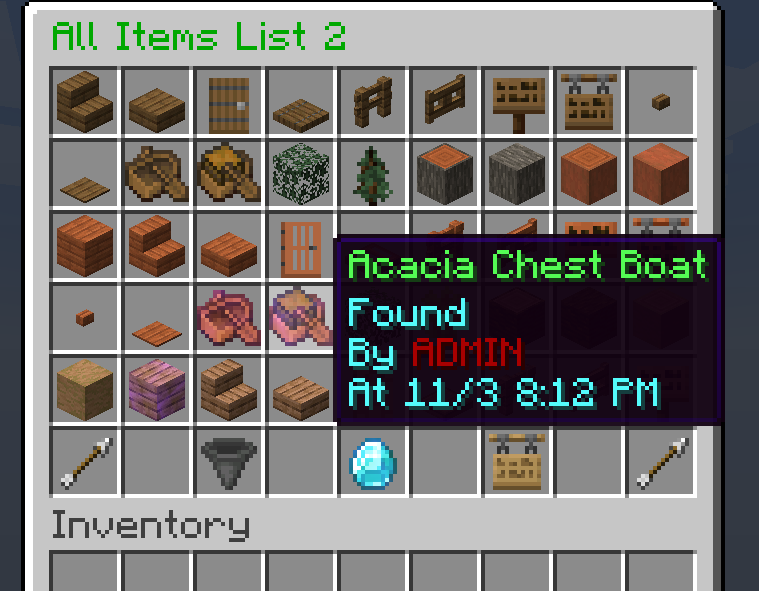
Are YOU looking for a plugin that can easily and conveniently track your progression for any or ALL items in the game? Well you've come to the right place!
This plugin allows a server to collect any set of items or kill any set of mobs. The default list, and the main intent of this plugin is to allow players to collect every obtainable item/mob in Minecraft, but there is also customizability to allow for more creative ways to use this plugin. The main functionalities are the ability to send the items that you collect, and the ability to list your progress. You can use this plugin for everyone with the main list, or have personal lists for every player on the server (or both!).
Versions: (1. 17 - 1. 21. 11) (Tested More on Current Versions)
A full tutorial on how to use this plugin, as well as community provided item/mob lists are available at this discord: https://discord.gg/zHzFgWX8KW
# PlaceholderAPI Supported (but not required): You can record information about global or personal lists such as the progress, players score, and check if an item has been found or not! For info on the placeholders scroll to the 'Placeholders' section of this description or look in the discord (link right above).
(https://www.spigotmc.org/resources/placeholderapi. 6245/)
# Extensive Config File: You are able to change everything about this plugin. Feel free to toggle off commands, global/personal lists, and even the mob/item sections of the plugin. The oportunities are endless.
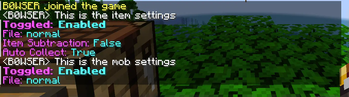
Some common uses of the config file is to enable auto collect, so players don't need to run a command to submit an item. Also subtraction mode so that the items disappear once submitted.
# Lang File Support: Don't want the plugin in english? No problem! Use the lang file to customize every text output on your server
# Commands: Plugin commands are "/aitem", "/amob", "/atimer", "/areset", and "/ahelp". The item command can execute all of the item related sub-commands. The mob command can execute all of the mob related sub-commands. The timer command can execute all of the timer related sub-commands. The reset command resets the data of the plugin (like turning it off and on again). The help command will display a help message for the plugin overall.
Here is a brief description of all of the commands in the plugin:
- list: Lists the items obtained
- self: Lists your personal item list
- send: Sends the item in your hand
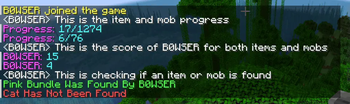
- prog: Displays the total item progress
- player: Displays the item score of the player listed
- check: Displays whether or not the item listed was found or not
- help: Displays the item help message
- settings: Lists the item settings of the plugin
- reset: Resets the itemdata
- submit: Submits the item listed as the player listed
- unsubmit: Unsubmits the item listed
- placeholders: Help menu for placeholder setup
Timer also has sub-commands, like start, stop, help, etc.
# Placeholder Info
The '<>' are NOT needed for PLAYERS, if your name is 'B0WSER', input 'B0WSER' in place of
The '{}' ARE needed for ITEMS/MOBS
### Progress
- %allitems_itemprog% - Fetches the global item progress
- %allitems_mobprog% - Fetches the global mob progress
- %allitems_itemprogpersonal\_
- %allitems_itemcheckpersonal\_{item}\_
% - Fetches whether or not a specific item has been found on the personal item list - %allitems_mobcheckpersonal\_{mob}\_
% - Fetches whether or not a specific mob has been killed on the personal mob list
- %allitems_itemcheckself\_{item}% - Fetches whether or not a specific item has been found on the player running the command's item list
- %allitems_mobcheckself\_{mob}% - Fetches whether or not a specific item has been found on the player running the command's mob list
### Completed
- %allitems_itemcompleted% - Fetches whether or not the main item list has been completed
- %allitems_mobcompleted% - Fetches whether or not the main mob list has been completed
- %allitems_itemcompletedpersonal\_
📊 Mod Details
- Game
- Minecraft Plugins
- Author
- Bowser_The_Boss
- Version
- 6.2
- Downloads
- 535
- Endorsements
- 5
- Category
- minigame
- Created
- 7/4/2025
- Updated
- 6/22/2026
- Game Versions
- 1.17, 1.17.1, 1.18, 1.18.1, 1.18.2
- Tags
- minigame, mobs
🔧 How to Install Minecraft Plugins Mods
Download from Modrinth. Use Prism Launcher or drop into your mods folder.
📖 Full step-by-step install guide for Minecraft Plugins →
Visit the official mod page for specific installation instructions for this mod.
🎮 Need cheat codes or console commands? Check ur gaming wiki for Minecraft Plugins commands, item IDs, and more.
❓ Frequently Asked Questions
Which Minecraft Plugins versions does All Items support?
The author lists 1.17, 1.17.1, 1.18, 1.18.1, 1.18.2, 1.19. Other versions may work but are untested by the author.
What is the latest version of All Items?
Version 6.2, published 2026-06-22 with 535 downloads recorded at the source.
Keep browsing — more Minecraft Plugins mods await