AliienChatColor - LITE
🟡 Updated this year🖼️ Gallery (1 images)
🔍 Analysis
- 🏆 #50 of 129 economy mods in this game by downloads
📋 About This Mod
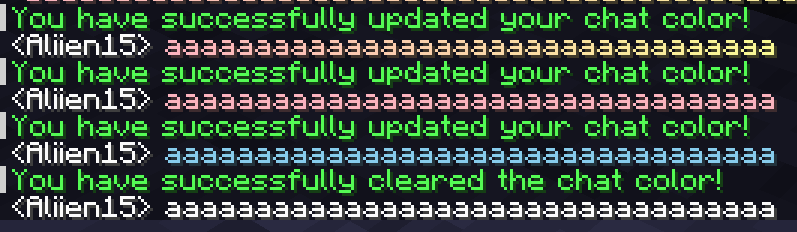
> **⭐ This is the FREE/LITE version of AliienChatColor! (https://aliien.gitbook.io/aliien-docs/aliienchatcolor/getting-started) ⭐** ### 🎨 Why Choose AliienChatColor Lite? AliienChatColor Lite is the ultimate lightweight chat colors plugin for your Minecraft server! It allows you to add a brand new type of chat-based cosmetics to your server, giving your players access to beautiful single colors and multi-color gradients while remaining incredibly optimized. ### ✨ Key Features * **Highly Optimized:** This plugin has been tested and proven to be incredibly efficient in terms of performance. It handles chat formatting with zero impact on your server's TPS. * **Custom Gradients & Hex Support:** This plugin uses MiniMessage, which means you can format your chat colors in the config using exact hex codes (e.g., `<#FF0000>`) or stunning multi-color gradients! * **PlaceholderAPI Integration:** PlaceholderAPI is an optional dependency, allowing you to easily hook your players' active chat colors into your favorite chat formatting plugins (like EssentialsChat or Chatty). ### ⌨️ Commands & Permissions AliienChatColor provides granular control over exactly what your players can do. **Player Commands:** * `/cc set <color>` - Manually equip a specific chat color from the config. * *Permissions:* `aliien.chatcolor.set` AND `aliien.color.<colorId>` (e.g., `aliien.color.cotton_candy`) * `/cc clear` - Removes your active chat color. * *Permission:* `aliien.chatcolor.clear` **Admin Commands:** * `/cc admin reload` - Safely reloads the config and messages files. * *Permission:* `aliien.chatcolor.admin.reload` (Base permission: `aliien.chatcolor.admin`) **Other Permissions:** * `aliien.chatcolor.version-notify` - Receive in-game notifications when a new plugin update is released. ### 🔌 Available Placeholders * `%aliienchatcolor_format%` - Returns the raw MiniMessage tags of the active color (e.g., `<#FF0000>`) * `%aliienchatcolor_active%` - Returns the raw ID of the player's equipped color (e.g., `cotton_candy`). * `%aliienchatcolor_has_<colorId>%` - Returns "True" or "False" if the player has permission for that specific color. ### 📦 Dependencies & Installation * **Permissions Plugin:** Required (e.g., LuckPerms). * **PlaceholderAPI:** Optional. 1. Download the latest `AliienChatColor-Lite.jar`. 2. Drop the `.jar` file into your server's `plugins/` folder. 3. Restart your server. ### 💬 Professional Support I am dedicated to maintaining my "Aliien" suite of plugins. If you find a bug or have a feature request, join the Discord for a fast response. **(https://discord.com/invite/K7RKrWBaV7)** --- *Thank you for downloading! If you enjoy the free version, please consider leaving a ⭐⭐⭐⭐⭐ review to help support the project!*
> ⭐ This is the FREE/LITE version of AliienChatColor! (https://aliien.gitbook.io/aliien-docs/aliienchatcolor/getting-started) ⭐
### 🎨 Why Choose AliienChatColor Lite? AliienChatColor Lite is the ultimate lightweight chat colors plugin for your Minecraft server! It allows you to add a brand new type of chat-based cosmetics to your server, giving your players access to beautiful single colors and multi-color gradients while remaining incredibly optimized.
### ✨ Key Features Highly Optimized: This plugin has been tested and proven to be incredibly efficient in terms of performance. It handles chat formatting with zero impact on your server's TPS. Custom Gradients & Hex Support: This plugin uses MiniMessage, which means you can format your chat colors in the config using exact hex codes (e.g., `<#FF0000>`) or stunning multi-color gradients! PlaceholderAPI Integration: PlaceholderAPI is an optional dependency, allowing you to easily hook your players' active chat colors into your favorite chat formatting plugins (like EssentialsChat or Chatty).
### ⌨️ Commands & Permissions AliienChatColor provides granular control over exactly what your players can do.
Player Commands:
`/cc set
Admin Commands: `/cc admin reload` - Safely reloads the config and messages files. Permission: `aliien.chatcolor.admin.reload` (Base permission: `aliien.chatcolor.admin`)
Other Permissions: `aliien.chatcolor.version-notify` - Receive in-game notifications when a new plugin update is released.
### 🔌 Available Placeholders
`%aliienchatcolor_format%` - Returns the raw MiniMessage tags of the active color (e.g., `<#FF0000>`)
`%aliienchatcolor_active%` - Returns the raw ID of the player's equipped color (e.g., `cotton_candy`).
`%aliienchatcolor_has_
### 📦 Dependencies & Installation Permissions Plugin: Required (e.g., LuckPerms). PlaceholderAPI: Optional.
1. Download the latest `AliienChatColor-Lite.jar`. 2. Drop the `.jar` file into your server's `plugins/` folder. 3. Restart your server.
### 💬 Professional Support I am dedicated to maintaining my "Aliien" suite of plugins. If you find a bug or have a feature request, join the Discord for a fast response.
(https://discord.com/invite/K7RKrWBaV7)**
- --
- Thank you for downloading! If you enjoy the free version, please consider leaving a ⭐⭐⭐⭐⭐ review to help support the project!*
📊 Mod Details
- Game
- Minecraft Plugins
- Author
- aliien15
- Version
- 1.0.2
- Downloads
- 58
- Endorsements
- 1
- Category
- economy
- Created
- 4/10/2026
- Updated
- 6/4/2026
- Game Versions
- 1.21, 1.21.1, 1.21.2, 1.21.3, 1.21.4
- Tags
- economy, social, utility
🔧 How to Install Minecraft Plugins Mods
Download from Modrinth. Use Prism Launcher or drop into your mods folder.
📖 Full step-by-step install guide for Minecraft Plugins →
Visit the official mod page for specific installation instructions for this mod.
🎮 Need cheat codes or console commands? Check ur gaming wiki for Minecraft Plugins commands, item IDs, and more.
❓ Frequently Asked Questions
Which Minecraft Plugins versions does AliienChatColor - LITE support?
The author lists 1.21, 1.21.1, 1.21.2, 1.21.3, 1.21.4, 1.21.5. Other versions may work but are untested by the author.
What is the latest version of AliienChatColor - LITE?
Version 1.0.2, published 2026-06-04 with 58 downloads recorded at the source.
Keep browsing — more Minecraft Plugins mods await