AdvancedReplay
🟡 Updated this year🖼️ Gallery (1 images)
🔍 Analysis
- 👍 0.8% endorsement rate
- 🏆 #575 of 1560 bukkit mods in this game by downloads
📋 About This Mod
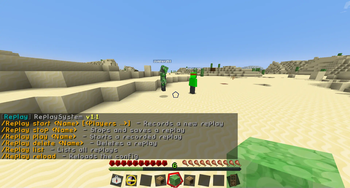
!(https://cdn.modrinth.com/data/cached_images/00a686ba17d84c720baec09b0d1852c6f5622e3a_0.webp) # AdvancedReplay AdvancedReplay is a Replay system for Spigot 1. 8 & 1. 21. It can record players on your Server and save the recorded data to a file or database, so you can watch the replays at any time. Currently it records almost every action a player does and can be easily controlled with the commands.
## Features
Replaying: When watching a replay you have a variety of tools to control the replay. For example, you can pause it, change the speed, teleport to one of the players and more.
Easy to use API: AdvancedReplay comes with a lot of possibilities for customization with the api, including a way to change how replays are saved and a possibility to add and replay your own data. For more details take look at the API section.
Recorded Data:
AdvancedReplay is currently able to record players, living entities, items and Projectiles. - Player movements - Player actions (Eating, Arm animations & more) - Inventory changes - Metadata updates - Projectiles - Dropped Items - Block changes by players - Chat messages
If you encounter any bugs please report them in Github.
## Configuration In the config.yml you can configure some general settings about the plugin and the recorded data If you want to use a database you also need to set up the mysql.yml. If you want to disable a notification or message just leave it empty.
Spoiler
```yml # General plugin settings general:
# Maximum length of a replay in seconds max_length: 3600
# Create a new recording on startup # save_on_stop and add_new_players should be enabled record_on_startup: false
# Should the Replay be saved on shutdown/when the maximum length is exceeded? save_on_stop: false
# Should the plugin save the Replays to a mysql database? # If enabled you need to configure the mysql.yml use_mysql: false
# Save the Replays to an S3 compatible Storage # If enabled you need to configure s3.yml use_s3: false
# If enabled in offline mode, the plugin will fetch the skin data from Mojang # Can slow down the server when recording a lot of players use_offline_skins: true # Change how detailed movement is recorded. Better quality results in larger replays # Options: high, medium, low quality: high
# Automatically delete replays after a specific amount of time (days) # Use -1 to disable cleanup_replays: -1
# Hide all players that are not participating in a replay hide_players: false
# Should players when they join after a recording started be added to all running recordings add_new_players: false
# Should AdvancedReplay check for new updates? update_notifications: true # This message is displayed when a player dies death_message: '&6{name} &7died.' # This message is displayed when a player leaves the game quit_message: '&6{name} &7left the game.'
# This message is displayed when a player joins the game join_message: '&6{name} &7joined the game.'
# Configuration of the replaying settings replaying: world: # Reset block changes after watching a replay? reset_changes: false
# How should the replay progress be displayed # Options: action_bar, xp_bar, none progress_display: action_bar
# Configuration of the recording data recording: blocks: # Enable recording of block changes? enabled: true # Use real block changes when replaying? real_changes: true entities: # Enable recording of all living entities? enabled: true items: # Enable recording of items? enabled: true chat: # Enable recording of chat messages? enabled: true # Format of recorded chat messages format: '&r<{name}> {message}' ```
## Videos
## Commands/Permissions
_/replay_ - Overview of all commands
_/replay start : [
_replay.command.
## API Examples
📊 Mod Details
- Game
- Minecraft Plugins
- Author
- Jumper251
- Version
- 1.8.19
- Downloads
- 4,410
- Endorsements
- 37
- Category
- bukkit
- Created
- 10/6/2024
- Updated
- 6/26/2026
- Game Versions
- 1.8.8, 1.8.9, 1.21.11, 26.1, 26.1.1
- Tags
- management, technology, utility
🔧 How to Install Minecraft Plugins Mods
Download from Modrinth. Use Prism Launcher or drop into your mods folder.
📖 Full step-by-step install guide for Minecraft Plugins →
Visit the official mod page for specific installation instructions for this mod.
🎮 Need cheat codes or console commands? Check ur gaming wiki for Minecraft Plugins commands, item IDs, and more.
❓ Frequently Asked Questions
Which Minecraft Plugins versions does AdvancedReplay support?
The author lists 1.8.8, 1.8.9, 1.21.11, 26.1, 26.1.1, 26.1.2. Other versions may work but are untested by the author.
What is the latest version of AdvancedReplay?
Version 1.8.19, published 2026-06-26 with 4,410 downloads recorded at the source.
Keep browsing — more Minecraft Plugins mods await