Addon for AdvancedTeleport
🟡 Updated this year🖼️ Gallery (6 images)

🔍 Analysis
- 🏆 #263 of 333 management mods in this game by downloads
📋 About This Mod
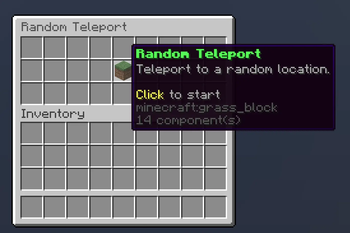
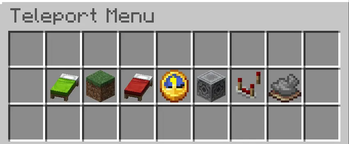
# ATAddon A feature-rich **add-on for (https://modrinth.com/plugin/advancedteleport)** that wraps its teleport commands in clean confirmation GUIs, adds a colored warmup countdown over the hotbar, a homes manager, a warps browser, a teleport-request menu, server-wide teleport locks and a central menu — all **plug-and-play** and available in **multiple languages**. > ⚠️ **Requires (https://modrinth.com/plugin/advancedteleport).** This is an add-on, not a standalone plugin. --- ## ✨ Features ### 🎯 Confirmation GUIs - Clean confirmation menus for `/tpa`, `/tpahere` and `/tpaccept`. - Shows the **head of the other player** right in the middle of the confirm screen, between the accept and cancel buttons. - Anti-misclick: every teleport is confirmed before it happens. - Items can't be taken from the menus — all clicks and drags are protected. ### 📨 Teleport request menu - `/tpas` opens a GUI listing all your incoming teleport requests as **player heads**. - Click a head to accept that specific request — perfect when several requests come in at once. ### ⏱️ Warmup countdown over the hotbar - A live countdown is shown above the hotbar while the teleport warms up. - Each teleport type has its **own color**: - 🟢 Home · 🟡 Spawn · 🟠 Back · 💜 Random Teleport · 🔵 TPA · 🟦 TPAHere · 🟦 Warp - Plays a soft sound each second and an arrival sound on teleport — **both fully configurable**. - **Automatically matches** AdvancedTeleport's warmup duration and movement/rotation cancel settings, so the countdown lines up exactly with the real teleport. ### 🏠 Homes manager - A homes GUI: left-click to teleport, right-click for options (rename, move here, teleport, delete). - **Set homes with your own custom name** — just type it in chat. - Safe rename (your home is never lost if something goes wrong). - Full support for AdvancedTeleport's bed-spawn home. ### 🌍 Warps browser - Browse all server warps in a clean GUI and click to teleport. ### 🔒 Teleport locks (admin) - `/rtplock`, `/backlock`, `/warplock` and `/spawnlock` — toggle server-wide locks through a simple GUI. - Locked features appear red in the menu and tell players they're blocked. - Lock states persist across restarts. ### 📋 Central menu - `/menu` opens a hub with buttons for Homes, RTP, Spawn, Back, Warps, Settings and a TPAuto toggle. - Locked features are clearly marked in red. ### ⚙️ Per-player settings - `/tpsettings` (or `/settings`) lets players toggle confirm GUIs, auto-accept (tpauto) and which request types they receive. - All settings are saved and survive restarts. ### 🌐 Multi-language + fully customizable text - Built-in languages: **English, German (Deutsch) and Spanish (Español)** — pick one with `language: en/de/esp`. - Every single message can also be overridden in a `messages.yml`, so you can translate or reword anything you like. ### 💤 Optional AFK warp - An optional `/afk` command that teleports players to a warp named `afk`. - **Off by default** so it won't clash with other AFK plugins — enable it in the config. - Works even when warps are locked. ### ⚔️ CombatLogX support - Optionally block teleporting while a player is tagged in combat (requires CombatLogX). ### 🔄 Reload without restart - `/ataddon reload` reloads the config, language and all settings on the fly. --- ## 🚀 Plug & Play No manual file editing required. On startup ATAddon automatically configures AdvancedTeleport's messages so the hotbar countdown and confirmation GUIs work out of the box. Just drop both plugins in and go. --- ## 📋 Commands | Command | Description | |---|---| | `/menu` | Open the teleport hub menu | | `/homes` | Open your homes GUI | | `/warps` | Browse server warps | | `/tpas` | View your incoming teleport requests | | `/settings` | Open your settings | | `/tpauto` | Toggle auto-accept | | `/rtplock` `/backlock` `/warplock` `/spawnlock` | Admin: lock features server-wide | | `/ataddon reload` | Admin: reload config & language | | `/afk` | Teleport to the AFK warp *(optional, off by default)* | ATAddon also enhances AdvancedTeleport's own commands (`/tpa`, `/tpahere`, `/tpaccept`, `/rtp`, `/back`, `/home`, `/spawn`, `/warp`) with its GUIs and countdown. --- ## 🔧 Setup 1. Install **(https://modrinth.com/plugin/advancedteleport)** and **ATAddon**. 2. Start the server — that's it. 3. *(Optional)* Pick a language in `config.yml` (`language: en`, `de` or `esp`). 4. *(Optional)* For homes to fill the GUI nicely, set `default-homes-limit: 6` in AdvancedTeleport. 5. *(Optional)* For warps, set `use-warps: true` in AdvancedTeleport and create warps with `/setwarp`. 6. **LuckPerms users:** grant your default group AdvancedTeleport's member permissions, e.g. `/lp group default permission set at.member.* true`. --- ## 📦 Requirements - **Paper** 1.21+ (or compatible forks) - **(https://modrinth.com/plugin/advancedteleport)** (required) - **CombatLogX** (optional, f
A feature-rich add-on for (https://modrinth.com/plugin/advancedteleport)** that wraps its teleport commands in clean confirmation GUIs, adds a colored warmup countdown over the hotbar, a homes manager, a warps browser, a teleport-request menu, server-wide teleport locks and a central menu — all plug-and-play and available in multiple languages.
> ⚠️ Requires (https://modrinth.com/plugin/advancedteleport).** This is an add-on, not a standalone plugin.
## ✨ Features
### 🎯 Confirmation GUIs - Clean confirmation menus for `/tpa`, `/tpahere` and `/tpaccept`. - Shows the head of the other player right in the middle of the confirm screen, between the accept and cancel buttons. - Anti-misclick: every teleport is confirmed before it happens. - Items can't be taken from the menus — all clicks and drags are protected.
### 📨 Teleport request menu - `/tpas` opens a GUI listing all your incoming teleport requests as player heads. - Click a head to accept that specific request — perfect when several requests come in at once.
### ⏱️ Warmup countdown over the hotbar - A live countdown is shown above the hotbar while the teleport warms up. - Each teleport type has its own color: - 🟢 Home · 🟡 Spawn · 🟠 Back · 💜 Random Teleport · 🔵 TPA · 🟦 TPAHere · 🟦 Warp - Plays a soft sound each second and an arrival sound on teleport — both fully configurable. - Automatically matches AdvancedTeleport's warmup duration and movement/rotation cancel settings, so the countdown lines up exactly with the real teleport.
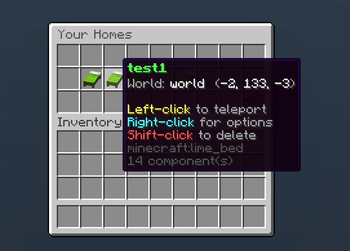
### 🏠 Homes manager - A homes GUI: left-click to teleport, right-click for options (rename, move here, teleport, delete). - Set homes with your own custom name — just type it in chat. - Safe rename (your home is never lost if something goes wrong). - Full support for AdvancedTeleport's bed-spawn home.
### 🌍 Warps browser - Browse all server warps in a clean GUI and click to teleport.
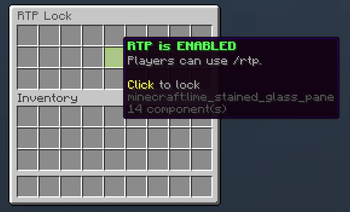
### 🔒 Teleport locks (admin) - `/rtplock`, `/backlock`, `/warplock` and `/spawnlock` — toggle server-wide locks through a simple GUI. - Locked features appear red in the menu and tell players they're blocked. - Lock states persist across restarts.
### 📋 Central menu - `/menu` opens a hub with buttons for Homes, RTP, Spawn, Back, Warps, Settings and a TPAuto toggle. - Locked features are clearly marked in red.
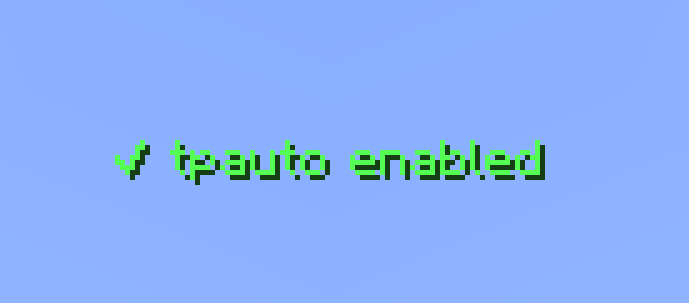
### ⚙️ Per-player settings - `/tpsettings` (or `/settings`) lets players toggle confirm GUIs, auto-accept (tpauto) and which request types they receive. - All settings are saved and survive restarts.
### 🌐 Multi-language + fully customizable text - Built-in languages: English, German (Deutsch) and Spanish (Español) — pick one with `language: en/de/esp`. - Every single message can also be overridden in a `messages.yml`, so you can translate or reword anything you like.
### 💤 Optional AFK warp - An optional `/afk` command that teleports players to a warp named `afk`. - Off by default so it won't clash with other AFK plugins — enable it in the config. - Works even when warps are locked.
### ⚔️ CombatLogX support - Optionally block teleporting while a player is tagged in combat (requires CombatLogX).
### 🔄 Reload without restart - `/ataddon reload` reloads the config, language and all settings on the fly.
## 🚀 Plug & Play
No manual file editing required. On startup ATAddon automatically configures AdvancedTeleport's messages so the hotbar countdown and confirmation GUIs work out of the box. Just drop both plugins in and go.
## 📋 Commands
| Command | Description | |---|---| | `/menu` | Open the teleport hub menu | | `/homes` | Open your homes GUI | | `/warps` | Browse server warps | | `/tpas` | View your incoming teleport requests | | `/settings` | Open your settings | | `/tpauto` | Toggle auto-accept | | `/rtplock` `/backlock` `/warplock` `/spawnlock` | Admin: lock features server-wide | | `/ataddon reload` | Admin: reload config & language | | `/afk` | Teleport to the AFK warp (optional, off by default) |
ATAddon also enhances AdvancedTeleport's own commands (`/tpa`, `/tpahere`, `/tpaccept`, `/rtp`, `/back`, `/home`, `/spawn`, `/warp`) with its GUIs and countdown.
## 🔧 Setup
1. Install (https://modrinth.com/plugin/advancedteleport)** and ATAddon*. 2. Start the server — that's it. 3. (Optional) Pick a language in `config.yml` (`language: en`, `de` or `esp`). 4. (Optional) For homes to fill the GUI nicely, set `default-homes-limit: 6` in AdvancedTeleport. 5. (Optional) For warps, set `use-warps: true` in AdvancedTeleport and create warps with `/setwarp`. 6. LuckPerms users: grant your default group AdvancedTeleport's member permissions, e.g. `/lp group default permission set at.member. true`.
## 📦 Requirements - Paper 1. 21+ (or compatible forks) - (https://modrinth.com/plugin/advancedteleport)** (required) - CombatLogX** (optional, f
📊 Mod Details
- Game
- Minecraft Plugins
- Author
- marcinator31
- Version
- uK0caDBq
- Downloads
- 40
- Endorsements
- 2
- Category
- management
- Created
- 6/8/2026
- Updated
- 6/9/2026
- Game Versions
- 6zZTJ0fU, uK0caDBq
- Tags
- management, transportation, utility
🔧 How to Install Minecraft Plugins Mods
Download from Modrinth. Use Prism Launcher or drop into your mods folder.
📖 Full step-by-step install guide for Minecraft Plugins →
Visit the official mod page for specific installation instructions for this mod.
🎮 Need cheat codes or console commands? Check ur gaming wiki for Minecraft Plugins commands, item IDs, and more.
❓ Frequently Asked Questions
Which Minecraft Plugins versions does Addon for AdvancedTeleport support?
The author lists 6zZTJ0fU, uK0caDBq. Other versions may work but are untested by the author.
What is the latest version of Addon for AdvancedTeleport?
Version uK0caDBq, published 2026-06-09 with 40 downloads recorded at the source.
Keep browsing — more Minecraft Plugins mods await