ZoomW (WAIZA)
⚪ Last updated 2024⚠️ Install Order · 2 steps
Install in this order, then this mod last — most mods fail to load without their framework and dependencies in place.
🖼️ Gallery (2 images)
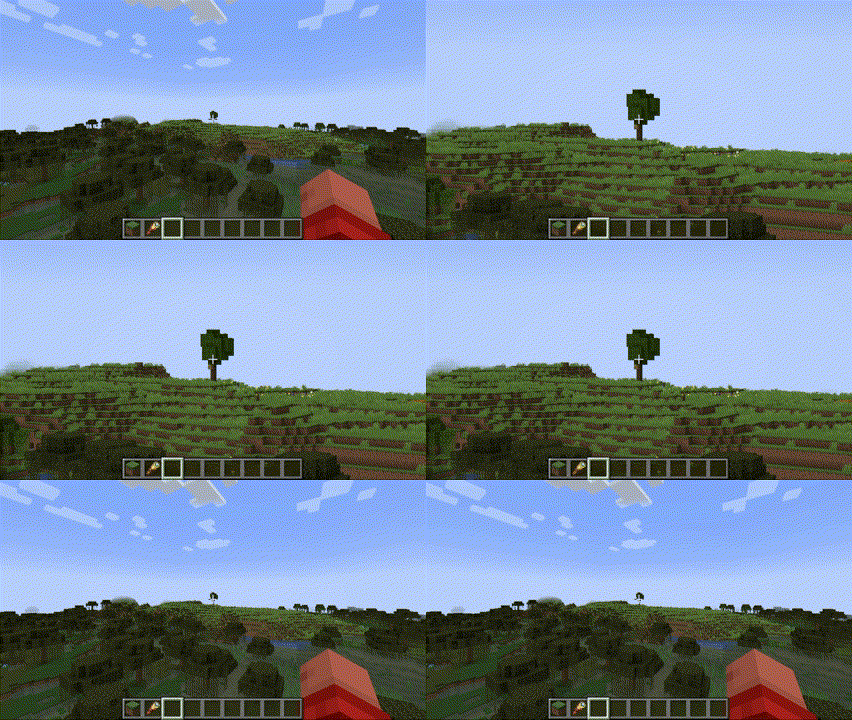
🔍 Analysis
- 👍 0.3% endorsement rate
- 🏆 #367 of 894 fabric mods in this game by downloads
📋 About This Mod
<div align="center"> <img width="500" height="100" src="https://i.imgur.com/XBCJqHt.png" img> </div> <div align="center"> <img src="https://img.shields.io/modrinth/dt/3BzJmkgf?logo=modrinth&color=coolgreen" img> <img src="https://img.shields.io/badge/environment-client-1976d2" img> <img src="https://img.shields.io/badge/modloader-Fabric-1976d2?color=beige&logo=data:image/png;base64,iVBORw0KGgoAAAANSUhEUgAAACAAAAAgCAYAAABzenr0AAAACXBIWXMAAAsTAAALEwEAmpwYAAAFHGlUWHRYTUw6Y29tLmFkb2JlLnhtcAAAAAAAPD94cGFja2V0IGJlZ2luPSLvu78iIGlkPSJXNU0wTXBDZWhpSHpyZVN6TlRjemtjOWQiPz4gPHg6eG1wbWV0YSB4bWxuczp4PSJhZG9iZTpuczptZXRhLyIgeDp4bXB0az0iQWRvYmUgWE1QIENvcmUgNS42LWMxNDIgNzkuMTYwOTI0LCAyMDE3LzA3LzEzLTAxOjA2OjM5ICAgICAgICAiPiA8cmRmOlJERiB4bWxuczpyZGY9Imh0dHA6Ly93d3cudzMub3JnLzE5OTkvMDIvMjItcmRmLXN5bnRheC1ucyMiPiA8cmRmOkRlc2NyaXB0aW9uIHJkZjphYm91dD0iIiB4bWxuczp4bXA9Imh0dHA6Ly9ucy5hZG9iZS5jb20veGFwLzEuMC8iIHhtbG5zOmRjPSJodHRwOi8vcHVybC5vcmcvZGMvZWxlbWVudHMvMS4xLyIgeG1sbnM6cGhvdG9zaG9wPSJodHRwOi8vbnMuYWRvYmUuY29tL3Bob3Rvc2hvcC8xLjAvIiB4bWxuczp4bXBNTT0iaHR0cDovL25zLmFkb2JlLmNvbS94YXAvMS4wL21tLyIgeG1sbnM6c3RFdnQ9Imh0dHA6Ly9ucy5hZG9iZS5jb20veGFwLzEuMC9zVHlwZS9SZXNvdXJjZUV2ZW50IyIgeG1wOkNyZWF0b3JUb29sPSJBZG9iZSBQaG90b3Nob3AgQ0MgMjAxOCAoV2luZG93cykiIHhtcDpDcmVhdGVEYXRlPSIyMDE4LTEyLTE2VDE2OjU0OjE3LTA4OjAwIiB4bXA6TW9kaWZ5RGF0ZT0iMjAxOS0wNy0yOFQyMToxNzo0OC0wNzowMCIgeG1wOk1ldGFkYXRhRGF0ZT0iMjAxOS0wNy0yOFQyMToxNzo0OC0wNzowMCIgZGM6Zm9ybWF0PSJpbWFnZS9wbmciIHBob3Rvc2hvcDpDb2xvck1vZGU9IjMiIHBob3Rvc2hvcDpJQ0NQcm9maWxlPSJzUkdCIElFQzYxOTY2LTIuMSIgeG1wTU06SW5zdGFuY2VJRD0ieG1wLmlpZDowZWRiMWMyYy1mZjhjLWU0NDEtOTMxZi00OTVkNGYxNGM3NjAiIHhtcE1NOkRvY3VtZW50SUQ9InhtcC5kaWQ6MGVkYjFjMmMtZmY4Yy1lNDQxLTkzMWYtNDk1ZDRmMTRjNzYwIiB4bXBNTTpPcmlnaW5hbERvY3VtZW50SUQ9InhtcC5kaWQ6MGVkYjFjMmMtZmY4Yy1lNDQxLTkzMWYtNDk1ZDRmMTRjNzYwIj4gPHhtcE1NOkhpc3Rvcnk+IDxyZGY6U2VxPiA8cmRmOmxpIHN0RXZ0OmFjdGlvbj0iY3JlYXRlZCIgc3RFdnQ6aW5zdGFuY2VJRD0ieG1wLmlpZDowZWRiMWMyYy1mZjhjLWU0NDEtOTMxZi00OTVkNGYxNGM3NjAiIHN0RXZ0OndoZW49IjIwMTgtMTItMTZUMTY6NTQ6MTctMDg6MDAiIHN0RXZ0OnNvZnR3YXJlQWdlbnQ9IkFkb2JlIFBob3Rvc2hvcCBDQyAyMDE4IChXaW5kb3dzKSIvPiA8L3JkZjpTZXE+IDwveG1wTU06SGlzdG9yeT4gPC9yZGY6RGVzY3JpcHRpb24+IDwvcmRmOlJERj4gPC94OnhtcG1ldGE+IDw/eHBhY2tldCBlbmQ9InIiPz4/HiGMAAAAtUlEQVRYw+XXrQqAMBQF4D2P2eBL+QIG8RnEJFaNBjEum+0+zMQLtwwv+wV3ZzhhMDgfJ0wUSinxZUQWgKos1JP/AbD4OneIDyQPwCFniA+EJ4CaXm4TxAXCC0BNHgLhAdAnx9hC8PwGSRtAFVMQjF7cNTWED8B1cgwW20yfJgAvrssAsZ1cB3g/xckAxr6FmCDU5N6f488BrpCQ4rQBJkiMYh4ACmLzwOQF0CExinkCsvw7vgGikl+OotaKRwAAAABJRU5ErkJggg==" img> </div> # Overview The Enhanced WAIZA Mod (What Am I Zooming At?) provides Minecraft players with a fully customizable zooming experience, allowing for more precise control over how you view the world. Whether you need to zoom in for a closer look at distant landscapes, or quickly zoom out for a broader view, this mod offers a range of settings that can be fine-tuned to match your preferences. Perfect for adventurers, builders, and anyone who enjoys a more tailored visual experience in Minecraft. <div align="center"> <img width="500" height="100" src="https://i.imgur.com/So56Iow.gif" img> </div> # Dependencies From now on you will need 2 new dependencies to run this mod. - **Mod Menu**: This handles the config button. - **YACL**: This handles the configuration screen and is a very reliable and thrustworthy mod. You can find YACL (https://modrinth.com/mod/yacl) and Mod Menu (https://modrinth.com/mod/modmenu). # Mod Menu Integration Upon first launch, the mod will generate a configuration file inside Mod Menu. You can access it through the Menu of Mod Menu. Here’s what each setting controls: - **zoom_increment:** Determines how much the zoom level changes with each scroll or key press. (Default: 0.05) Description: A lower value allows for finer adjustments, while a higher value makes zooming faster but less precise. - **max_zoom:** Sets the maximum zoom level you can achieve. (Default: 0.83) Description: This limits how far in you can zoom. Useful to prevent excessive zooming that might distort the view. - **min_zoom:** Sets the minimum zoom level you can achieve. (Default: 0.03) Description: This controls how far out you can zoom, allowing for a wide-angle view of your surroundings. - **zoom_smoothing:** Controls the smoothness of the zoom transition. (Default: 0.05) Description: A lower value results in a quicker, more immediate zoom, while a higher value makes zooming feel more gradual. - **instant_zoom_increment:** Defines the increment for instant zoom adjustments. (Default: 0.1) Description: Use this setting for faster zoom changes when you need to quickly get closer or further away. - **default_zoom_level:** Sets the default zoom level that the mod reverts to when you release the zoom key. (Default: 0.23) Description: This is your “starting point” for zooming, ensuring a consistent and comfortable level of zoom when not actively zooming in or out. <div align="center"> <img width="500" hei





# Dependencies From now on you will need 2 new dependencies to run this mod. - Mod Menu: This handles the config button. - YACL: This handles the configuration screen and is a very reliable and thrustworthy mod.
You can find YACL (https://modrinth.com/mod/yacl) and Mod Menu (https://modrinth.com/mod/modmenu).
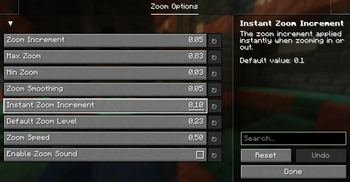
# Mod Menu Integration Upon first launch, the mod will generate a configuration file inside Mod Menu. You can access it through the Menu of Mod Menu. Here’s what each setting controls:
- zoom_increment: Determines how much the zoom level changes with each scroll or key press. (Default: 0. 05)
Description: A lower value allows for finer adjustments, while a higher value makes zooming faster but less precise.
- max_zoom: Sets the maximum zoom level you can achieve. (Default: 0. 83)
Description: This limits how far in you can zoom. Useful to prevent excessive zooming that might distort the view.
- min_zoom: Sets the minimum zoom level you can achieve. (Default: 0. 03)
Description: This controls how far out you can zoom, allowing for a wide-angle view of your surroundings.
- zoom_smoothing: Controls the smoothness of the zoom transition. (Default: 0. 05)
Description: A lower value results in a quicker, more immediate zoom, while a higher value makes zooming feel more gradual.
- instant_zoom_increment: Defines the increment for instant zoom adjustments. (Default: 0. 1)
Description: Use this setting for faster zoom changes when you need to quickly get closer or further away.
- default_zoom_level: Sets the default zoom level that the mod reverts to when you release the zoom key. (Default: 0. 23)
Description: This is your “starting point” for zooming, ensuring a consistent and comfortable level of zoom when not actively zooming in or out.
📊 Mod Details
- Game
- Minecraft Mods
- Author
- justElias
- Version
- 0.0.3+(Release)
- Downloads
- 672
- Endorsements
- 2
- Category
- fabric
- Created
- 8/26/2024
- Updated
- 9/1/2024
- Game Versions
- 1.21.1
- Tags
- game-mechanics, utility
🔧 How to Install Minecraft Mods Mods
Download from Modrinth. Use Prism Launcher or drop into your mods folder.
📖 Full step-by-step install guide for Minecraft Mods →
Visit the official mod page for specific installation instructions for this mod.
🎮 Need cheat codes or console commands? Check ur gaming wiki for Minecraft Mods commands, item IDs, and more.
❓ Frequently Asked Questions
Which Minecraft Mods versions does ZoomW (WAIZA) support?
The author lists 1.21.1. Other versions may work but are untested by the author.
What is the latest version of ZoomW (WAIZA)?
Version 0.0.3+(Release), published 2024-09-01 with 672 downloads recorded at the source.
Keep browsing — more Minecraft Mods mods await