ZapHosting Server Integration Menu
🟠 Updated over a year ago⚠️ Install Order · 2 steps
Install in this order, then this mod last — most mods fail to load without their framework and dependencies in place.
🖼️ Gallery (1 images)

🔍 Analysis
- 🏆 #105 of 367 forge mods in this game by downloads
📋 About This Mod
<p><img src="https://media.forgecdn.net/attachments/description/null/description_39fc85a8-b949-4d8e-9d21-e2af0a8c0f42.gif" alt=""></p> <h3 style="text-align: center;"><strong><span style="color: #2dc26b;">ZAP-Hosting Server Integration Menu</span></strong></h3> <p style="text-align: center;">This mod provides an <strong>in-game configurable menu</strong> for integrating ZAP-Hosting directly into your Minecraft Modpack. With this, you can easily add your <strong>partner link and discount code</strong> to promote your ZAP-Hosting affiliation.<br><br><br>This mod is intended for Zap-Hosting Official Partners.<br><span style="color: #2dc26b;"><a style="color: #2dc26b;" href="https://zap-hosting.com/guides/docs/account-partner-system/" target="_blank" rel="nofollow noopener">Apply for the Partnership Program.</a></span></p> <hr> <h1><strong>Mod Installation & Features Guide</strong></h1> <h2><strong>Installation Instructions</strong></h2> <h3><strong>Step 1: Install the Mod</strong></h3> <ul> <li> <p>Download the mod <code>.jar</code> file.</p> </li> <li> <p>Place it inside the <code>mods</code> folder of your <strong>Modpack</strong>.</p> <ul> <li> <p>Location: <code>Your_Modpack_Folder/mods/</code></p> </li> </ul> </li> </ul> <h3><strong>Step 2: Generate the Configuration File</strong></h3> <ul> <li> <p>Launch the modpack or directly execute the <code>.jar</code> file.</p> </li> <li> <p>This will automatically generate the necessary config files in the following directory:</p> <ul> <li> <p><strong>Config Path:</strong> <code>config/zap_hosting_server_integration_menu/common.json5<br><img src="https://media.forgecdn.net/attachments/description/1234147/description_b658fc72-a587-4331-8943-b709e501880f.png"></code></p> </li> </ul> </li> </ul> <h3><strong>Step 3: Configure the Mod</strong></h3> <ul> <li> <p>Modify settings using either:</p> <ul> <li> <p><strong>The in-game Config Menu</strong> <img src="https://media.forgecdn.net/attachments/description/1234147/description_11a03db2-3518-4f59-94a0-fc47080f5383.png" alt="" width="850" height="230"></p> </li> <li> <p><strong>Manually editing the <code>common.json5</code> file.</strong><br><img src="https://media.forgecdn.net/attachments/description/1234147/description_ca159310-9cb9-4f30-9e34-3dd747e16688.png"></p> </li> </ul> </li> </ul> <hr> <h2><strong>Mod Features</strong></h2> <h3><strong>1. ZAP-Hosting Integration</strong></h3> <ul> <li> <p>Players can <strong>order a Minecraft server</strong> directly by clicking on the <strong>ZAP-Hosting image</strong> in the game.</p> </li> <li> <p>This provides a seamless way to set up multiplayer worlds with optimized hosting.</p> </li> </ul> <h3><strong>2. First-Time In-Game Notification</strong></h3> <ul> <li> <p>When launching a world for the <strong>first time</strong>, a special <strong>one-time popup message</strong> will appear.</p> </li> <li> <p>This message informs players about the <strong>ZAP-Hosting integration</strong> and how to order a server.</p> </li> <li> <p>The message will <strong>only appear once per world</strong> to avoid spam.</p> </li> </ul> <h3><strong>3. Customizable Settings</strong></h3> <ul> <li> <p>Players can adjust settings in <code>common.json5</code> to:</p> <ul> <li> <p>Enable/disable the popup message.</p> </li> <li> <p>Customize the ZAP-Hosting image click behavior.</p> </li> </ul> </li> </ul> <hr> <p><img style="font-weight: 400; display: block; margin-left: auto; margin-right: auto;" src="https://media.forgecdn.net/attachments/description/1234147/description_0983fb02-01d2-4a8d-9eaf-be43f9d725d4.gif" alt=""></p>

ZAP-Hosting Server Integration Menu
This mod provides an in-game configurable menu for integrating ZAP-Hosting directly into your Minecraft Modpack. With this, you can easily add your partner link and discount code to promote your ZAP-Hosting affiliation.
This mod is intended for Zap-Hosting Official Partners. Apply for the Partnership Program.
Mod Installation & Features Guide
Installation Instructions
Step 1: Install the Mod
-
Download the mod
.jarfile. -
Place it inside the
modsfolder of your Modpack.-
Location:
Your_Modpack_Folder/mods/
-
Step 2: Generate the Configuration File
-
Launch the modpack or directly execute the
.jarfile. -
This will automatically generate the necessary config files in the following directory:
-
Config Path:
config/zap_hosting_server_integration_menu/common.json5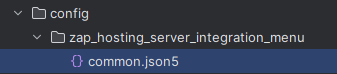
-
Step 3: Configure the Mod
-
Modify settings using either:
-
The in-game Config Menu
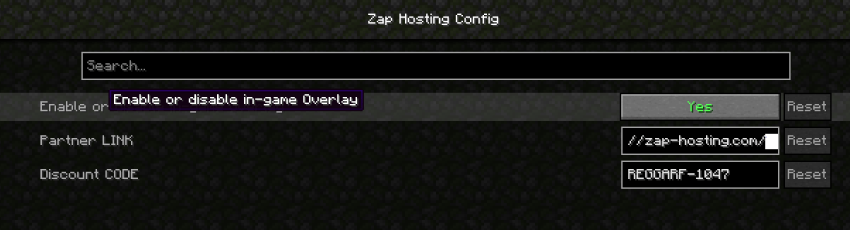
-
Manually editing the
common.json5file.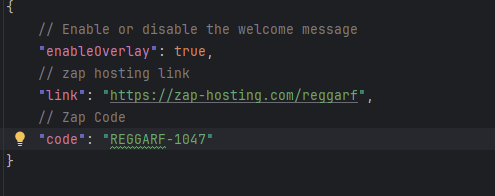
-
Mod Features
1. ZAP-Hosting Integration
-
Players can order a Minecraft server directly by clicking on the ZAP-Hosting image in the game.
-
This provides a seamless way to set up multiplayer worlds with optimized hosting.
2. First-Time In-Game Notification
-
When launching a world for the first time, a special one-time popup message will appear.
-
This message informs players about the ZAP-Hosting integration and how to order a server.
-
The message will only appear once per world to avoid spam.
3. Customizable Settings
-
Players can adjust settings in
common.json5to:-
Enable/disable the popup message.
-
Customize the ZAP-Hosting image click behavior.
-

📊 Mod Details
- Game
- Minecraft Mods
- Author
- Reggarf
- Version
- 1.101.1
- Downloads
- 445
- Endorsements
- 1
- Category
- forge
- Created
- 4/15/2025
- Updated
- 4/5/2025
- Game Versions
- 1.21.3
- Tags
- utility
🔧 How to Install Minecraft Mods Mods
Download from Modrinth. Use Prism Launcher or drop into your mods folder.
📖 Full step-by-step install guide for Minecraft Mods →
Visit the official mod page for specific installation instructions for this mod.
🎮 Need cheat codes or console commands? Check ur gaming wiki for Minecraft Mods commands, item IDs, and more.
❓ Frequently Asked Questions
Which Minecraft Mods versions does ZapHosting Server Integration Menu support?
The author lists 1.21.3. Other versions may work but are untested by the author.
What is the latest version of ZapHosting Server Integration Menu?
Version 1.101.1, published 2025-04-05 with 445 downloads recorded at the source.
Keep browsing — more Minecraft Mods mods await