Years C
⚪ Last updated 2023⚠️ Install Order · 2 steps
Install in this order, then this mod last — most mods fail to load without their framework and dependencies in place.
🖼️ Gallery (2 images)

🔍 Analysis
- 👍 0.5% endorsement rate
- 🏆 #228 of 280 decoration mods in this game by downloads
📋 About This Mod
### Years C - Remastered Mod #### (Forge) A standalone mod that lets you choose your Age, and grow old. Be sure to use the latest Forge version for each release! #### Usage: Press the V key to set your Age Afterwards pressing the V key will open up your data sheet, showing your Age, and other information from the mod Command: /jycage <livedDays> <playerName> Sets the Age of a Player depending on how many Minecraft Days you have set. #### Some Features: Starting Age selector You age as the game goes on If you have Hair C installed as well, then your Hair will turn white as you become Old Being too old will kill the player #### Compatible Mod: JinGames Hair C #### Common Question(s): Q: Will the mod be updated/downgraded to a newer/older Forge version? A: Maybe, but there are no fixed plans on this yet. Q: Is it possible to play with this mod in older forge versions? A: You can find an older version for 1.7.10 on it's official page here: main.jingames.net/jinryuus-years-c/ OR Here On CurseForge #### Credits: Creator: Tamás "JinRyuu" Nagy (Passed away) Current developer: Benjámin "JinGames_Ben" Nagy Contributor: YourDailyModder #### Donate: OUR PATREON: patreon.com/JinRyuu SERVER DONATION: JinGames DBC Zero S Minecraft Server JinGames is Sponsored by BisectHosting! Need a Minecraft Server? BisectHosting is a super easy to use Server Hosting provider! (https://www.bisecthosting.com/partners/custom-banners/c5361f7e-2b1c-4321-945a-95dd5976b45f.png)](https://bisecthosting.com/jingames) (https://i.imgur.com/d1P47bK.png)](https://discord.gg/54mDQkf)
### Years C - Remastered Mod #### (Forge)
A standalone mod that lets you choose your Age, and grow old.
Be sure to use the latest Forge version for each release!
#### Usage:
Press the V key to set your Age
Afterwards pressing the V key will open up your data sheet, showing your Age, and other information from the mod
Command:
/jycage
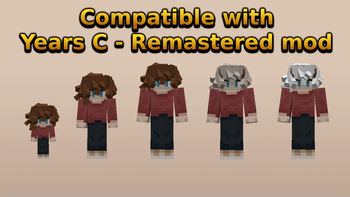
#### Some Features: Starting Age selector You age as the game goes on If you have Hair C installed as well, then your Hair will turn white as you become Old Being too old will kill the player
#### Compatible Mod: JinGames Hair C
#### Common Question(s): Q: Will the mod be updated/downgraded to a newer/older Forge version?
A: Maybe, but there are no fixed plans on this yet.
Q: Is it possible to play with this mod in older forge versions?
A: You can find an older version for 1. 7. 10 on it's official page here: main.jingames.net/jinryuus-years-c/ OR Here On CurseForge
#### Credits: Creator: Tamás "JinRyuu" Nagy (Passed away)
Current developer: Benjámin "JinGames_Ben" Nagy
Contributor: YourDailyModder
#### Donate: OUR PATREON: patreon.com/JinRyuu
SERVER DONATION: JinGames DBC Zero S Minecraft Server
JinGames is Sponsored by BisectHosting! Need a Minecraft Server? BisectHosting is a super easy to use Server Hosting provider!
(https://www.bisecthosting.com/partners/custom-banners/c5361f7e-2b1c-4321-945a-95dd5976b45f.png)](https://bisecthosting.com/jingames)
[!(https://i.imgur.com/d1P47bK.png)](https://discord.gg/54mDQkf)
📊 Mod Details
- Game
- Minecraft Mods
- Author
- YourDailyModder
- Version
- 1.2.2+1.20.2+forge
- Downloads
- 3,116
- Endorsements
- 17
- Category
- decoration
- Created
- 9/8/2023
- Updated
- 11/27/2023
- Game Versions
- 1.20.2
- Tags
- decoration
🔧 How to Install Minecraft Mods Mods
Download from Modrinth. Use Prism Launcher or drop into your mods folder.
📖 Full step-by-step install guide for Minecraft Mods →
Visit the official mod page for specific installation instructions for this mod.
🎮 Need cheat codes or console commands? Check ur gaming wiki for Minecraft Mods commands, item IDs, and more.
❓ Frequently Asked Questions
Which Minecraft Mods versions does Years C support?
The author lists 1.20.2. Other versions may work but are untested by the author.
What is the latest version of Years C?
Version 1.2.2+1.20.2+forge, published 2023-11-27 with 3,116 downloads recorded at the source.
Keep browsing — more Minecraft Mods mods await