WynnVista
🟡 Updated this year⚠️ Install Order · 2 steps
Install in this order, then this mod last — most mods fail to load without their framework and dependencies in place.
🖼️ Gallery (3 images)
🔍 Analysis
- 👍 0.0% endorsement rate
- 🏆 #40 of 611 adventure mods in this game by downloads
📋 About This Mod
# WynnVista !(https://github.com/user-attachments/assets/495e19de-1f5b-40b0-a24b-7f28692427e5) The Fog is coming. WynnVista is a Minecraft mod designed to enhance the gameplay experience on Wynncraft by automatically adjusting the render distance of LOD mods (Distant Horizons or Voxy). Made for my modpack (https://github.com/bob10234/World-of-Wynncraft) ## What's Up - Supports both **Distant Horizons** and **Voxy** LOD mods - Automagically adjusts LOD render distance based on player location - Captures your current LOD render distance on first launch - Returns to saved distance when inside the Wynncraft map, reduces when outside - Configurable settings via Mod Menu or config file ## Installation 1. Make sure you have Fabric Loader and Fabric API installed 2. Download and install **either** Distant Horizons (2.2+) **or** Voxy (0.2.9+) 3. Download the latest version of WynnVista from the releases page 4. Place the downloaded .jar file in your Minecraft mods folder ## Configuration You can configure WynnVista using Mod Menu. The following options are available: - **Show In-Game Messages**: Toggle whether to display "The Fog lifts/descends" messages - **Max Render Distance** (16-256 chunks): Your preferred LOD distance inside the Wynncraft map - On first launch, WynnVista captures your current LOD render distance - After that, you can adjust this value in the config to change your max distance - **Reduced Render Distance** (12-128 chunks): Distance for areas outside the Wynncraft map - **Distant Horizons**: Uses this value outside the map - **Voxy**: Ignores this setting and completely hides LODs outside the map ## Requirements - Minecraft 1.21.11 - Fabric Loader 0.14.21 or higher - Fabric API - **One of the following LOD mods:** - Distant Horizons 2.2 or higher - Voxy 0.2.9-alpha or higher - Cloth Config - Mod Menu ## Go Ham - I don't know nothing about java so if you wanna fork this and fix this up go ham. - Feel free to use this in your modpack ## Acknowledgments - Thanks to the Distant Horizons team for their amazing mod - Thanks to Cortex for the incredible Voxy mod - Thanks to the Wynncraft team for creating an awesome MMORPG experience in Minecraft - Thanks to igbarvonsquid!!! ## Support and My Mods Please report any bugs or feature suggestions on the Github Issues page, I'll be updating this frequently with community feedback and ideas! You can also (https://discord.gg/jqFF64rXZZ) if you need direct support, or want to stay updated with all of my mods. ### Check out all my projects! > (https://modrinth.com/modpack/world-of-wynncraft) > (https://modrinth.com/mod/wynnvista) > (https://modrinth.com/mod/wynnweaponbigger) > (https://modrinth.com/mod/nimble-rewynnded) > (https://modrinth.com/mod/class-keybind-profiles) > (https://modrinth.com/mod/wynnbubbles) > (https://modrinth.com/mod/wynnlodgrabber)
# WynnVista
!(https://github.com/user-attachments/assets/495e19de-1f5b-40b0-a24b-7f28692427e5)
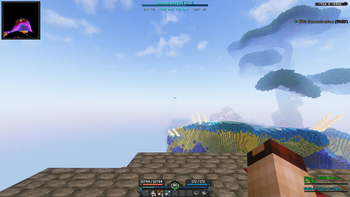
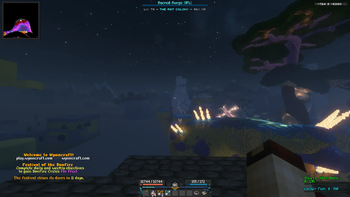
The Fog is coming. WynnVista is a Minecraft mod designed to enhance the gameplay experience on Wynncraft by automatically adjusting the render distance of LOD mods (Distant Horizons or Voxy). Made for my modpack (https://github.com/bob10234/World-of-Wynncraft)
## What's Up
- Supports both Distant Horizons and Voxy LOD mods
- Automagically adjusts LOD render distance based on player location
- Captures your current LOD render distance on first launch
- Returns to saved distance when inside the Wynncraft map, reduces when outside
- Configurable settings via Mod Menu or config file
## Installation
1. Make sure you have Fabric Loader and Fabric API installed 2. Download and install either Distant Horizons (2. 2+) or Voxy (0. 2. 9+) 3. Download the latest version of WynnVista from the releases page 4. Place the downloaded .jar file in your Minecraft mods folder
## Configuration
You can configure WynnVista using Mod Menu. The following options are available:
- Show In-Game Messages: Toggle whether to display "The Fog lifts/descends" messages
- Max Render Distance (16-256 chunks): Your preferred LOD distance inside the Wynncraft map
- - On first launch, WynnVista captures your current LOD render distance
- - After that, you can adjust this value in the config to change your max distance
- Reduced Render Distance (12-128 chunks): Distance for areas outside the Wynncraft map
- - Distant Horizons: Uses this value outside the map
- - Voxy: Ignores this setting and completely hides LODs outside the map
## Requirements
- Minecraft 1. 21. 11
- Fabric Loader 0. 14. 21 or higher
- Fabric API
- One of the following LOD mods:
- - Distant Horizons 2. 2 or higher
- - Voxy 0. 2. 9-alpha or higher
- Cloth Config
- Mod Menu
- I don't know nothing about java so if you wanna fork this and fix this up go ham.
- Feel free to use this in your modpack
## Acknowledgments
- Thanks to the Distant Horizons team for their amazing mod
- Thanks to Cortex for the incredible Voxy mod
- Thanks to the Wynncraft team for creating an awesome MMORPG experience in Minecraft
- Thanks to igbarvonsquid!!!
## Support and My Mods Please report any bugs or feature suggestions on the Github Issues page, I'll be updating this frequently with community feedback and ideas! You can also (https://discord.gg/jqFF64rXZZ) if you need direct support, or want to stay updated with all of my mods. ### Check out all my projects! > (https://modrinth.com/modpack/world-of-wynncraft)
> (https://modrinth.com/mod/wynnvista)
> (https://modrinth.com/mod/wynnweaponbigger)
> (https://modrinth.com/mod/nimble-rewynnded)
> (https://modrinth.com/mod/class-keybind-profiles)
> (https://modrinth.com/mod/wynnbubbles)
> (https://modrinth.com/mod/wynnlodgrabber)
📊 Mod Details
- Game
- Minecraft Mods
- Author
- DrBiznes
- Version
- 1.0.2
- Downloads
- 83,374
- Endorsements
- 7
- Category
- adventure
- Created
- 9/6/2024
- Updated
- 6/23/2026
- Game Versions
- 1.21.11
- Tags
- adventure, optimization, utility
🔧 How to Install Minecraft Mods Mods
Download from Modrinth. Use Prism Launcher or drop into your mods folder.
📖 Full step-by-step install guide for Minecraft Mods →
Visit the official mod page for specific installation instructions for this mod.
🎮 Need cheat codes or console commands? Check ur gaming wiki for Minecraft Mods commands, item IDs, and more.
❓ Frequently Asked Questions
Which Minecraft Mods versions does WynnVista support?
The author lists 1.21.11. Other versions may work but are untested by the author.
What is the latest version of WynnVista?
Version 1.0.2, published 2026-06-23 with 83,374 downloads recorded at the source.
Keep browsing — more Minecraft Mods mods await