World Host
🟠 Updated over a year ago⚠️ Install Order · 2 steps
Install in this order, then this mod last — most mods fail to load without their framework and dependencies in place.
🖼️ Gallery (1 images)
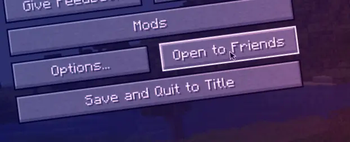
🔍 Analysis
- 👍 0.1% endorsement rate
- 🏆 #713 of 1284 fabric mods in this game by downloads
📋 About This Mod
# World Host (https://img.shields.io/modrinth/dt/world-host?color=00AF5C&label=Downloads&style=round&logo=modrinth)](https://modrinth.com/mod/world-host) !(https://img.shields.io/badge/Enviroment-Client-purple?style=round) (https://img.shields.io/uptimerobot/ratio/m794216582-8c2e3383b556b643f86c85fe?label=Server%20uptime&color=blue)](https://stats.uptimerobot.com/jL0OztYWBj) Host your singleplayer worlds **without having to run a server or setup port forwarding!** In the future, we also plan to support Bedrock Edition clients through the use of Geyser. ## What if my friend doesn't have the mod installed? If your friend doesn't have the mod installed, you cannot use the friends system with them. However, you can run the command `/worldhost ip` to get an IP that can be used with tunneling. Do note, however, that not using the friends system could increase ping. If you don't want the ping increase, you can run `/worldhost tempip` to get a *temporary* server IP that lasts for at least 60 seconds. Clients who connect within the 60 seconds will remain connected. If you plan to never use the friends system, you can disable it in the mod settings. ## How does this mod work? This mod has a server that your client connects to, this server is used to communicate with other clients using World Host. 1. When your friend wants to join you, your friend's client asks the server for an IP address to connect to. 2. The server then asks your client to create a join mode (`JoinType` in the protocol). There are two join mods: UPnP and Proxy. 3. UPnP mode is tried first. Your client tries to open a temporary port forward in your router that your friends client can use to connect to you directly. 4. If UPnP succeeds, your client tells the server the port to use, then the server tells your friend's client your IP and the port number. 5. If UPnP fails, then your client tells the server to use Proxy mode. The server will then give your friend's client the same "proxy IP" as `/worldhost ip` does. `/worldhost tempip` tries to do UPnP first instead of just giving you the proxy IP straightaway. ## License The mod is open source and licensed under the (LICENSE).
# World Host
[!(https://img.shields.io/modrinth/dt/world-host?color=00AF5C&label=Downloads&style=round&logo=modrinth)](https://modrinth.com/mod/world-host) !(https://img.shields.io/badge/Enviroment-Client-purple?style=round)
[!(https://img.shields.io/uptimerobot/ratio/m794216582-8c2e3383b556b643f86c85fe?label=Server%20uptime&color=blue)](https://stats.uptimerobot.com/jL0OztYWBj)
Host your singleplayer worlds without having to run a server or setup port forwarding! In the future, we also plan to support Bedrock Edition clients through the use of Geyser.
## What if my friend doesn't have the mod installed?
If your friend doesn't have the mod installed, you cannot use the friends system with them. However, you can run the command `/worldhost ip` to get an IP that can be used with tunneling. Do note, however, that not using the friends system could increase ping. If you don't want the ping increase, you can run `/worldhost tempip` to get a temporary server IP that lasts for at least 60 seconds. Clients who connect within the 60 seconds will remain connected. If you plan to never use the friends system, you can disable it in the mod settings.
## How does this mod work?
This mod has a server that your client connects to, this server is used to communicate with other clients using World Host.
1. When your friend wants to join you, your friend's client asks the server for an IP address to connect to. 2. The server then asks your client to create a join mode (`JoinType` in the protocol). There are two join mods: UPnP and Proxy. 3. UPnP mode is tried first. Your client tries to open a temporary port forward in your router that your friends client can use to connect to you directly. 4. If UPnP succeeds, your client tells the server the port to use, then the server tells your friend's client your IP and the port number. 5. If UPnP fails, then your client tells the server to use Proxy mode. The server will then give your friend's client the same "proxy IP" as `/worldhost ip` does. `/worldhost tempip` tries to do UPnP first instead of just giving you the proxy IP straightaway.
The mod is open source and licensed under the (LICENSE).
📊 Mod Details
- Game
- Minecraft Mods
- Author
- TakiSpl
- Version
- 0.5.2+1.21.5-neoforge
- Downloads
- 1,460,949
- Endorsements
- 942
- Category
- fabric
- Created
- 3/12/2023
- Updated
- 4/5/2025
- Game Versions
- 1.21.5
- Tags
- social, utility
🔧 How to Install Minecraft Mods Mods
Download from Modrinth. Use Prism Launcher or drop into your mods folder.
📖 Full step-by-step install guide for Minecraft Mods →
Visit the official mod page for specific installation instructions for this mod.
🎮 Need cheat codes or console commands? Check ur gaming wiki for Minecraft Mods commands, item IDs, and more.
❓ Frequently Asked Questions
Which Minecraft Mods versions does World Host support?
The author lists 1.21.5. Other versions may work but are untested by the author.
What is the latest version of World Host?
Version 0.5.2+1.21.5-neoforge, published 2025-04-05 with 1.5M downloads recorded at the source.
Keep browsing — more Minecraft Mods mods await