World First Join Message
🟡 Updated this year⚠️ Install Order · 2 steps
Install in this order, then this mod last — most mods fail to load without their framework and dependencies in place.
🖼️ Gallery (1 images)

🔍 Analysis
- 👍 0.2% endorsement rate
- 🏆 #419 of 874 fabric mods in this game by downloads
📋 About This Mod
<p style="text-align: center;"><a href="https://modrinth.com/mod/world-first-join-message" target="_blank" rel="noopener"><img src="https://img.shields.io/modrinth/dt/ZtJwBIdt?color=34D058&label=Modrinth Downloads&logo=modrinth&logoColor=white"></a> <a href="https://www.curseforge.com/minecraft/mc-mods/world-first-join-message" target="_blank" rel="noopener"><img src="https://img.shields.io/curseforge/dt/1150146?color=FC7303&label=CurseForge Downloads&logo=curseforge&logoColor=white"></a> <img src="https://img.shields.io/github/issues/Reggarfgod/World_First_Join_Message?color=6E40C9&label=Issues&logo=github"> <img src="https://img.shields.io/discord/430776550443581450?color=5865F2&label=Online Users&logo=discord"></p> <p><img style="display: block; margin-left: auto; margin-right: auto;" src="https://media.forgecdn.net/attachments/description/null/description_c49242bd-302f-4e01-9752-6450dd2a7601.png" alt=""></p> <p><span style="color: #f1c40f;"><strong>World_First_Join_Message</strong></span> is a lightweight yet powerful Minecraft mod that adds a unique and personalized twist to your server and modpack. With this mod, you can display a custom message whenever a new player joins your world for the very first time. Perfect for creating a welcoming environment on multiplayer servers ,modpack or adding a touch of flair to single-player adventures.<br><br><img src="https://media.forgecdn.net/attachments/description/1150146/description_f7977da6-067b-481c-a8d3-6b96912a562e.png" alt=""></p> <h3>Features:</h3> <ul> <li><strong>Customizable Messages:</strong> Set unique first-time join messages with full color and style formatting.</li> <li><strong>Player Recognition:</strong> Displays the first-join message only once per player.</li> <li><strong>Server-Wide Appeal:</strong> Great for community servers to welcome new members with a personalized touch.</li> <li><strong>Lightweight & Compatible:</strong> Designed to work seamlessly with other mods and plugins.</li> </ul> <p>Make every player's first join an unforgettable experience with <strong>World_First_Join_Message</strong>!</p> <p>Let your imagination run wild with creative welcomes and make your server stand out from the rest. Download now and give your players the warm greeting they deserve!</p> <hr> <h2><strong>Installation and Configuration Instructions for World_First_Join_Message</strong></h2> <h4><strong>Install the Mod:</strong></h4> <ol> <li> <p>Download the mod from <a href="https://www.curseforge.com/minecraft/mc-mods/world-first-join-message">CurseForge</a> and place it into the <code>mods</code> folder of your Minecraft directory.</p> </li> </ol> <h4><strong>Launch Minecraft:</strong></h4> <ol> <li> <p>Start Minecraft with the mod installed.</p> </li> <li> <p>The mod will be loaded, and its settings can be adjusted in-game.</p> </li> </ol> <h4><strong>Accessing In-Game Configuration:</strong></h4> <ol> <li> <p><strong>Open Minecraft and go to the Mods menu.</strong></p> </li> <li> <p><strong>Locate World First Join Message and click on Configure (if using ModMenu or Forge's built-in config GUI).</strong><img src="https://media.forgecdn.net/attachments/description/1150146/description_b170445c-2aca-4354-972e-ce1afb74abb7.png"></p> </li> <li> <p><strong>Customize the following settings:</strong></p> </li> </ol> <p><img src="https://media.forgecdn.net/attachments/description/1150146/description_27f7360c-fc1c-4581-9ca4-3f32571cee47.png" alt="" width="850" height="357"></p> <p>Now, all configurations can be managed directly from the game without manually editing any files! 🚀</p> <pre> #Enable or disable the welcome message enabled = true #The message to be displayed when a player joins the game for the first time text = "THANKS TO OUR SPONSORS, ZAP-HOSTING! Support Reggarf And Save BIG - USE CODE Reggarf-1047 FOR 20% OFF Your ORDER!" #The RGB color code for the welcome message. #Examples: 'FF0000' for red, '00FF00' for green, '0000FF' for blue #'FFFF00' for yellow, 'FF00FF' for magenta, '00FFFF' for cyan color = "FFFFFF" #The URL to be opened when the player clicks the link url = "https://zap-hosting.com/reggarf" #The RGB color code for the clickable text '', #Examples: 'FF0000' for red, '00FF00' for green, '0000FF' for blue #'FFFF00' for yellow, 'FF00FF' for magenta, '00FFFF' for cyan, 'FFFFFF' for white clickableColor = "00FFAA" </pre> <p>Your server or modpack is now ready to welcome new players with a custom, vibrant message! </p> <p> </p>


World_First_Join_Message is a lightweight yet powerful Minecraft mod that adds a unique and personalized twist to your server and modpack. With this mod, you can display a custom message whenever a new player joins your world for the very first time. Perfect for creating a welcoming environment on multiplayer servers ,modpack or adding a touch of flair to single-player adventures.

Features:
- Customizable Messages: Set unique first-time join messages with full color and style formatting.
- Player Recognition: Displays the first-join message only once per player.
- Server-Wide Appeal: Great for community servers to welcome new members with a personalized touch.
- Lightweight & Compatible: Designed to work seamlessly with other mods and plugins.
Make every player's first join an unforgettable experience with World_First_Join_Message!
Let your imagination run wild with creative welcomes and make your server stand out from the rest. Download now and give your players the warm greeting they deserve!
Installation and Configuration Instructions for World_First_Join_Message
Install the Mod:
-
Download the mod from CurseForge and place it into the
modsfolder of your Minecraft directory.
Launch Minecraft:
-
Start Minecraft with the mod installed.
-
The mod will be loaded, and its settings can be adjusted in-game.
Accessing In-Game Configuration:
-
Open Minecraft and go to the Mods menu.
-
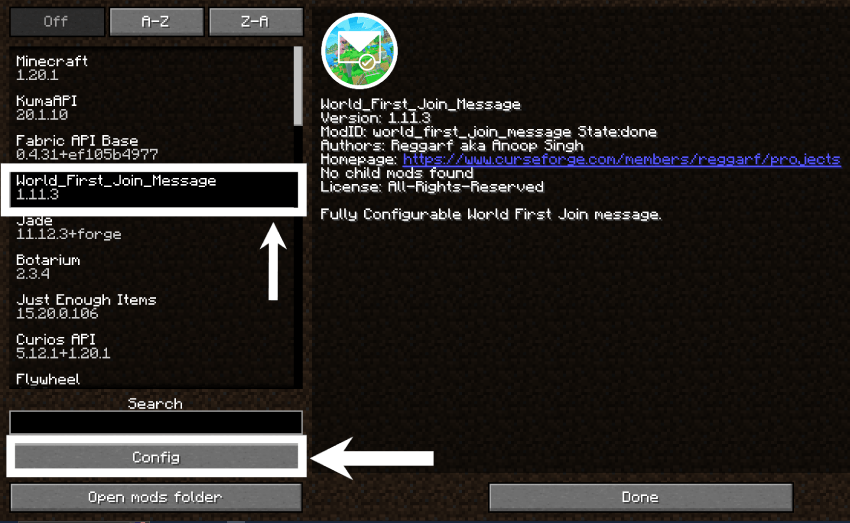
Locate World First Join Message and click on Configure (if using ModMenu or Forge's built-in config GUI).
-
Customize the following settings:
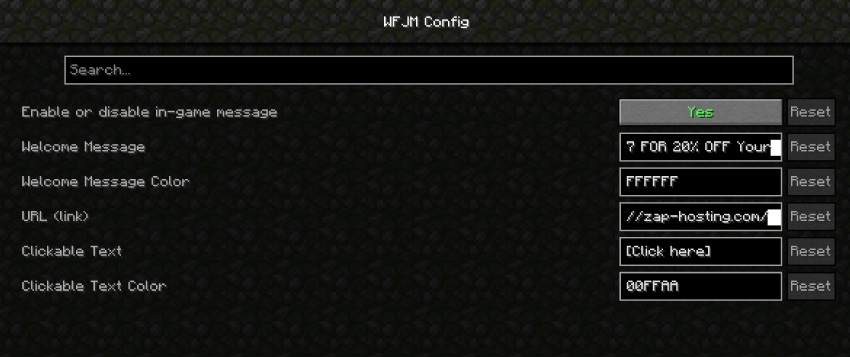
Now, all configurations can be managed directly from the game without manually editing any files! 🚀
 #Enable or disable the welcome message
 enabled = true
 #The message to be displayed when a player joins the game for the first time
 text = "THANKS TO OUR SPONSORS, ZAP-HOSTING! Support Reggarf And Save BIG -
 USE CODE Reggarf-1047 FOR 20% OFF Your ORDER!"
 #The RGB color code for the welcome message.
 #Examples: 'FF0000' for red, '00FF00' for green, '0000FF' for blue
 #'FFFF00' for yellow, 'FF00FF' for magenta, '00FFFF' for cyan
 color = "FFFFFF"
 #The URL to be opened when the player clicks the link
 url = "https://zap-hosting.com/reggarf"
 #The RGB color code for the clickable text '',
 #Examples: 'FF0000' for red, '00FF00' for green, '0000FF' for blue
 #'FFFF00' for yellow, 'FF00FF' for magenta, '00FFFF' for cyan, 'FFFFFF' for white
 clickableColor = "00FFAA"
Your server or modpack is now ready to welcome new players with a custom, vibrant message!
📊 Mod Details
- Game
- Minecraft Mods
- Author
- Reggarf
- Version
- 2.0.0
- Downloads
- 1,840
- Endorsements
- 4
- Category
- fabric
- Created
- 3/30/2025
- Updated
- 4/7/2026
- Game Versions
- 26.1, 26.1.1
- Tags
- library, social, utility
🔧 How to Install Minecraft Mods Mods
Download from Modrinth. Use Prism Launcher or drop into your mods folder.
📖 Full step-by-step install guide for Minecraft Mods →
Visit the official mod page for specific installation instructions for this mod.
🎮 Need cheat codes or console commands? Check ur gaming wiki for Minecraft Mods commands, item IDs, and more.
❓ Frequently Asked Questions
Which Minecraft Mods versions does World First Join Message support?
The author lists 26.1, 26.1.1. Other versions may work but are untested by the author.
What is the latest version of World First Join Message?
Version 2.0.0, published 2026-04-07 with 1,840 downloads recorded at the source.
Keep browsing — more Minecraft Mods mods await