Wireless Redstone Lite
🟡 Updated this year⚠️ Install Order · 2 steps
Install in this order, then this mod last — most mods fail to load without their framework and dependencies in place.
🖼️ Gallery (1 images)
🔍 Analysis
- 👍 0.4% endorsement rate
- 🏆 #304 of 892 fabric mods in this game by downloads
📋 About This Mod
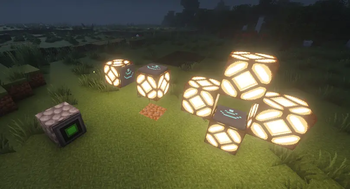
!(https://i.imgur.com/8XgQNqG.png) # Wireless Redstone Tired of running redstone wire through your whole base just to flip one lamp? Drop a **transmitter** next to your switch, a **receiver** next to your lamp, match the channel — done. No wire. No floor‑tile mazes. No accidentally powering the wrong piston. ## Features - **Transmitter** — takes a redstone input from any side, broadcasts on its channel. - **Receiver** — outputs the strongest signal it sees on its channel, like a redstone block. - **Channel** (1–128) and **Frequency** (0–65535) — pick any pair to keep your networks separate. Over 8 million combinations per dimension. - **Lock** toggle — freezes the channel/frequency so you can't bump them by accident. - **Private** toggle — binds the pair to your player, so two players can use the same channel without crossing wires on a multiplayer server. - **Item tooltips** show the current config without placing the block — handy for sorting them in a chest. - **Configurable range** — defaults to 128 blocks. Server admins can bump it up to 1024 or disable the limit entirely. ## How it works 1. Craft a transmitter and a receiver (recipes below). 2. Place the transmitter and feed it redstone from any side — lever, button, comparator, whatever. 3. Place the receiver anywhere in the same dimension within range. 4. Right‑click either block to open the config screen. Match the channel + frequency. 5. The receiver mirrors whatever signal strength the transmitter sees. Strength matters — comparator outputs travel intact. Multiple transmitters on the same channel? The receiver picks the strongest. Multiple receivers? They all output the same. No cross‑dimension signalling (yet). ## Recipes **Transmitter** — 4 iron + 3 redstone + 1 ender pearl + 1 redstone block !(https://cdn.modrinth.com/data/cached_images/f1e37157c06d8d0550869389be1104218f03f29e.png) **Receiver** — 2 iron + 3 redstone + 1 ender pearl + 1 redstone torch !(https://cdn.modrinth.com/data/cached_images/8d869d1ef631d8292ab0d485928989638e4518ee.png) The ender pearl gates these behind your first enderman kill — far enough out that you've explored a bit, but accessible long before diamond or Nether tier. ## Configuration Config file lives at `config/wirelessredstone.json` (created on first launch): ```json { "rangeLocked": true, "maxRange": 128 } ``` | Key | Default | What it does | |---|---|---| | `rangeLocked` | `true` | When true, receivers ignore transmitters farther than `maxRange` blocks. Set false for unlimited range within a dimension. | | `maxRange` | `128` | Block distance. Clamped to . | Edit the file and restart Minecraft (or the dedicated server) for changes to take effect. ## Requirements - Minecraft **26.1.x** - Java **25** - Fabric Loader **0.18.4+** with **Fabric API**, *or* NeoForge **26.1+** ## Roadmap Future versions may add: a "fixed strength" mode (transmitter always emits a chosen 1–15 instead of mirroring its input), Jade/WAILA tooltips for in‑world inspection, and an owner‑only Private gamerule. ## Source (https://github.com/kestalkayden/wireless-redstone) — CC0‑1.0.
!(https://i.imgur.com/8XgQNqG.png)
# Wireless Redstone
Tired of running redstone wire through your whole base just to flip one lamp? Drop a transmitter next to your switch, a receiver next to your lamp, match the channel — done. No wire. No floor‑tile mazes. No accidentally powering the wrong piston.
## Features
- Transmitter — takes a redstone input from any side, broadcasts on its channel.
- Receiver — outputs the strongest signal it sees on its channel, like a redstone block.
- Channel (1–128) and Frequency (0–65535) — pick any pair to keep your networks separate. Over 8 million combinations per dimension.
- Lock toggle — freezes the channel/frequency so you can't bump them by accident.
- Private toggle — binds the pair to your player, so two players can use the same channel without crossing wires on a multiplayer server.
- Item tooltips show the current config without placing the block — handy for sorting them in a chest.
- Configurable range — defaults to 128 blocks. Server admins can bump it up to 1024 or disable the limit entirely.
## How it works
1. Craft a transmitter and a receiver (recipes below). 2. Place the transmitter and feed it redstone from any side — lever, button, comparator, whatever. 3. Place the receiver anywhere in the same dimension within range. 4. Right‑click either block to open the config screen. Match the channel + frequency. 5. The receiver mirrors whatever signal strength the transmitter sees. Strength matters — comparator outputs travel intact.
Multiple transmitters on the same channel? The receiver picks the strongest. Multiple receivers? They all output the same. No cross‑dimension signalling (yet).
Transmitter — 4 iron + 3 redstone + 1 ender pearl + 1 redstone block
!(https://cdn.modrinth.com/data/cached_images/f1e37157c06d8d0550869389be1104218f03f29e.png)
Receiver — 2 iron + 3 redstone + 1 ender pearl + 1 redstone torch
!(https://cdn.modrinth.com/data/cached_images/8d869d1ef631d8292ab0d485928989638e4518ee.png)
The ender pearl gates these behind your first enderman kill — far enough out that you've explored a bit, but accessible long before diamond or Nether tier.
## Configuration
Config file lives at `config/wirelessredstone.json` (created on first launch):
```json { "rangeLocked": true, "maxRange": 128 } ```
| Key | Default | What it does | |---|---|---| | `rangeLocked` | `true` | When true, receivers ignore transmitters farther than `maxRange` blocks. Set false for unlimited range within a dimension. | | `maxRange` | `128` | Block distance. Clamped to . |
Edit the file and restart Minecraft (or the dedicated server) for changes to take effect.
## Requirements
- Minecraft 26. 1.x
- Java 25
- Fabric Loader 0. 18. 4+ with Fabric API, or NeoForge 26. 1+
Future versions may add: a "fixed strength" mode (transmitter always emits a chosen 1–15 instead of mirroring its input), Jade/WAILA tooltips for in‑world inspection, and an owner‑only Private gamerule.
(https://github.com/kestalkayden/wireless-redstone) — CC0‑1. 0.
📊 Mod Details
- Game
- Minecraft Mods
- Author
- kestalkayden
- Version
- 0.1.4+mc26.1.2
- Downloads
- 1,472
- Endorsements
- 6
- Category
- fabric
- Created
- 5/22/2026
- Updated
- 7/19/2026
- Game Versions
- 26.1, 26.1.1, 26.1.2
- Tags
- game-mechanics
🔧 How to Install Minecraft Mods Mods
Download from Modrinth. Use Prism Launcher or drop into your mods folder.
📖 Full step-by-step install guide for Minecraft Mods →
Visit the official mod page for specific installation instructions for this mod.
🎮 Need cheat codes or console commands? Check ur gaming wiki for Minecraft Mods commands, item IDs, and more.
❓ Frequently Asked Questions
Which Minecraft Mods versions does Wireless Redstone Lite support?
The author lists 26.1, 26.1.1, 26.1.2. Other versions may work but are untested by the author.
What is the latest version of Wireless Redstone Lite?
Version 0.1.4+mc26.1.2, published 2026-07-19 with 1,472 downloads recorded at the source.
Keep browsing — more Minecraft Mods mods await