Whitelister
🟡 Updated this year⚠️ Install Order · 2 steps
Install in this order, then this mod last — most mods fail to load without their framework and dependencies in place.
🖼️ Gallery (1 images)
🔍 Analysis
- 👍 0.5% endorsement rate
- 🏆 #16 of 19 bukkit mods in this game by downloads
📋 About This Mod
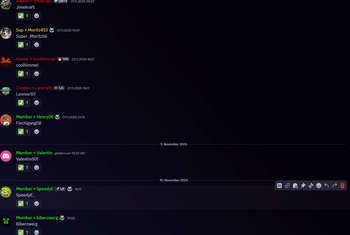
🎮 Whitelister - Discord Whitelist Management Manage your Minecraft whitelist directly through Discord - simple, fast, and clean! ✨ Features - 💬 Intuitive Usage: Just write player names in a Discord channel - done! - ✅ Emoji Feedback: Clean emoji reactions (✅/⛔) instead of cluttering text messages - 👥 Multi-User Support: Each Discord user can whitelist multiple players (configurable) - 📊 Clear Overview: List all your whitelisted players with !list - 🗑️ Easy Removal: Remove players from whitelist with !remove PlayerName - 💾 Persistent Storage: All data remains saved after server restarts - 🔒 Channel-Based: Bot only responds in a designated Discord channel 🚀 Quick Start 1. Create Discord Bot at https://discord.com/developers/applications 2. Enable MESSAGE_CONTENT Intent (important!) 3. Enter bot token and channel ID in config.yml 4. Load plugin onto server and start 5. Done! Write player names in Discord channel to whitelist them
🎮 Whitelister - Discord Whitelist Management
Manage your Minecraft whitelist directly through Discord - simple, fast, and clean!
- 💬 Intuitive Usage: Just write player names in a Discord channel - done!
- - ✅ Emoji Feedback: Clean emoji reactions (✅/⛔) instead of cluttering text messages
- - 👥 Multi-User Support: Each Discord user can whitelist multiple players (configurable)
- - 📊 Clear Overview: List all your whitelisted players with !list
- - 🗑️ Easy Removal: Remove players from whitelist with !remove PlayerName
- - 💾 Persistent Storage: All data remains saved after server restarts
- - 🔒 Channel-Based: Bot only responds in a designated Discord channel
🚀 Quick Start
1. Create Discord Bot at https://discord.com/developers/applications 2. Enable MESSAGE_CONTENT Intent (important!) 3. Enter bot token and channel ID in config.yml 4. Load plugin onto server and start 5. Done! Write player names in Discord channel to whitelist them
📊 Mod Details
- Game
- Minecraft Mods
- Author
- Theredstonee
- Version
- 1.0.0
- Downloads
- 956
- Endorsements
- 5
- Category
- bukkit
- Created
- 11/10/2025
- Updated
- 6/6/2026
- Game Versions
- 1.21.10, 1.21.11
- Tags
- management, social, utility
🔧 How to Install Minecraft Mods Mods
Download from Modrinth. Use Prism Launcher or drop into your mods folder.
📖 Full step-by-step install guide for Minecraft Mods →
Visit the official mod page for specific installation instructions for this mod.
🎮 Need cheat codes or console commands? Check ur gaming wiki for Minecraft Mods commands, item IDs, and more.
❓ Frequently Asked Questions
Which Minecraft Mods versions does Whitelister support?
The author lists 1.21.10, 1.21.11. Other versions may work but are untested by the author.
What is the latest version of Whitelister?
Version 1.0.0, published 2026-06-06 with 956 downloads recorded at the source.
Keep browsing — more Minecraft Mods mods await