Welcome+
🟡 Updated this year⚠️ Install Order · 2 steps
Install in this order, then this mod last — most mods fail to load without their framework and dependencies in place.
🖼️ Gallery (6 images)




🔍 Analysis
- 🏆 #331 of 909 fabric mods in this game by downloads
📋 About This Mod
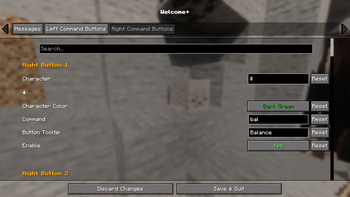
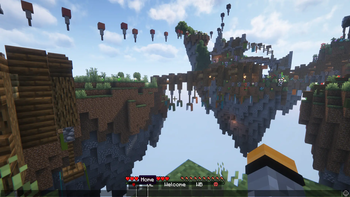
# **Welcome+** is a lightweight quality-of-life client mod that adds customizable quick-chat buttons directly to the Minecraft chat bar. Including 20 optional/configurable command buttons! Instead of typing out common greetings or commands every time, just click a button! Perfect for multiplayer servers where **fast** communication matters. !(https://cdn.modrinth.com/data/cached_images/79032134390351336b199d629ae1fcbca4ed7300_0.webp) ## **Features** •🖱️ **Chat Bar Buttons** – Adds clickable buttons directly to your chat screen. •👋 **Welcome Button** – Sends your configured Welcome message to new players. •🍀 **Good Luck Button (GL)** – Quickly wish teammates Good Luck. •🔄 **Welcome Back Button (WB)** – Greet returning friends with a single click. •🎭 **Custom Command Buttons** – Up to 20 configurable mini-buttons (10 left, 10 right) for personal commands. •🎨 **Configurable Colors & Labels** – Each custom button can have its own symbol, text color, and tooltip. •🖼️ **Hover Tooltips** – Preview what each button will send before clicking. •🔧 **Config Menu Integration** – Works with Cloth Config + Mod Menu for in-game configuration. •✅ **Lightweight & Client-Only** – No server installation required.
# Welcome+ is a lightweight quality-of-life client mod that adds customizable quick-chat buttons directly to the Minecraft chat bar. Including 20 optional/configurable command buttons! Instead of typing out common greetings or commands every time, just click a button!
Perfect for multiplayer servers where fast communication matters.
!(https://cdn.modrinth.com/data/cached_images/79032134390351336b199d629ae1fcbca4ed7300_0.webp)
## Features
•🖱️ Chat Bar Buttons – Adds clickable buttons directly to your chat screen.
•👋 Welcome Button – Sends your configured Welcome message to new players.
•🍀 Good Luck Button (GL) – Quickly wish teammates Good Luck.
•🔄 Welcome Back Button (WB) – Greet returning friends with a single click.
•🎭 Custom Command Buttons – Up to 20 configurable mini-buttons (10 left, 10 right) for personal commands.
•🎨 Configurable Colors & Labels – Each custom button can have its own symbol, text color, and tooltip.
•🖼️ Hover Tooltips – Preview what each button will send before clicking.
•🔧 Config Menu Integration – Works with Cloth Config + Mod Menu for in-game configuration.
•✅ Lightweight & Client-Only – No server installation required.
📊 Mod Details
- Game
- Minecraft Mods
- Author
- LovexKGx
- Version
- 2.0.0
- Downloads
- 276
- Endorsements
- 3
- Category
- fabric
- Created
- 8/22/2025
- Updated
- 6/28/2026
- Game Versions
- 26.1.2
- Tags
- management, social, utility
🔧 How to Install Minecraft Mods Mods
Download from Modrinth. Use Prism Launcher or drop into your mods folder.
📖 Full step-by-step install guide for Minecraft Mods →
Visit the official mod page for specific installation instructions for this mod.
🎮 Need cheat codes or console commands? Check ur gaming wiki for Minecraft Mods commands, item IDs, and more.
❓ Frequently Asked Questions
Which Minecraft Mods versions does Welcome+ support?
The author lists 26.1.2. Other versions may work but are untested by the author.
What is the latest version of Welcome+?
Version 2.0.0, published 2026-06-28 with 276 downloads recorded at the source.
Keep browsing — more Minecraft Mods mods await