Web Chat
🟡 Updated this year⚠️ Install Order · 2 steps
Install in this order, then this mod last — most mods fail to load without their framework and dependencies in place.
🖼️ Gallery (4 images)

🔍 Analysis
- 👍 0.4% endorsement rate
- 🏆 #142 of 893 fabric mods in this game by downloads
📋 About This Mod
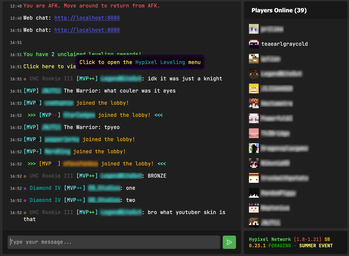
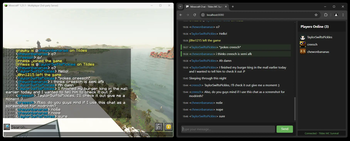
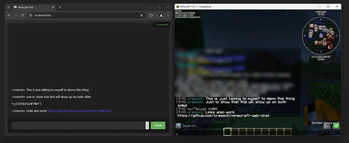
Web chat is a **client only** mod that gives you access to the Minecraft chat of your running game window. This allows you to chat with other players while having minecraft in the background. Great for things like semi-afk farming and similar things! # Features - Access chat through any web browser. - Chat history is stored and available when you are on a server and open chat in a browser. - Tab completion of usernames. - Tab icon notification for new messages when the browser isn't focused. - Fully client side, works on any server. - Ping support for your username & configurable keywords. - Support for `/tell`, `/msg`, `/w` and `/me` commands. - Full support for Minecraft's text formatting (colors, bold, italic, translation, etc.) - Support for official click and hover interactions (opening URLs, achievement details, etc.) !(https://cdn.modrinth.com/data/zxB8528D/images/e03e9b2ad17e78e19acbd93a1c08f7a8337ac950.jpeg) # Availability - Minecraft version: - 26.2 supported by Web Chat v1.9.0+ - 26.1 supported by Web Chat v1.7.0-v1.8.0 - 1.21.11 supported by Web Chat v1.5.0-v1.6.0 - 1.21.8 supported by Web Chat v1.4.0 - 1.21.1 - 1.21.4 are supported up to Web Chat v1.3.0 and not further. - Mod loader: Fabric only There are no plans to support other mod loaders. # Usage ## Requirements - (https://modrinth.com/mod/fabric-api) (required) - (https://modrinth.com/mod/yacl) (required) - (https://modrinth.com/mod/modmenu) (optional, needed for configuration) ## Installation 1. Install the mod (https://modrinth.com/mod/web-chat) or grab the (https://github.com/Tildes-MC/minecraft-web-chat/releases). 2. Start minecraft. 3. Join a server. 4. Go to `localhost:8080` on the same computer, or use your computer's local IP address (like `192.168.1.x:8080`) from other devices on your network. 5. Start chatting. ## Settings ### Message settings - `Ping on Username` - This will ping the browser window any time a player's username appears in the chat. - `Extra Ping keywords` - This will ping the browser window any time one of these words appear in the chat. ### Network settings - `HTTP Port` - Port number used to serve the web interface. `8080` by default. - `Open Chat to LAN` - Open the web chat to your local network so other devices (like your phone) can connect. Enabled by default. When disabled, the chat binds to `localhost` only and is reachable from this computer alone. While enabled, a QR code button is shown in the player list that lets you quickly open the chat on your phone by scanning your computer's local network address. # Security & Privacy This mod turns minecraft into a small web server on your computer that's only accessible (using `localhost` or your local IP) on your home network. This means that you can access Web Chat on a different device on your network, but not over the internet. No data is sent over the internet beyond your normal Minecraft traffic. **Important:** This mod is designed for local use only. **Do not** expose the web chat port to the internet. If you need remote access, setup a VPN (such as (https://tailscale.com/)).
Web chat is a client only mod that gives you access to the Minecraft chat of your running game window. This allows you to chat with other players while having minecraft in the background. Great for things like semi-afk farming and similar things!
# Features - Access chat through any web browser. - Chat history is stored and available when you are on a server and open chat in a browser. - Tab completion of usernames. - Tab icon notification for new messages when the browser isn't focused. - Fully client side, works on any server. - Ping support for your username & configurable keywords. - Support for `/tell`, `/msg`, `/w` and `/me` commands. - Full support for Minecraft's text formatting (colors, bold, italic, translation, etc.) - Support for official click and hover interactions (opening URLs, achievement details, etc.)
!(https://cdn.modrinth.com/data/zxB8528D/images/e03e9b2ad17e78e19acbd93a1c08f7a8337ac950.jpeg)
# Availability
- Minecraft version:
- - 26. 2 supported by Web Chat v1. 9. 0+
- - 26. 1 supported by Web Chat v1. 7. 0-v1. 8. 0
- - 1. 21. 11 supported by Web Chat v1. 5. 0-v1. 6. 0
- - 1. 21. 8 supported by Web Chat v1. 4. 0
- - 1. 21. 1 - 1. 21. 4 are supported up to Web Chat v1. 3. 0 and not further.
- Mod loader: Fabric only
There are no plans to support other mod loaders.
## Requirements - (https://modrinth.com/mod/fabric-api) (required) - (https://modrinth.com/mod/yacl) (required) - (https://modrinth.com/mod/modmenu) (optional, needed for configuration)
## Installation 1. Install the mod (https://modrinth.com/mod/web-chat) or grab the (https://github.com/Tildes-MC/minecraft-web-chat/releases). 2. Start minecraft. 3. Join a server. 4. Go to `localhost:8080` on the same computer, or use your computer's local IP address (like `192. 168. 1.x:8080`) from other devices on your network. 5. Start chatting.
## Settings
### Message settings
- `Ping on Username` - This will ping the browser window any time a player's username appears in the chat.
- `Extra Ping keywords` - This will ping the browser window any time one of these words appear in the chat.
### Network settings
- `HTTP Port` - Port number used to serve the web interface. `8080` by default.
- `Open Chat to LAN` - Open the web chat to your local network so other devices (like your phone) can connect. Enabled by default. When disabled, the chat binds to `localhost` only and is reachable from this computer alone. While enabled, a QR code button is shown in the player list that lets you quickly open the chat on your phone by scanning your computer's local network address.
# Security & Privacy
This mod turns minecraft into a small web server on your computer that's only accessible (using `localhost` or your local IP) on your home network. This means that you can access Web Chat on a different device on your network, but not over the internet. No data is sent over the internet beyond your normal Minecraft traffic.
📊 Mod Details
- Game
- Minecraft Mods
- Author
- creesch
- Version
- 1.9.1
- Downloads
- 8,966
- Endorsements
- 38
- Category
- fabric
- Created
- 12/19/2024
- Updated
- 7/3/2026
- Game Versions
- 26.2
- Tags
- social, technology, utility
🔧 How to Install Minecraft Mods Mods
Download from Modrinth. Use Prism Launcher or drop into your mods folder.
📖 Full step-by-step install guide for Minecraft Mods →
Visit the official mod page for specific installation instructions for this mod.
🎮 Need cheat codes or console commands? Check ur gaming wiki for Minecraft Mods commands, item IDs, and more.
❓ Frequently Asked Questions
Which Minecraft Mods versions does Web Chat support?
The author lists 26.2. Other versions may work but are untested by the author.
What is the latest version of Web Chat?
Version 1.9.1, published 2026-07-03 with 8,966 downloads recorded at the source.
Keep browsing — more Minecraft Mods mods await