Vulkan PostFX
🟡 Updated this year⚠️ Install Order · 2 steps
Install in this order, then this mod last — most mods fail to load without their framework and dependencies in place.
🖼️ Gallery (1 images)
🔍 Analysis
- 👍 0.2% endorsement rate
- 🏆 #140 of 343 decoration mods in this game by downloads
📋 About This Mod
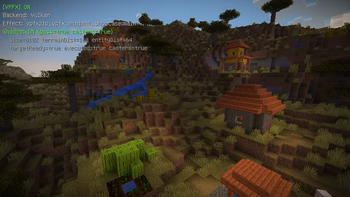
# Vulkan PostFX **Vulkan PostFX**, also known as **VPFX**, is an experimental VPFX shader pack loader and post-processing framework for Minecraft’s modern Vulkan-based rendering path. It allows external **VPFX shader packs** to add screen-space visual effects such as color grading, vignette, tone mapping, highlight compression, cinematic look adjustments, depth-based effects, and early shadow-depth experiments. This project is still experimental, but it already supports ZIP-based VPFX shader packs through Minecraft’s resource pipeline. --- ## Start here For the best first experience, install both: * **Vulkan PostFX** — the loader and runtime * **VPFX Minimal Showcase** — the official minimal example pack Vulkan PostFX is **not** a full Iris / OptiFine replacement. The goal is to build a new VPFX workflow for Minecraft’s Vulkan rendering path, starting from reliable external pack loading and gradually moving toward a more capable shader runtime. --- ## What Vulkan PostFX does Vulkan PostFX currently focuses on: * external ZIP-based VPFX shader pack loading * graph-based post-processing configuration * runtime resource pack materialization * runtime resource pack injection * external post-chain execution * scene color sampling * scene depth capture * experimental shadow depth input * diagnostics for broken packs * early native runtime experiments This means Vulkan PostFX is already executing a real external VPFX pack pipeline, not just parsing ZIP files. ```text external ZIP shader pack -> VPFX manifest / graph validation -> runtime resource pack materialization -> Minecraft resource system injection -> external post-chain execution ``` --- ## Current features ### External VPFX pack loading Vulkan PostFX supports ZIP-based VPFX shader packs containing files such as: ```text pack.json post_effect/main.json shaders/<path>.vsh shaders/<path>.fsh ``` Shader references use the following format: ```text <pack_id>:<path> ``` For example: ```text vpfx_minimal_showcase:composite/final ``` which resolves to: ```text shaders/composite/final.vsh shaders/composite/final.fsh ``` Shader paths are not limited to a fixed `post/` directory layout. --- ### Runtime namespace rewriting External packs are rewritten into isolated runtime namespaces to reduce conflicts with built-in resources and other packs. This allows VPFX packs to behave more like external visual packages while still being routed through Minecraft’s resource system. --- ### Runtime resource pack injection External ZIP contents are materialized into runtime resource packs during startup / resource reload and injected into Minecraft’s client resource system. This is one of the core parts of the VPFX loading pipeline. --- ### External post-chain execution Vulkan PostFX can load external post chains through Minecraft’s `ShaderManager` and execute them through the current `minecraft_postchain` backend. The current stable execution path is still based on Minecraft’s post-chain system. --- ### Scene, depth, and shadow inputs Current VPFX runtime inputs include: ```text minecraft:scene_color vulkanpostfx:scene_depth vulkanpostfx:shadow_depth minecraft:main ``` These inputs are used for screen-space effects, depth-based experiments, and shadow-depth debugging. --- ### Failure diagnostics When a VPFX pack fails to load or execute, Vulkan PostFX can generate diagnostic information for issues such as: * missing shader files * invalid graph targets * sampler mismatches * shader path errors * external target problems * pipeline creation failures If a pack is broken, the goal is to make the failure understandable instead of silently failing. --- ## Experimental native runtime Vulkan PostFX is gradually moving beyond Minecraft’s default post-chain backend. Current experimental native runtime progress includes: * native runtime support checks * resource mapping dry-runs * same-target hazard detection * transient color target planning * `mainTarget -> transientColor` copy validation * builtin native fullscreen passthrough draw * opt-in diagnostic mode for testing the native passthrough path The current experimental native path can be summarized as: ```text minecraft:main -> transientColor -> builtin native fullscreen passthrough -> minecraft:main ``` This is still experimental and opt-in. User VPFX shaders are **not** fully executed natively yet. --- ## Current sample pack ### VPFX Minimal Showcase The official minimal example pack demonstrates: * VPFX `pack.json` * graph-based post-effect configuration * non-`post/` shader paths * `minecraft:scene_color` sampling * `minecraft:main` output * basic screen-space look adjustment It is the recommended starting point for testing Vulkan PostFX. --- ## Usage ### 1. Place a VPFX shader pack Put the VPFX shader pack ZIP into the `shaderpacks` folder of your Minecraft instance. For development runs, this is usually: ```text run/shaderpacks/ ``` --- ### 2.
# Vulkan PostFX
Vulkan PostFX, also known as VPFX, is an experimental VPFX shader pack loader and post-processing framework for Minecraft’s modern Vulkan-based rendering path.
It allows external VPFX shader packs to add screen-space visual effects such as color grading, vignette, tone mapping, highlight compression, cinematic look adjustments, depth-based effects, and early shadow-depth experiments.
This project is still experimental, but it already supports ZIP-based VPFX shader packs through Minecraft’s resource pipeline.
## Start here
For the best first experience, install both:
Vulkan PostFX — the loader and runtime VPFX Minimal Showcase — the official minimal example pack
Vulkan PostFX is not a full Iris / OptiFine replacement.
The goal is to build a new VPFX workflow for Minecraft’s Vulkan rendering path, starting from reliable external pack loading and gradually moving toward a more capable shader runtime.
## What Vulkan PostFX does
Vulkan PostFX currently focuses on:
external ZIP-based VPFX shader pack loading graph-based post-processing configuration runtime resource pack materialization runtime resource pack injection external post-chain execution scene color sampling scene depth capture experimental shadow depth input diagnostics for broken packs early native runtime experiments
This means Vulkan PostFX is already executing a real external VPFX pack pipeline, not just parsing ZIP files.
```text external ZIP shader pack -> VPFX manifest / graph validation -> runtime resource pack materialization -> Minecraft resource system injection -> external post-chain execution ```
## Current features
### External VPFX pack loading
Vulkan PostFX supports ZIP-based VPFX shader packs containing files such as:
```text
pack.json
post_effect/main.json
shaders/
Shader references use the following format:
```text
For example:
```text vpfx_minimal_showcase:composite/final ```
which resolves to:
```text shaders/composite/final.vsh shaders/composite/final.fsh ```
Shader paths are not limited to a fixed `post/` directory layout.
### Runtime namespace rewriting
External packs are rewritten into isolated runtime namespaces to reduce conflicts with built-in resources and other packs.
This allows VPFX packs to behave more like external visual packages while still being routed through Minecraft’s resource system.
### Runtime resource pack injection
External ZIP contents are materialized into runtime resource packs during startup / resource reload and injected into Minecraft’s client resource system.
This is one of the core parts of the VPFX loading pipeline.
### External post-chain execution
Vulkan PostFX can load external post chains through Minecraft’s `ShaderManager` and execute them through the current `minecraft_postchain` backend.
The current stable execution path is still based on Minecraft’s post-chain system.
### Scene, depth, and shadow inputs
Current VPFX runtime inputs include:
```text minecraft:scene_color vulkanpostfx:scene_depth vulkanpostfx:shadow_depth minecraft:main ```
These inputs are used for screen-space effects, depth-based experiments, and shadow-depth debugging.
### Failure diagnostics
When a VPFX pack fails to load or execute, Vulkan PostFX can generate diagnostic information for issues such as:
missing shader files invalid graph targets sampler mismatches shader path errors external target problems pipeline creation failures
If a pack is broken, the goal is to make the failure understandable instead of silently failing.
## Experimental native runtime
Vulkan PostFX is gradually moving beyond Minecraft’s default post-chain backend.
Current experimental native runtime progress includes:
native runtime support checks resource mapping dry-runs same-target hazard detection transient color target planning `mainTarget -> transientColor` copy validation builtin native fullscreen passthrough draw opt-in diagnostic mode for testing the native passthrough path
The current experimental native path can be summarized as:
```text minecraft:main -> transientColor -> builtin native fullscreen passthrough -> minecraft:main ```
This is still experimental and opt-in.
User VPFX shaders are not fully executed natively yet.
## Current sample pack
### VPFX Minimal Showcase
The official minimal example pack demonstrates:
VPFX `pack.json` graph-based post-effect configuration non-`post/` shader paths `minecraft:scene_color` sampling `minecraft:main` output * basic screen-space look adjustment
It is the recommended starting point for testing Vulkan PostFX.
### 1. Place a VPFX shader pack
Put the VPFX shader pack ZIP into the `shaderpacks` folder of your Minecraft instance.
For development runs, this is usually:
```text run/shaderpacks/ ```
📊 Mod Details
- Game
- Minecraft Mods
- Author
- Player9753193
- Version
- 1.15.11+mc26.2-2026-07-10
- Downloads
- 13,412
- Endorsements
- 24
- Category
- decoration
- Created
- 4/12/2026
- Updated
- 7/10/2026
- Game Versions
- 26.2
- Tags
- decoration, game-mechanics, optimization
🔧 How to Install Minecraft Mods Mods
Download from Modrinth. Use Prism Launcher or drop into your mods folder.
📖 Full step-by-step install guide for Minecraft Mods →
Visit the official mod page for specific installation instructions for this mod.
🎮 Need cheat codes or console commands? Check ur gaming wiki for Minecraft Mods commands, item IDs, and more.
❓ Frequently Asked Questions
Which Minecraft Mods versions does Vulkan PostFX support?
The author lists 26.2. Other versions may work but are untested by the author.
What is the latest version of Vulkan PostFX?
Version 1.15.11+mc26.2-2026-07-10, published 2026-07-10 with 13,412 downloads recorded at the source.
Keep browsing — more Minecraft Mods mods await