Voyagermap
⚪ Last updated 2024⚠️ Install Order · 2 steps
Install in this order, then this mod last — most mods fail to load without their framework and dependencies in place.
🖼️ Gallery (2 images)
🔍 Analysis
- 👍 0.8% endorsement rate
- 🏆 #251 of 574 adventure mods in this game by downloads
📋 About This Mod
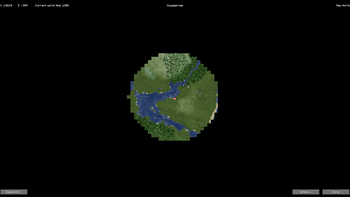
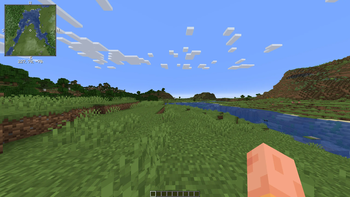
# Welcome to Voyagermap: A Minecraft Mod !(https://cdn.modrinth.com/data/EUkNYLLE/images/02a97627891ffc9ca0eb6b67e9487642153f8eff.png) !(https://cdn.modrinth.com/data/EUkNYLLE/images/b458608d7380df5ed1b37ce8edd94fa8c20114a1.png) ## What is this mod? Voyagermap is a minimap and worldmap mod for Minecraft 1.19.4, designed to enhance your navigation and exploration experience. ## What does this mod do? - **Minimap and World Map**: Voyagermap allows you to see the world around you that you have loaded, including players and mobs in your environment. - **World Map Overview**: It offers a detailed world map with zoom capabilities and teleport commands for an expansive view of your entire world. - **Waypoints System**: Easily mark places of interest with the built-in waypoints system, which aids in quick location and navigation. These waypoints are visible on both the minimap and the world map. - **Cave View**: If the cave mode is enabled, Voyagermap lets you see caves, providing a comprehensive underground navigation experience. ## Features ### Worldmap - **Exportable map(Options coming soon)** Export the world map into and image to share with freinds! - **Detailed Overview**: Get a comprehensive view of your entire world, including loaded chunks and points of interest. - **Zoom and Teleport**: Zoom in and out for different levels of detail and use the right click menu for teleport commands for quick travel. - **Customizability**: Set custom keybinds, edit veiwing settings, and also radar settings ### Minimap - **All entity radar**: shows all entitys on the map including boats and other dropped items - **Real-Time Environment View**: See the world around you in real-time, including nearby players and mobs. - **Custom Waypoints**: Mark and manage waypoints for easy navigation and location tracking. - **Cave Mapping**: If enabled, view underground caves to aid in your spelunking adventures. ## FAQ ### Q: How do I open the worldmap? A: To open the worldmap, press the default key **'M'**. You can change this keybinding in the settings menu if needed. ### Q: How do I set a waypoint? A: To set a waypoint, open the minimap by pressing the default key **'N'**, then configure the settings to your liking and click **"Done"** To save the waypoint. ### Q: Can I see other players on the map? A: Yes, Voyagermap allows you to see nearby players on both the minimap and worldmap, as long as they are within your chunks. ### Q: How do I enable cave view? A: To enable cave view, go the worldmap,click options,look for "Enable Cave Mode:" and change as you wish. ### Q: Where is the options menu? A: The options menu is located in the bottom right corner of the worldmap, which you can open by pressing **'M'** by default. ### Q: How do I zoom the minimap? A: To zoom the minimap, press the default key **'Z'** to cycle through different zoom levels. Note that in release 0.125, zooming only works with filtering enabled. ### Q: The worldmap is blurry. What do I do? A: If the worldmap appears blurry, go to the options menu, navigate to "Details/Performance," and turn off filtering. ### Q: How can I zoom further in the worldmap? It's stopping my zoom. A: To zoom further in the worldmap, go to the options menu, navigate to "Worldmap," and adjust the minimum and maximum zoom levels to your preference. ## Support me on patreon You can donate here https://www.patreon.com/hotsuop ## Is this mod client or server side or both? ### Client-Side Features - **Cave Mapping:** Allows users to map caves in their Minecraft world. - **Radar:** Displays nearby entities or players. ### Server-Side Configuration When installed on a server, administrators can control certain options using chat commands: - **Disable Cave Mapping:** Admins can disable cave mapping for all users by entering `§3 §6 §3 §6 §3 §6 §d`. This command disables cave mapping on the server. - **Disable Radar:** Admins can disable the radar for all users by entering `§3 §6 §3 §6 §3 §6 §e`. This command disables the radar feature for all users. - **Enable Cave Mapping:** Admins can enable cave mapping for all users by entering `§3 §6 §3 §6 §3 §6 §f`. This command enables cave mapping on the server. - **Enable Radar:** Admins can enable the radar for all users by entering `§3 §6 §3 §6 §3 §6 §0`. This command enables the radar feature for all users. ## Simple tips and how too's You can bind a copy cords button in the optons menu ## Fun facts about this mod Total number of characters in folder: 992168 Number of devs: 2 ## Planned features - Round map - None more! Suggest some (https://github.com/hotsu0p/minimap/issues) ## Got an issue? Report it (https://github.com/hotsu0p/minimap/issues)! ## Meet the devs - (https://github.com/hotsu0p) - Lead dev/Owner - (https://github.com/MusiJVR) - Dev # License and Usage Info ## License Voyagermap is licensed under the Apache License, Version 2.0 . See below for the terms of the li
# Welcome to Voyagermap: A Minecraft Mod !(https://cdn.modrinth.com/data/EUkNYLLE/images/02a97627891ffc9ca0eb6b67e9487642153f8eff.png) !(https://cdn.modrinth.com/data/EUkNYLLE/images/b458608d7380df5ed1b37ce8edd94fa8c20114a1.png) ## What is this mod?
Voyagermap is a minimap and worldmap mod for Minecraft 1. 19. 4, designed to enhance your navigation and exploration experience.
## What does this mod do?
- Minimap and World Map: Voyagermap allows you to see the world around you that you have loaded, including players and mobs in your environment.
- World Map Overview: It offers a detailed world map with zoom capabilities and teleport commands for an expansive view of your entire world.
- Waypoints System: Easily mark places of interest with the built-in waypoints system, which aids in quick location and navigation. These waypoints are visible on both the minimap and the world map.
- Cave View: If the cave mode is enabled, Voyagermap lets you see caves, providing a comprehensive underground navigation experience.
## Features ### Worldmap - Exportable map(Options coming soon) Export the world map into and image to share with freinds! - Detailed Overview: Get a comprehensive view of your entire world, including loaded chunks and points of interest. - Zoom and Teleport: Zoom in and out for different levels of detail and use the right click menu for teleport commands for quick travel. - Customizability: Set custom keybinds, edit veiwing settings, and also radar settings ### Minimap - All entity radar: shows all entitys on the map including boats and other dropped items - Real-Time Environment View: See the world around you in real-time, including nearby players and mobs. - Custom Waypoints: Mark and manage waypoints for easy navigation and location tracking. - Cave Mapping: If enabled, view underground caves to aid in your spelunking adventures.
### Q: How do I open the worldmap? A: To open the worldmap, press the default key 'M'. You can change this keybinding in the settings menu if needed.
### Q: How do I set a waypoint? A: To set a waypoint, open the minimap by pressing the default key 'N', then configure the settings to your liking and click "Done" To save the waypoint.
### Q: Can I see other players on the map? A: Yes, Voyagermap allows you to see nearby players on both the minimap and worldmap, as long as they are within your chunks.
### Q: How do I enable cave view? A: To enable cave view, go the worldmap,click options,look for "Enable Cave Mode:" and change as you wish.
### Q: Where is the options menu? A: The options menu is located in the bottom right corner of the worldmap, which you can open by pressing 'M' by default.
### Q: How do I zoom the minimap? A: To zoom the minimap, press the default key 'Z' to cycle through different zoom levels. Note that in release 0. 125, zooming only works with filtering enabled.
### Q: The worldmap is blurry. What do I do? A: If the worldmap appears blurry, go to the options menu, navigate to "Details/Performance," and turn off filtering.
### Q: How can I zoom further in the worldmap? It's stopping my zoom. A: To zoom further in the worldmap, go to the options menu, navigate to "Worldmap," and adjust the minimum and maximum zoom levels to your preference. ## Support me on patreon You can donate here https://www.patreon.com/hotsuop ## Is this mod client or server side or both? ### Client-Side Features
- Cave Mapping: Allows users to map caves in their Minecraft world.
- Radar: Displays nearby entities or players.
### Server-Side Configuration
When installed on a server, administrators can control certain options using chat commands:
- Disable Cave Mapping: Admins can disable cave mapping for all users by entering `§3 §6 §3 §6 §3 §6 §d`. This command disables cave mapping on the server.
- Disable Radar: Admins can disable the radar for all users by entering `§3 §6 §3 §6 §3 §6 §e`. This command disables the radar feature for all users.
- Enable Cave Mapping: Admins can enable cave mapping for all users by entering `§3 §6 §3 §6 §3 §6 §f`. This command enables cave mapping on the server.
- Enable Radar: Admins can enable the radar for all users by entering `§3 §6 §3 §6 §3 §6 §0`. This command enables the radar feature for all users.
- ## Simple tips and how too's
- You can bind a copy cords button in the optons menu
- ## Fun facts about this mod
- Total number of characters in folder: 992168
- Number of devs: 2
- ## Planned features
- Round map
- None more! Suggest some (https://github.com/hotsu0p/minimap/issues)
- ## Got an issue?
- Report it (https://github.com/hotsu0p/minimap/issues)!
- ## Meet the devs
- (https://github.com/hotsu0p) - Lead dev/Owner
- (https://github.com/MusiJVR) - Dev
- # License and Usage Info
Voyagermap is licensed under the Apache License, Version 2. 0 . See below for the terms of the li
📊 Mod Details
- Game
- Minecraft Mods
- Author
- hotsuop
- Version
- 1.19.4-0.1.6
- Downloads
- 1,420
- Endorsements
- 11
- Category
- adventure
- Created
- 7/19/2024
- Updated
- 9/1/2024
- Game Versions
- 1.19.4
- Tags
- adventure, optimization, utility
🔧 How to Install Minecraft Mods Mods
Download from Modrinth. Use Prism Launcher or drop into your mods folder.
📖 Full step-by-step install guide for Minecraft Mods →
Visit the official mod page for specific installation instructions for this mod.
🎮 Need cheat codes or console commands? Check ur gaming wiki for Minecraft Mods commands, item IDs, and more.
❓ Frequently Asked Questions
Which Minecraft Mods versions does Voyagermap support?
The author lists 1.19.4. Other versions may work but are untested by the author.
What is the latest version of Voyagermap?
Version 1.19.4-0.1.6, published 2024-09-01 with 1,420 downloads recorded at the source.
Keep browsing — more Minecraft Mods mods await