Voice Transcript
🟠 Updated over a year ago⚠️ Install Order · 2 steps
Install in this order, then this mod last — most mods fail to load without their framework and dependencies in place.
🖼️ Gallery (1 images)
🔍 Analysis
- 👍 0.7% endorsement rate
- 🏆 #278 of 326 forge mods in this game by downloads
📋 About This Mod
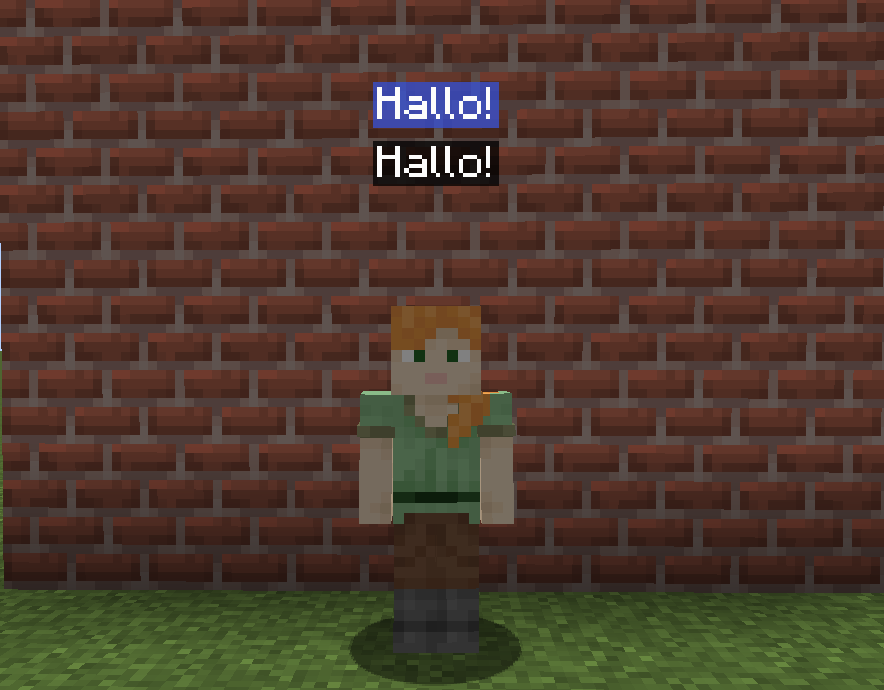
# Voice Transcript This is an addon for (https://modrinth.com/plugin/simple-voice-chat). Before downloading please check the instructions on how to use the mod below. This mod uses VOSK offline speech recognition and currently supports these languages: English, Chinese, Russian, French, German, Spanish, Portuguese/Brazilian Portuguese, Greek, Turkish, Vietnamese, Italian, Dutch, Catalan, Arabic/Arabic Tunisian, Farsi, Filipino, Ukrainian, Kazakh, Swedish, Japanese, Esperanto, Hindi, Czech, Polish, Uzbek, Korean, Breton, Gujarati, Tajik and Telugu. --- ## How to install ### 1. Make sure you have the latest (https://modrinth.com/plugin/simple-voice-chat) mod version and the latest Voice Transcript mod version. ### 2. Go inside your config folder, and search for a folder called "voicetranscript-model", if you can't find it, create it. ### 3. Download your desired voice language model, here you can search for your language: https://alphacephei.com/vosk/models If you are going to speak in English, I recommend using (https://alphacephei.com/vosk/models/vosk-model-small-en-us-0.15.zip) here. Keep in mind that using more large language models requires a stronger PC on your server-side. ### 4. Extract the files inside the voicetranscript-model. Make sure to extract the files, and not create a new folder with the files inside it. Your voicetranscript-model folder needs to look like this: !(https://i.imgur.com/0IwuH1f.png) --- ## Customizing ### Chat Bubbles Color You can change the chat bubbles color using the command: /bubblecolor <color> !(https://i.imgur.com/WjgZCcK.png)
# Voice Transcript
This is an addon for (https://modrinth.com/plugin/simple-voice-chat). Before downloading please check the instructions on how to use the mod below. This mod uses VOSK offline speech recognition and currently supports these languages:
English, Chinese, Russian, French, German, Spanish, Portuguese/Brazilian Portuguese, Greek, Turkish, Vietnamese, Italian, Dutch, Catalan, Arabic/Arabic Tunisian, Farsi, Filipino, Ukrainian, Kazakh, Swedish, Japanese, Esperanto, Hindi, Czech, Polish, Uzbek, Korean, Breton, Gujarati, Tajik and Telugu.
## How to install ### 1. Make sure you have the latest (https://modrinth.com/plugin/simple-voice-chat) mod version and the latest Voice Transcript mod version.
### 2. Go inside your config folder, and search for a folder called "voicetranscript-model", if you can't find it, create it.
### 3. Download your desired voice language model, here you can search for your language: https://alphacephei.com/vosk/models
If you are going to speak in English, I recommend using (https://alphacephei.com/vosk/models/vosk-model-small-en-us-0. 15.zip) here. Keep in mind that using more large language models requires a stronger PC on your server-side.
### 4. Extract the files inside the voicetranscript-model. Make sure to extract the files, and not create a new folder with the files inside it. Your voicetranscript-model folder needs to look like this: !(https://i.imgur.com/0IwuH1f.png)
## Customizing
### Chat Bubbles Color
You can change the chat bubbles color using the command: /bubblecolor
!(https://i.imgur.com/WjgZCcK.png)
📊 Mod Details
- Game
- Minecraft Mods
- Author
- Drawned_
- Version
- 1.0.0
- Downloads
- 4,329
- Endorsements
- 30
- Category
- forge
- Created
- 9/10/2025
- Updated
- 9/9/2025
- Game Versions
- 1.20, 1.20.1
- Tags
- game-mechanics, social, utility
🔧 How to Install Minecraft Mods Mods
Download from Modrinth. Use Prism Launcher or drop into your mods folder.
📖 Full step-by-step install guide for Minecraft Mods →
Visit the official mod page for specific installation instructions for this mod.
🎮 Need cheat codes or console commands? Check ur gaming wiki for Minecraft Mods commands, item IDs, and more.
❓ Frequently Asked Questions
Which Minecraft Mods versions does Voice Transcript support?
The author lists 1.20, 1.20.1. Other versions may work but are untested by the author.
What is the latest version of Voice Transcript?
Version 1.0.0, published 2025-09-09 with 4,329 downloads recorded at the source.
Keep browsing — more Minecraft Mods mods await