Visual Recipe Edit-Create
🟡 Updated this year⚠️ Install Order · 2 steps
Install in this order, then this mod last — most mods fail to load without their framework and dependencies in place.
🖼️ Gallery (8 images)
🔍 Analysis
- 👍 1.1% endorsement rate — high engagement, a strong quality signal
- 🏆 #205 of 369 forge mods in this game by downloads
📋 About This Mod
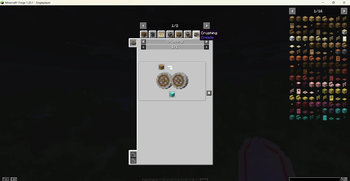
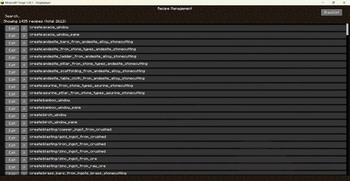
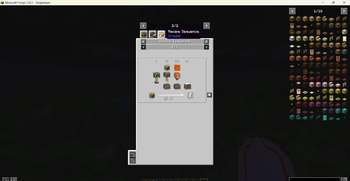
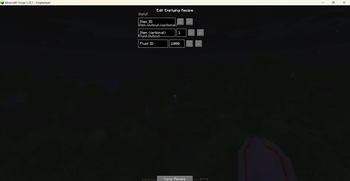
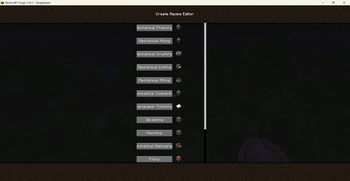
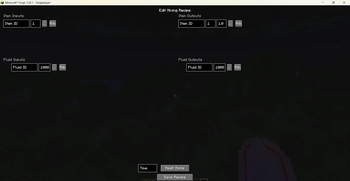
Introduction Visual Recipe Edit-Create is a Create add-on that provides a visual GUI for creating new recipes and editing or disabling certain existing Create recipes. Recipe changes take effect after leaving and re-entering the world. Detailed Description Use /vre create gui to open the main screen and browse all 14 recipe types: Pressing, Mixing, Crushing, Cutting, Milling, Compacting, Sandpaper Polishing, Splashing, Haunting, Deploying, Filling, Emptying, Mechanical Crafting, and Sequenced Assembly. Click any type to enter its dedicated editing page, which offers fields for item inputs, fluid inputs, output items with probabilities, processing time, and heat requirements, along with convenient item/fluid pickers and a tag picker. In the Recipe Management screen (/vre create manage), you can search all registered Create recipes and click “Edit” to modify those that are editable. You can also add any recipe to a blacklist to temporarily disable it, and restore blacklisted recipes. All created or modified recipes are saved as JSON files in the config/visual_recipe_edit_create/ directory. The mod fully supports both Chinese and English, with the UI language automatically following the game setting. Commands /vre create gui – Opens the recipe type selection screen to create new recipes. /vre create manage – Opens the recipe management screen to edit, disable, or restore existing recipes. Note This is a Create add-on; please use it with Create 6.0.8 or later. Not all vanilla Create recipes support visual editing: pure Create processing recipes (e.g., those under “Mixed Mixing”) can be fully edited, while “Auto‑Stirring” and “Auto‑Brewing” recipes that inherit from crafting/brewing systems do not have dedicated editing pages (you can still disable them in the management screen). Recipe changes only take effect after leaving and re-entering the current world.
Introduction Visual Recipe Edit-Create is a Create add-on that provides a visual GUI for creating new recipes and editing or disabling certain existing Create recipes. Recipe changes take effect after leaving and re-entering the world.
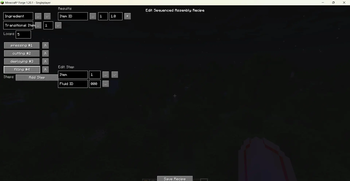
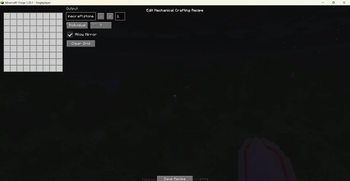
Detailed Description Use /vre create gui to open the main screen and browse all 14 recipe types: Pressing, Mixing, Crushing, Cutting, Milling, Compacting, Sandpaper Polishing, Splashing, Haunting, Deploying, Filling, Emptying, Mechanical Crafting, and Sequenced Assembly. Click any type to enter its dedicated editing page, which offers fields for item inputs, fluid inputs, output items with probabilities, processing time, and heat requirements, along with convenient item/fluid pickers and a tag picker.
In the Recipe Management screen (/vre create manage), you can search all registered Create recipes and click “Edit” to modify those that are editable. You can also add any recipe to a blacklist to temporarily disable it, and restore blacklisted recipes.
All created or modified recipes are saved as JSON files in the config/visual_recipe_edit_create/ directory.
The mod fully supports both Chinese and English, with the UI language automatically following the game setting.
Commands /vre create gui – Opens the recipe type selection screen to create new recipes. /vre create manage – Opens the recipe management screen to edit, disable, or restore existing recipes.
Note This is a Create add-on; please use it with Create 6. 0. 8 or later.
Not all vanilla Create recipes support visual editing: pure Create processing recipes (e.g., those under “Mixed Mixing”) can be fully edited, while “Auto‑Stirring” and “Auto‑Brewing” recipes that inherit from crafting/brewing systems do not have dedicated editing pages (you can still disable them in the management screen).
Recipe changes only take effect after leaving and re-entering the current world.
📊 Mod Details
- Game
- Minecraft Mods
- Author
- sal-fish
- Version
- 1.1.0-neoforge-1.21.1
- Downloads
- 641
- Endorsements
- 7
- Category
- forge
- Created
- 7/5/2026
- Updated
- 7/25/2026
- Game Versions
- 1.21.1
- Tags
- utility
🔧 How to Install Minecraft Mods Mods
Download from Modrinth. Use Prism Launcher or drop into your mods folder.
📖 Full step-by-step install guide for Minecraft Mods →
Visit the official mod page for specific installation instructions for this mod.
🎮 Need cheat codes or console commands? Check ur gaming wiki for Minecraft Mods commands, item IDs, and more.
❓ Frequently Asked Questions
Which Minecraft Mods versions does Visual Recipe Edit-Create support?
The author lists 1.21.1. Other versions may work but are untested by the author.
What is the latest version of Visual Recipe Edit-Create?
Version 1.1.0-neoforge-1.21.1, published 2026-07-25 with 641 downloads recorded at the source.
Keep browsing — more Minecraft Mods mods await