Visual HUD
🟡 Updated this year⚠️ Install Order · 2 steps
Install in this order, then this mod last — most mods fail to load without their framework and dependencies in place.
🖼️ Gallery (2 images)
🔍 Analysis
- 🏆 #808 of 896 fabric mods in this game by downloads
📋 About This Mod
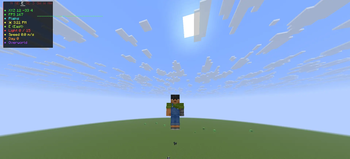
# Visual HUD A clean, fully customizable HUD overlay for Minecraft 1.21.11 Fabric. Client-side only — no server-side install needed. ## Features - **Coordinates** — XYZ position with green highlighting - **FPS Counter** — with color-coded bar sparkline graph - **Biome** — current biome name (nicely formatted) - **Time** — 12-hour clock with AM/PM and day/night icon - **Direction** — compass direction with full name - **Light Level** — block/sky light levels - **Speed** — real-time movement speed in m/s - **Day Counter** — current in-game day - **Dimension** — shows Overworld / Nether / The End - **Compass Strip** — interactive compass bar showing all 8 directions - **FPS Sparkline** — real-time bar graph of recent FPS history ## Controls | Key | Action | |-----|--------| | **H** | Toggle HUD visibility (animated) | | **C** | Open configuration screen | | **ALT + Left Click** | Drag to reposition anywhere on screen | All controls are rebindable in Minecraft's Controls settings. ## Configuration Press **C** in-game to open the config screen where you can: - Toggle each HUD element on/off individually - Toggle all elements at once - Pick from 10 accent colors - Reset HUD position to default The HUD fades in/out smoothly when toggled and remembers your settings in `config/visualhud.json`. ## Visual - Semi-transparent dark panel with accent color strip - Color-coded text for readability at a glance - Text shadows for visibility on any background - Smooth fade animation on toggle - Draggable anywhere on screen - Resets on game restart — no persistence unless you save via config ## Requirements - Minecraft **1.21.11** - Fabric Loader **>=0.18.2** - Fabric API - Java **>=21** ## Installation 1. Install Fabric Loader for Minecraft 1.21.11 2. Download Fabric API and place in `.minecraft/mods` 3. Download Visual HUD and place in `.minecraft/mods` 4. Launch and press **H** to toggle the HUD, **C** to configure ## License MIT
# Visual HUD
A clean, fully customizable HUD overlay for Minecraft 1. 21. 11 Fabric. Client-side only — no server-side install needed.
## Features
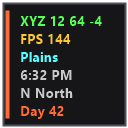
- Coordinates — XYZ position with green highlighting
- FPS Counter — with color-coded bar sparkline graph
- Biome — current biome name (nicely formatted)
- Time — 12-hour clock with AM/PM and day/night icon
- Direction — compass direction with full name
- Light Level — block/sky light levels
- Speed — real-time movement speed in m/s
- Day Counter — current in-game day
- Dimension — shows Overworld / Nether / The End
- Compass Strip — interactive compass bar showing all 8 directions
- FPS Sparkline — real-time bar graph of recent FPS history
## Controls
| Key | Action | |-----|--------| | H | Toggle HUD visibility (animated) | | C | Open configuration screen | | ALT + Left Click | Drag to reposition anywhere on screen |
All controls are rebindable in Minecraft's Controls settings.
## Configuration
Press C in-game to open the config screen where you can: - Toggle each HUD element on/off individually - Toggle all elements at once - Pick from 10 accent colors - Reset HUD position to default
The HUD fades in/out smoothly when toggled and remembers your settings in `config/visualhud.json`.
- Semi-transparent dark panel with accent color strip
- Color-coded text for readability at a glance
- Text shadows for visibility on any background
- Smooth fade animation on toggle
- Draggable anywhere on screen
- Resets on game restart — no persistence unless you save via config
## Requirements
- Minecraft 1. 21. 11
- Fabric Loader >=0. 18. 2
- Fabric API
- Java >=21
## Installation
1. Install Fabric Loader for Minecraft 1. 21. 11 2. Download Fabric API and place in `.minecraft/mods` 3. Download Visual HUD and place in `.minecraft/mods` 4. Launch and press H to toggle the HUD, C to configure
📊 Mod Details
- Game
- Minecraft Mods
- Author
- ghiasbroun5j
- Version
- 1.0.0
- Downloads
- 483
- Endorsements
- 2
- Category
- fabric
- Created
- 6/28/2026
- Updated
- 6/22/2026
- Game Versions
- 1.21.11
- Tags
- game-mechanics, library, optimization
🔧 How to Install Minecraft Mods Mods
Download from Modrinth. Use Prism Launcher or drop into your mods folder.
📖 Full step-by-step install guide for Minecraft Mods →
Visit the official mod page for specific installation instructions for this mod.
🎮 Need cheat codes or console commands? Check ur gaming wiki for Minecraft Mods commands, item IDs, and more.
❓ Frequently Asked Questions
Which Minecraft Mods versions does Visual HUD support?
The author lists 1.21.11. Other versions may work but are untested by the author.
What is the latest version of Visual HUD?
Version 1.0.0, published 2026-06-22 with 483 downloads recorded at the source.
Keep browsing — more Minecraft Mods mods await