Vanity Splash Text
⚪ Last updated 2022⚠️ Install Order · 2 steps
Install in this order, then this mod last — most mods fail to load without their framework and dependencies in place.
🖼️ Gallery (1 images)
🔍 Analysis
- 👍 0.6% endorsement rate
📋 About This Mod
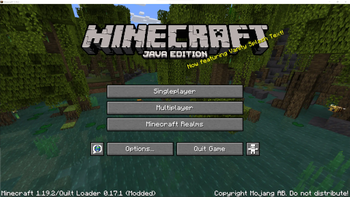
Have you ever discovered a modpack, seen the twenty-page list of mods, and decided to play without knowing exactly what mods are you using? This mod is the solution to all your nightmares: it replaces the splash screen random texts with a message that announces one of the mods that you're using. The message is randomized, and thus helps you slowly discover the mods that you are playing with.
# ⚙️ Configuration There are a couple of options you can play with in `.minecraft/config/vanity_splash_text/config.toml`. It is really recommended for creators of modpacks to adjust the `ignore_modid_regexs` option to ensure that it has the expected behaviour.
```toml # All the mods with an id matching any of the regular expressions in this list will be excluded from the generated splash texts ignore_modid_regexs = ["java", "minecraft", "quilt_.", "quilted_fabric_.", ".api."] # This templates are used to generate the splash texts. Some patterns are replaced: # @@MOD@@ will be replaced with a mod's name # @@VERSION@@ will be replaced with a mod's version # If various replace patterns are used in a template, they will refer to the same mod splash_templates = ["Now featuring @@MOD@@!", "With @@MOD@@ version @@VERSION@@!", "@@MOD@@???? Cool!", "Can't play without @@MOD@@!", "Who's at version @@VERSION@@? That's right, @@MOD@@!", "Did you ever play before with @@MOD@@?", "@@MOD@@ is @@MOD@@", "If you liked @@MOD@@, it's authors will love to hear about it!"] # Set this option to false to enable seasonal splash texts (for Christmas, New year, and Halloween) # default: false skip_seasonal_splash_text = false # The special PLAYER IS YOU splash text will be enabled if this value is set to 24 # default: 0 the_answer = 0 # If you want to see the original splash texts alongside the ones generated by the mod, set this option to true # default: false keep_old_splashes = false ```
# 📚 Modpacks This mod has been designed with modpacks in mind, so i'll be very glad if you include it in yours. (Using this mod is also a great way to credit the mods in your modpack)
# 🎉 ModFest: Singularity This mod is my submission to (https://modfest.net/)! !(https://github.com/ModFest/art/blob/main/1024w/ModFest%20Singularity%20Twitter.jpg?raw=true)
📊 Mod Details
- Game
- Minecraft Mods
- Author
- naritanara
- Version
- 1.1.0+1.19
- Downloads
- 1,338
- Endorsements
- 8
- Category
- quilt
- Created
- 8/17/2022
- Updated
- 8/21/2022
- Game Versions
- 1.19, 1.19.1, 1.19.2, 1.19.3, 1.19.4
- Tags
- social, utility
🔧 How to Install Minecraft Mods Mods
Download from Modrinth. Use Prism Launcher or drop into your mods folder.
📖 Full step-by-step install guide for Minecraft Mods →
Visit the official mod page for specific installation instructions for this mod.
🎮 Need cheat codes or console commands? Check ur gaming wiki for Minecraft Mods commands, item IDs, and more.
❓ Frequently Asked Questions
Which Minecraft Mods versions does Vanity Splash Text support?
The author lists 1.19, 1.19.1, 1.19.2, 1.19.3, 1.19.4, 1.20. Other versions may work but are untested by the author.
What is the latest version of Vanity Splash Text?
Version 1.1.0+1.19, published 2022-08-21 with 1,338 downloads recorded at the source.
Keep browsing — more Minecraft Mods mods await