Utility Drawers
🟡 Updated this year⚠️ Install Order · 2 steps
Install in this order, then this mod last — most mods fail to load without their framework and dependencies in place.
🖼️ Gallery (8 images)
🔍 Analysis
- 🏆 #33 of 68 neoforge mods in this game by downloads
📋 About This Mod
# Utility Drawers **Utility Drawers** is a storage mod designed for players who want an organized, high-capacity, and functional storage solution, whether that be for central storage, resource farms, or anything in between. *** ## Features ### Drawers Store massive quantities of a single item or fluid in one block. Utility Drawers come in a variety of types to fit any storage need, and are available in all vanilla wood types: | Type |Description | | ----------------------------- |--------------------------------------------------------------------------------------------------------- | | <strong>1, 2, 3 & 4 Slot Item Drawers</strong> |Store one to four item types in a single block. Capacity scales with slot count. | | <strong>1, 2, 3 & 4 Fluid Drawers</strong> |Same concept, but for fluids. Compatible with any NeoForge fluid. | | <strong>Compacting Drawer</strong> |Automatically handles compression and decompression, storing items across all three tiers simultaneously. | ### Wireless Drawers Access your items and fluids from anywhere, across any dimension. * **Frequency Networks:** Configure your wireless drawers using a 3-color frequency code. Any wireless drawers set to the same color code will instantly share the same inventory pool. * **Security:** Networks can be set to **Public** (anyone can access and link to them) or **Private** (locked to the creator). ### Framed Drawers Framed Drawers are fully customizable drawers that let you apply any block's texture to the drawer faces, perfect for blending storage seamlessly into any build style. Craft them using the **Drawer Framer** block. ### Storage Interface The Storage Interface is the heart of your drawer network. Link up to as many drawers as you want within a **16-block radius** using the Storage Remote (can be increased with upgrades), and access the entire network as a single unified storage. Attach any compatible storage interface such as a **Storage Bus** ((https://www.curseforge.com/minecraft/mc-mods/applied-energistics-2)) or **External Storage** ((https://www.curseforge.com/minecraft/mc-mods/refined-storage)) to access your drawer network through a digital interface. The interface **glows red** when your network is locked and **green** when unlocked, so you can glance at it to check your network state at a moment's notice. !(https://i.imgur.com/O7nb0p9.gif) ### Storage Remote An all-in-one tool for managing your drawer network: * **Linking:** Connect drawers or storage viewers to the network. Switch between Single and Multi-Select by shift-left-clicking the air. * Single-Select: Connect one drawer at a time * Multi-Select: Choose two opposite corners, all drawers in the given area will automatically link in one selection. * **Locking:** Lock or unlock individual drawers, or right-click the Storage Interface to lock/unlock the entire network at once. ### Storage Viewer If you want an early game way to view your entire system, place a Storage Viewer either directly on the Storage Interface (automatically links) or link one to the network with the Storage Remote. The Storage Viewer will allow you to insert and extract items and fluids, and search for specific names, mods (@…), tags (#…), or tooltips ($…). ### Crafting Storage Viewer The same thing but with crafting capabilities. Will pull items directly from the storage network to craft with, and then from the inventory if there are no more items in the network, but matching items in the inventory to work with. ### Filing Cabinet A large scale storage block for non-stackable items, such as tools, armor, weapons, enchanted books, etc. Has a GUI to search for and interact with the items that are in it. It stores 4096 items by default. However, this can be changed in the configs. Separate from the storage network. (Although this may change in the future!) ### Upgrades Slot upgrades directly into your drawers, Storage Interface, or Drawer Framer to enhance them: **Upgrade Types** _(Capacity, Range, Speed)_ * Iron — 4× * Gold — 8× * Diamond — 16× * Netherite — 32× **Utility Upgrades:** * **Void Upgrade** — Automatically destroys excess items or fluids once a drawer is full. * **Insert Upgrade** — Pull items or fluids into drawers from adjacent inventories. Has 9 filterable slots per direction (Up, Down, North, South, East, West) to whitelist certain fluids or items. * **Extract Upgrade** — Push items or fluids from drawers to adjacent inventories. Has the same filter feature ### Configuration Utility Drawers has a customizable `config` file to allow for changing the properties of many items. ### GuideMe Integration If you ever don't know how an item or block works, there is a **GuideMe** entry (h
# Utility Drawers
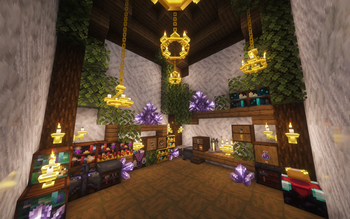
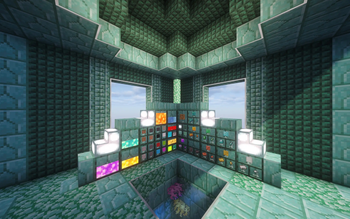
Utility Drawers is a storage mod designed for players who want an organized, high-capacity, and functional storage solution, whether that be for central storage, resource farms, or anything in between.
## Features
### Drawers
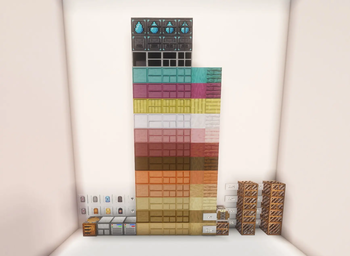
Store massive quantities of a single item or fluid in one block. Utility Drawers come in a variety of types to fit any storage need, and are available in all vanilla wood types:
| Type |Description | | ----------------------------- |--------------------------------------------------------------------------------------------------------- | | 1, 2, 3 & 4 Slot Item Drawers |Store one to four item types in a single block. Capacity scales with slot count. | | 1, 2, 3 & 4 Fluid Drawers |Same concept, but for fluids. Compatible with any NeoForge fluid. | | Compacting Drawer |Automatically handles compression and decompression, storing items across all three tiers simultaneously. |
### Wireless Drawers
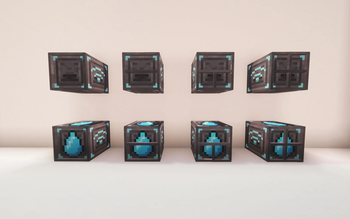
Access your items and fluids from anywhere, across any dimension.
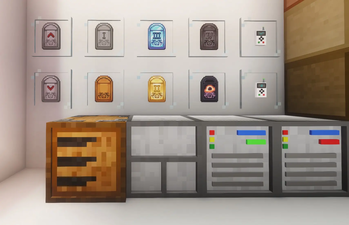
Frequency Networks: Configure your wireless drawers using a 3-color frequency code. Any wireless drawers set to the same color code will instantly share the same inventory pool. Security: Networks can be set to Public (anyone can access and link to them) or Private (locked to the creator).
### Framed Drawers
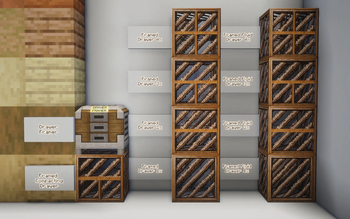
Framed Drawers are fully customizable drawers that let you apply any block's texture to the drawer faces, perfect for blending storage seamlessly into any build style. Craft them using the Drawer Framer block.
### Storage Interface
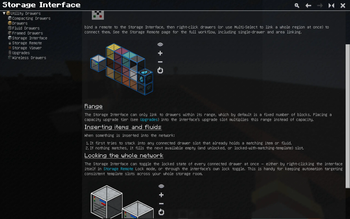
The Storage Interface is the heart of your drawer network. Link up to as many drawers as you want within a 16-block radius using the Storage Remote (can be increased with upgrades), and access the entire network as a single unified storage.
Attach any compatible storage interface such as a Storage Bus ((https://www.curseforge.com/minecraft/mc-mods/applied-energistics-2)) or External Storage ((https://www.curseforge.com/minecraft/mc-mods/refined-storage)) to access your drawer network through a digital interface.
The interface glows red when your network is locked and green when unlocked, so you can glance at it to check your network state at a moment's notice. !(https://i.imgur.com/O7nb0p9.gif)
### Storage Remote
An all-in-one tool for managing your drawer network:
Linking: Connect drawers or storage viewers to the network. Switch between Single and Multi-Select by shift-left-clicking the air. Single-Select: Connect one drawer at a time Multi-Select: Choose two opposite corners, all drawers in the given area will automatically link in one selection. Locking: Lock or unlock individual drawers, or right-click the Storage Interface to lock/unlock the entire network at once.
### Storage Viewer
If you want an early game way to view your entire system, place a Storage Viewer either directly on the Storage Interface (automatically links) or link one to the network with the Storage Remote. The Storage Viewer will allow you to insert and extract items and fluids, and search for specific names, mods (@…), tags (#…), or tooltips ($…).
### Crafting Storage Viewer
The same thing but with crafting capabilities. Will pull items directly from the storage network to craft with, and then from the inventory if there are no more items in the network, but matching items in the inventory to work with.
### Filing Cabinet
A large scale storage block for non-stackable items, such as tools, armor, weapons, enchanted books, etc. Has a GUI to search for and interact with the items that are in it. It stores 4096 items by default. However, this can be changed in the configs. Separate from the storage network. (Although this may change in the future!)
### Upgrades
Slot upgrades directly into your drawers, Storage Interface, or Drawer Framer to enhance them:
Upgrade Types _(Capacity, Range, Speed)_
Iron — 4× Gold — 8× Diamond — 16× Netherite — 32×
Utility Upgrades:
Void Upgrade — Automatically destroys excess items or fluids once a drawer is full. Insert Upgrade — Pull items or fluids into drawers from adjacent inventories. Has 9 filterable slots per direction (Up, Down, North, South, East, West) to whitelist certain fluids or items. Extract Upgrade — Push items or fluids from drawers to adjacent inventories. Has the same filter feature
### Configuration
Utility Drawers has a customizable `config` file to allow for changing the properties of many items.
### GuideMe Integration
If you ever don't know how an item or block works, there is a GuideMe entry (h
📊 Mod Details
- Game
- Minecraft Mods
- Author
- ChowdaSlime
- Version
- 1.2.6-26.2
- Downloads
- 218
- Endorsements
- 0
- Category
- neoforge
- Created
- 7/1/2026
- Updated
- 7/25/2026
- Game Versions
- 26.2
- Tags
- storage
🔧 How to Install Minecraft Mods Mods
Download from Modrinth. Use Prism Launcher or drop into your mods folder.
📖 Full step-by-step install guide for Minecraft Mods →
Visit the official mod page for specific installation instructions for this mod.
🎮 Need cheat codes or console commands? Check ur gaming wiki for Minecraft Mods commands, item IDs, and more.
❓ Frequently Asked Questions
Which Minecraft Mods versions does Utility Drawers support?
The author lists 26.2. Other versions may work but are untested by the author.
What is the latest version of Utility Drawers?
Version 1.2.6-26.2, published 2026-07-25 with 218 downloads recorded at the source.
Keep browsing — more Minecraft Mods mods await