USeArKey - Keybinding
🟡 Updated this year⚠️ Install Order · 2 steps
Install in this order, then this mod last — most mods fail to load without their framework and dependencies in place.
🖼️ Gallery (4 images)
🔍 Analysis
- 🏆 #476 of 876 fabric mods in this game by downloads
📋 About This Mod
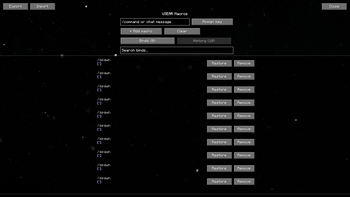
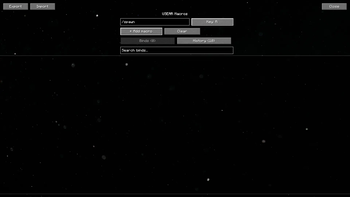
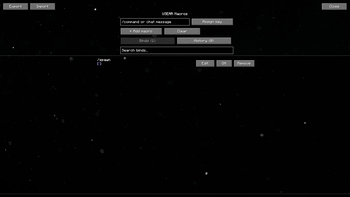
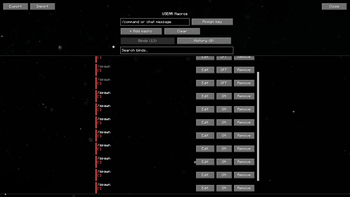
## USeArKey — Keybinding **Bind any command to any key or mouse button.** USeArKey is a lightweight Minecraft mod that makes hotkey customization simple. Create keybinds, assign them to keys, and streamline your gameplay with fast access to commands. ### Features - **Flexible keybinding**: assign chat commands or actions to any key or mouse button. - **Scrollable bind list**: a native, searchable list of your binds — smooth scrolling and a scrollbar, so it stays clean no matter how many binds you add. - **Enable/disable toggle**: temporarily turn a bind off without deleting it. - **Duplicate key warning**: binds sharing the same key are highlighted so you can spot conflicts at a glance. - **History support**: recently removed binds are kept so you can restore them in one click. - **Export / Import**: copy your binds to the clipboard as JSON and share or restore them instantly — great for backups or moving to a new PC. - **Mouse binds**: supports side buttons for extra control. - **Smooth, polished UI**: fade-in animations, live toast notifications, and a parallax background give the macro screen a bit of extra life. ### How to use 1. Go to *Options → Controls* and set a key for **Open Keybinder Screen** (default: `K`). 2. Open the Keybinder Screen, type a command, press **Assign Key**, and choose a button. 3. Save and use your new hotkey directly in-game. 4. Use the search bar and tabs to manage binds once you've added a few — toggle, edit, or remove them anytime. ### Installation - Download the latest version from Modrinth. - Place the `.jar` file into your `mods` folder. - Launch Minecraft with Fabric or Quilt. ### Why you'll like it USeArKey keeps things simple: no bloated features, just reliable keybinding with a clean, comfortable interface. Perfect for players who want quick access to commands without typing them every time. --- ### Have a question, suggestion, or idea? | | | |---|---| | <img src="https://cdn.discordapp.com/attachments/1450457293056639077/1535724680575721493/DiscordIcon.png?ex=6a78ce90&is=6a777d10&hm=bc699099a030c259c81e898786540778921e03ec127d15db91a0b92c79fc9c65&" alt="Discord Icon" width="150"> | Check our (https://discord.gg/2gyMDXE4Dt). |
## USeArKey — Keybinding Bind any command to any key or mouse button. USeArKey is a lightweight Minecraft mod that makes hotkey customization simple. Create keybinds, assign them to keys, and streamline your gameplay with fast access to commands.
### Features - Flexible keybinding: assign chat commands or actions to any key or mouse button. - Scrollable bind list: a native, searchable list of your binds — smooth scrolling and a scrollbar, so it stays clean no matter how many binds you add. - Enable/disable toggle: temporarily turn a bind off without deleting it. - Duplicate key warning: binds sharing the same key are highlighted so you can spot conflicts at a glance. - History support: recently removed binds are kept so you can restore them in one click. - Export / Import: copy your binds to the clipboard as JSON and share or restore them instantly — great for backups or moving to a new PC. - Mouse binds: supports side buttons for extra control. - Smooth, polished UI: fade-in animations, live toast notifications, and a parallax background give the macro screen a bit of extra life.
### How to use 1. Go to Options → Controls and set a key for Open Keybinder Screen (default: `K`). 2. Open the Keybinder Screen, type a command, press Assign Key, and choose a button. 3. Save and use your new hotkey directly in-game. 4. Use the search bar and tabs to manage binds once you've added a few — toggle, edit, or remove them anytime.
### Installation - Download the latest version from Modrinth. - Place the `.jar` file into your `mods` folder. - Launch Minecraft with Fabric or Quilt.
### Why you'll like it USeArKey keeps things simple: no bloated features, just reliable keybinding with a clean, comfortable interface. Perfect for players who want quick access to commands without typing them every time.
- --
- ### Have a question, suggestion, or idea?
- | | |
- |---|---|
- |
 | Check our (https://discord.gg/2gyMDXE4Dt). |
📊 Mod Details
- Game
- Minecraft Mods
- Author
- USeAr3658
- Version
- 3.1
- Downloads
- 334
- Endorsements
- 0
- Category
- fabric
- Created
- 11/9/2025
- Updated
- 7/31/2026
- Game Versions
- 1.21.11
- Tags
- management, utility
🔧 How to Install Minecraft Mods Mods
Download from Modrinth. Use Prism Launcher or drop into your mods folder.
📖 Full step-by-step install guide for Minecraft Mods →
Visit the official mod page for specific installation instructions for this mod.
🎮 Need cheat codes or console commands? Check ur gaming wiki for Minecraft Mods commands, item IDs, and more.
❓ Frequently Asked Questions
Which Minecraft Mods versions does USeArKey - Keybinding support?
The author lists 1.21.11. Other versions may work but are untested by the author.
What is the latest version of USeArKey - Keybinding?
Version 3.1, published 2026-07-31 with 334 downloads recorded at the source.
Keep browsing — more Minecraft Mods mods await