Unified
🟠 Updated over a year ago⚠️ Install Order · 2 steps
Install in this order, then this mod last — most mods fail to load without their framework and dependencies in place.
Preview

🔍 Analysis
- 👍 0.1% endorsement rate
- 🏆 #65 of 874 fabric mods in this game by downloads
📋 About This Mod
# Unified Annoying for a lot of same items from different mods cannot use mutually? This mod can help you. This mod add a command `/unify`, which you can open a unify screen. You can exchange items with same tag. ## How to use By default, this mod don't provide any exchange in the screen. You need to configure first. Open file `.minecraft/config/unified.json`. If file don't exist, create it. ```json ``` Then, when you put items which has one of these tags into the unify screen, you can select other items which have the same tag to exchange. I recommend to use EMI for tag checking. ### Example You want to let all logs can exchange. First, find the tag id. <div align=center><img src="https://raw.githubusercontent.com/IAFEnvoy/Unified/refs/heads/master/img/1.webp" style="width:400px;text-align:center;" alt=""></img></div> Then write following contents into config file. ```json ``` Open game (or `/reload`), and you can exchange now. <div align=center><img src="https://raw.githubusercontent.com/IAFEnvoy/Unified/refs/heads/master/img/2.webp" style="width:400px;text-align:center;" alt=""></img></div>
Annoying for a lot of same items from different mods cannot use mutually? This mod can help you.
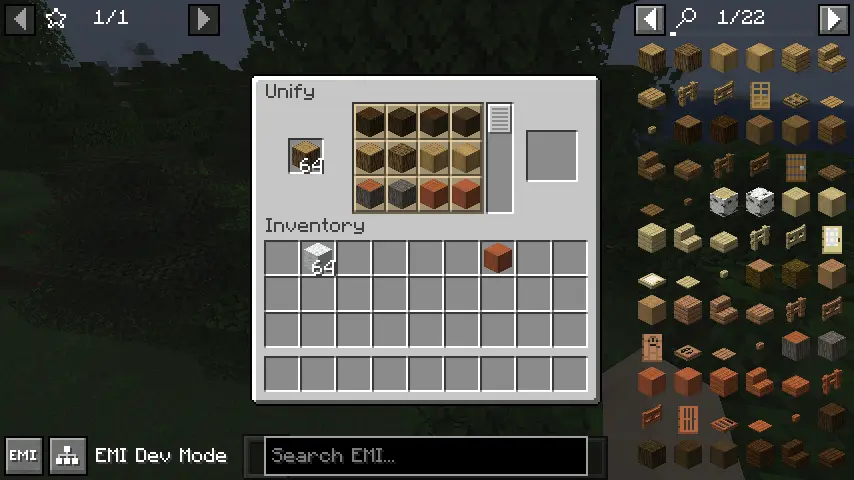
This mod add a command `/unify`, which you can open a unify screen. You can exchange items with same tag.
## How to use
By default, this mod don't provide any exchange in the screen. You need to configure first.
Open file `.minecraft/config/unified.json`. If file don't exist, create it.
```json [ "Write item tag here", "More tag", "You can write as much as you want to add" ] ```
Then, when you put items which has one of these tags into the unify screen, you can select other items which have the same tag to exchange.
I recommend to use EMI for tag checking.
### Example
You want to let all logs can exchange.
First, find the tag id.

Then write following contents into config file.
```json [ "minecraft:logs" ] ```
Open game (or `/reload`), and you can exchange now.
📊 Mod Details
- Game
- Minecraft Mods
- Author
- IAFEnvoy
- Version
- 1.0
- Downloads
- 2,063
- Endorsements
- 3
- Category
- fabric
- Created
- 4/25/2025
- Updated
- 4/22/2025
- Game Versions
- 1.20.1
- Tags
- game-mechanics, utility
🔧 How to Install Minecraft Mods Mods
Download from Modrinth. Use Prism Launcher or drop into your mods folder.
📖 Full step-by-step install guide for Minecraft Mods →
Visit the official mod page for specific installation instructions for this mod.
🎮 Need cheat codes or console commands? Check ur gaming wiki for Minecraft Mods commands, item IDs, and more.
❓ Frequently Asked Questions
Which Minecraft Mods versions does Unified support?
The author lists 1.20.1. Other versions may work but are untested by the author.
What is the latest version of Unified?
Version 1.0, published 2025-04-22 with 2,063 downloads recorded at the source.
Keep browsing — more Minecraft Mods mods await