Unbounded Bundle
🟡 Updated this year⚠️ Install Order · 2 steps
Install in this order, then this mod last — most mods fail to load without their framework and dependencies in place.
🖼️ Gallery (3 images)
🔍 Analysis
- 👍 1.2% endorsement rate — high engagement, a strong quality signal
- 🏆 #430 of 894 fabric mods in this game by downloads
📋 About This Mod
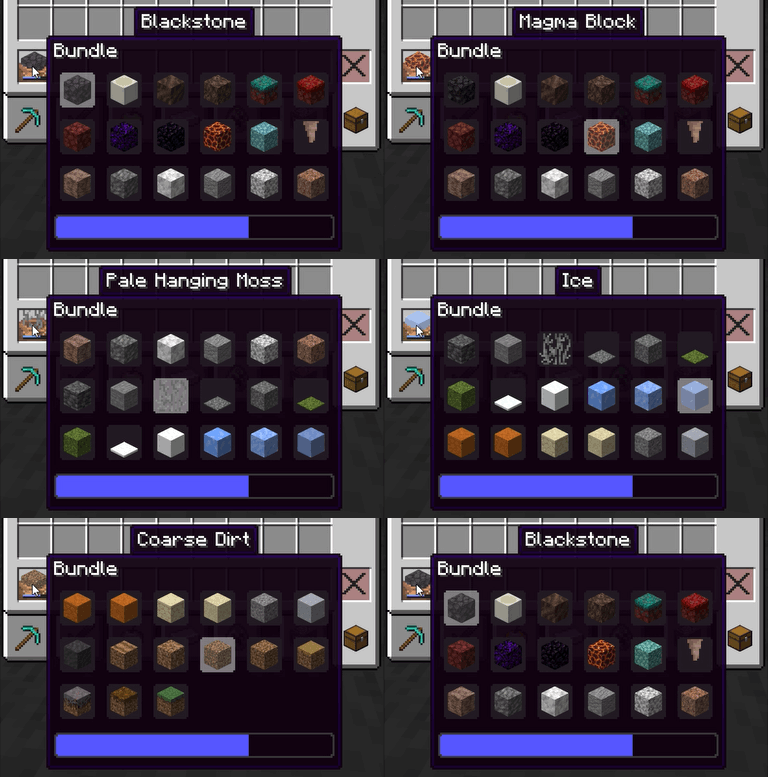
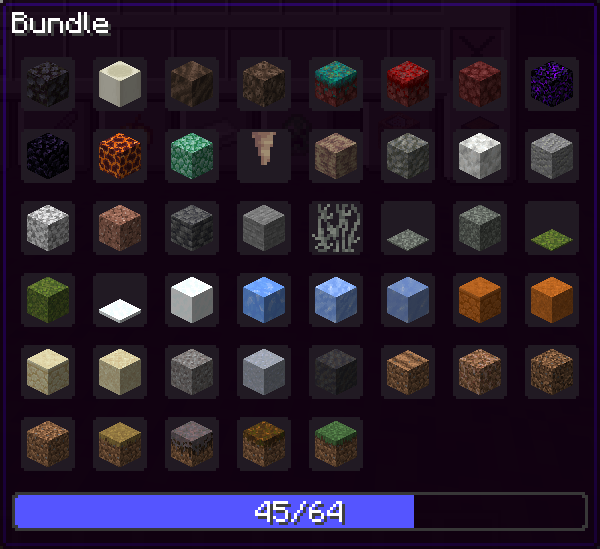
# Unbounded Bundle !(https://img.shields.io/badge/Loader-Fabric-blue) !(https://img.shields.io/badge/Loader-NeoForge-orange) !(https://img.shields.io/badge/Environment-Client-red) Removes the 12-item display limit on bundles and replaces the fixed tooltip with a scrollable, dynamically-sized grid. Store as many different items as you want and navigate them without leaving your inventory. --- ## Features - No more 12-item display limit — all bundle contents are always accessible - Dynamic column count that adapts to the number of stored items (configurable, 4–8 columns) - Scrollable tooltip with a configurable max height so it never overflows your screen - Scroll automatically follows the selected item to keep it always in view - Full (https://modrinth.com/mod/modmenu) + (https://modrinth.com/mod/cloth-config) support for in-game configuration (both optional) - Fabric, Quilt and NeoForge support --- ## Configuration The config file is located at `.minecraft/config/unbounded_bundle.json` and is created automatically on first launch. | Option | Description | |-------------------|------------------------------------------------------------| | `enabled` | Enables the whole mod. | | `minColumns` | Minimum number of columns in the tooltip grid. | | `maxColumns` | Maximum number of columns in the tooltip grid. | | `scrollable` | Enables the scrollable tooltip. | | `smoothScrolling` | Enables smooth scrolling. | | `maxRows` | Maximum number of visible rows when scrollable is enabled. | | `usePercentageProgress` | Show the progress as a percentage. | The column count adapts automatically to the number of items in the bundle, clamped between `minColumns` and `maxColumns`. `maxRows` has no effect when `scrollable` is set to `false`.
# Unbounded Bundle
!(https://img.shields.io/badge/Loader-Fabric-blue) !(https://img.shields.io/badge/Loader-NeoForge-orange) !(https://img.shields.io/badge/Environment-Client-red)
Removes the 12-item display limit on bundles and replaces the fixed tooltip with a scrollable, dynamically-sized grid. Store as many different items as you want and navigate them without leaving your inventory.
## Features
- No more 12-item display limit — all bundle contents are always accessible
- Dynamic column count that adapts to the number of stored items (configurable, 4–8 columns)
- Scrollable tooltip with a configurable max height so it never overflows your screen
- Scroll automatically follows the selected item to keep it always in view
- Full (https://modrinth.com/mod/modmenu) + (https://modrinth.com/mod/cloth-config) support for in-game configuration (both optional)
- Fabric, Quilt and NeoForge support
## Configuration
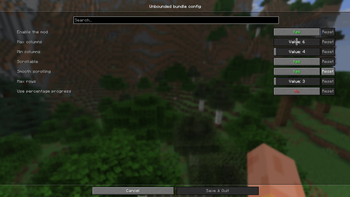
The config file is located at `.minecraft/config/unbounded_bundle.json` and is created automatically on first launch.
| Option | Description | |-------------------|------------------------------------------------------------| | `enabled` | Enables the whole mod. | | `minColumns` | Minimum number of columns in the tooltip grid. | | `maxColumns` | Maximum number of columns in the tooltip grid. | | `scrollable` | Enables the scrollable tooltip. | | `smoothScrolling` | Enables smooth scrolling. | | `maxRows` | Maximum number of visible rows when scrollable is enabled. | | `usePercentageProgress` | Show the progress as a percentage. |
The column count adapts automatically to the number of items in the bundle, clamped between `minColumns` and `maxColumns`. `maxRows` has no effect when `scrollable` is set to `false`.
📊 Mod Details
- Game
- Minecraft Mods
- Author
- Azz_9
- Version
- 1.1-1.21.2
- Downloads
- 662
- Endorsements
- 8
- Category
- fabric
- Created
- 7/5/2026
- Updated
- 7/24/2026
- Game Versions
- 1.21.2, 1.21.3, 1.21.4, 1.21.5
- Tags
- storage, utility
🔧 How to Install Minecraft Mods Mods
Download from Modrinth. Use Prism Launcher or drop into your mods folder.
📖 Full step-by-step install guide for Minecraft Mods →
Visit the official mod page for specific installation instructions for this mod.
🎮 Need cheat codes or console commands? Check ur gaming wiki for Minecraft Mods commands, item IDs, and more.
❓ Frequently Asked Questions
Which Minecraft Mods versions does Unbounded Bundle support?
The author lists 1.21.2, 1.21.3, 1.21.4, 1.21.5. Other versions may work but are untested by the author.
What is the latest version of Unbounded Bundle?
Version 1.1-1.21.2, published 2026-07-24 with 662 downloads recorded at the source.
Keep browsing — more Minecraft Mods mods await