Ultimate Map Atlases
🟡 Updated this year⚠️ Install Order · 2 steps
Install in this order, then this mod last — most mods fail to load without their framework and dependencies in place.
🖼️ Gallery (2 images)
🔍 Analysis
- 👍 1.0% endorsement rate
- 🏆 #80 of 538 adventure mods in this game by downloads
📋 About This Mod
**Thanks to MapAtlases for the original idea & project structure!** !(https://github.com/nanakytim/host_image/blob/Main/bar.png?raw=true) !(https://github.com/Pepperoni-Jabroni/MapAtlases/assets/17690401/3c934d54-99ca-4f66-b3fd-5865ea2a3d98) !(https://github.com/nanakytim/host_image/blob/Main/bar.png?raw=true) # 🌍 Features **Atlas** is a new item that can be crafted with a slimeball / honey bottle, a map / empty map and a book. It will render a minimap when open in the inventory or hotbar! - You can add more maps with more sticky material, or for free using a cartography table. - You can also merge and clone atlases on the cartography table. - You can remove maps with shears at the cartography table. Other than that, **atlases** will work exactly like normal maps do. ## 🧭 DYNAMIC COMPASS <iframe width="560" height="315" src="https://www.youtube-nocookie.com/embed/i2xWKrnvUBg" title="YouTube video player" frameborder="0" allow="accelerometer; autoplay; clipboard-write; encrypted-media; gyroscope; picture-in-picture; web-share" allowfullscreen></iframe> - The Minimap HUD now requires a Compass somewhere in your inventory (excluding containers like bundles) to rotate with the player. This replaces the old config by giving a diegetic option! - The cardinals also depend on the presence of a compass. - These changes pair really well with (https://modrinth.com/mod/gui-compass). :) ## 📕 OPEN/CLOSE MECHANIC: <iframe width="560" height="315" src="https://www.youtube-nocookie.com/embed/eOa6cWIgEy8" title="YouTube video player" frameborder="0" allow="accelerometer; autoplay; clipboard-write; encrypted-media; gyroscope; picture-in-picture; web-share" allowfullscreen></iframe> - Replacing the "Lock" mechanic, Atlases will now change texture when you shift+right click! - When open, they will show the Minimap HUD, when closed the HUD will be hidden. This again gives a diegetic way to configure what you see from this mod :) ## 🗺️ CARTOGRAPHY TABLE OVERHAUL <iframe width="560" height="315" src="https://www.youtube-nocookie.com/embed/rewsMCKJLYw" title="YouTube video player" frameborder="0" allow="accelerometer; autoplay; clipboard-write; encrypted-media; gyroscope; picture-in-picture; web-share" allowfullscreen></iframe> - Shift-clicking Atlases, Maps, Paper and even Shears now works correctly on the cartography table. This allows to use it more efficiently! - Improvement on the shears menu as well. - **For consistency and balance, adding maps to your atlas without the cartography table requires one sticky item (Slimeball or Honey Bottle) per Map. Meaning you can "only" put 4 maps at a time on a crafting table, at a minor cost.** ## 📍 EXTRAS - Cardinals UI do not render in the Nether, to match vanilla compass behaviour. - Changed the colour of the north cardinal to red to hint compass use. - Added compatibility with (https://modrinth.com/mod/fwa). - Improved texture for the Atlas Minimap HUD! - Maps in your atlas now update when you open the atlas rather than at a given amount of ticks. !(https://github.com/nanakytim/host_image/blob/Main/bar.png?raw=true) ## 📖 About !(https://user-images.githubusercontent.com/17690401/206921288-fa262fb0-e294-409c-b0d8-9321ab6dbadd.png) An Atlas can be crafted by combining a: * **Filled** Map (the source map) * Book * And something sticky (Slimeball or Honey Bottle by default) The source map determines the Atlas' scale. _Who knew this whole time, all you had to do to get a mini-map was slap a map onto a book?_ !(https://user-images.githubusercontent.com/17690401/206921556-f865f820-0aba-4db3-a14f-7f5646b401a0.png) * You can put both Filled Maps and Empty Maps with an Atlas in a crafting inventory to insert either Map type into the Atlas. * A Cartography Table can be used to add Filled Maps and Empty Maps as well. * Filled Maps which are added **must** be of same Scale. * There's a maximum of 512 Maps in each Atlas (configurable/togglable). * You can use your Atlas and Shears in the Crafting Grid to remove Maps from the Atlas. !(https://user-images.githubusercontent.com/17690401/206921859-f21cacac-2f6d-4522-a7a6-871edb6b7c74.png) * When the Atlas is active (on your hot-bar or off-hand by default), it will render your current-position Map on the HUD if a such Map exists inside the Atlas. * Filled Maps inside the Atlas will continue updating your location & world-state. * Empty Maps are consumed when you enter an un-mapped region to generate a new Map of the corresponding Scale. * If the player is in Creative, un-mapped regions will generate new Maps even if there's no Empty Maps in the Atlas. * If specified, the requirement for having Empty Maps to create new regions can be disabled. * **Atlases do work inter-dimensionally**. They create new Maps in new Dimensions as you'd expect. * The mini-map supports the abili
Thanks to MapAtlases for the original idea & project structure!
!(https://github.com/nanakytim/host_image/blob/Main/bar.png?raw=true)

!(https://github.com/nanakytim/host_image/blob/Main/bar.png?raw=true) # 🌍 Features
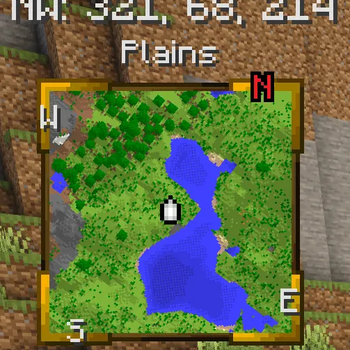
Atlas is a new item that can be crafted with a slimeball / honey bottle, a map / empty map and a book. It will render a minimap when open in the inventory or hotbar!
- You can add more maps with more sticky material, or for free using a cartography table.
- You can also merge and clone atlases on the cartography table.
- You can remove maps with shears at the cartography table.
Other than that, atlases will work exactly like normal maps do.
## 🧭 DYNAMIC COMPASS
- The Minimap HUD now requires a Compass somewhere in your inventory (excluding containers like bundles) to rotate with the player. This replaces the old config by giving a diegetic option!
- The cardinals also depend on the presence of a compass.
- These changes pair really well with (https://modrinth.com/mod/gui-compass). :)
- ## 📕 OPEN/CLOSE MECHANIC:
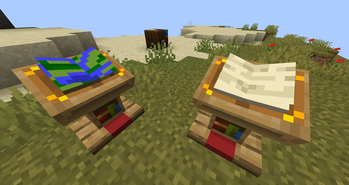
- Replacing the "Lock" mechanic, Atlases will now change texture when you shift+right click!
- When open, they will show the Minimap HUD, when closed the HUD will be hidden. This again gives a diegetic way to configure what you see from this mod :)
- ## 🗺️ CARTOGRAPHY TABLE OVERHAUL
- Shift-clicking Atlases, Maps, Paper and even Shears now works correctly on the cartography table. This allows to use it more efficiently!
- Improvement on the shears menu as well.
- For consistency and balance, adding maps to your atlas without the cartography table requires one sticky item (Slimeball or Honey Bottle) per Map. Meaning you can "only" put 4 maps at a time on a crafting table, at a minor cost.
## 📍 EXTRAS - Cardinals UI do not render in the Nether, to match vanilla compass behaviour. - Changed the colour of the north cardinal to red to hint compass use. - Added compatibility with (https://modrinth.com/mod/fwa). - Improved texture for the Atlas Minimap HUD! - Maps in your atlas now update when you open the atlas rather than at a given amount of ticks.
!(https://github.com/nanakytim/host_image/blob/Main/bar.png?raw=true)
## 📖 About
!(https://user-images.githubusercontent.com/17690401/206921288-fa262fb0-e294-409c-b0d8-9321ab6dbadd.png)
An Atlas can be crafted by combining a:
Filled Map (the source map) Book And something sticky (Slimeball or Honey Bottle by default)
The source map determines the Atlas' scale. _Who knew this whole time, all you had to do to get a mini-map was slap a map onto a book?_
!(https://user-images.githubusercontent.com/17690401/206921556-f865f820-0aba-4db3-a14f-7f5646b401a0.png)
You can put both Filled Maps and Empty Maps with an Atlas in a crafting inventory to insert either Map type into the Atlas. A Cartography Table can be used to add Filled Maps and Empty Maps as well. Filled Maps which are added must be of same Scale. There's a maximum of 512 Maps in each Atlas (configurable/togglable). You can use your Atlas and Shears in the Crafting Grid to remove Maps from the Atlas.
!(https://user-images.githubusercontent.com/17690401/206921859-f21cacac-2f6d-4522-a7a6-871edb6b7c74.png)
When the Atlas is active (on your hot-bar or off-hand by default), it will render your current-position Map on the HUD if a such Map exists inside the Atlas. Filled Maps inside the Atlas will continue updating your location & world-state. Empty Maps are consumed when you enter an un-mapped region to generate a new Map of the corresponding Scale. If the player is in Creative, un-mapped regions will generate new Maps even if there's no Empty Maps in the Atlas. If specified, the requirement for having Empty Maps to create new regions can be disabled. Atlases do work inter-dimensionally. They create new Maps in new Dimensions as you'd expect. * The mini-map supports the abili
📊 Mod Details
- Game
- Minecraft Mods
- Author
- Nanaky
- Version
- 26.2
- Downloads
- 2,009
- Endorsements
- 20
- Category
- adventure
- Created
- 5/16/2026
- Updated
- 6/17/2026
- Game Versions
- 26.2
- Tags
- adventure, game-mechanics, management
🔧 How to Install Minecraft Mods Mods
Download from Modrinth. Use Prism Launcher or drop into your mods folder.
📖 Full step-by-step install guide for Minecraft Mods →
Visit the official mod page for specific installation instructions for this mod.
🎮 Need cheat codes or console commands? Check ur gaming wiki for Minecraft Mods commands, item IDs, and more.
❓ Frequently Asked Questions
Which Minecraft Mods versions does Ultimate Map Atlases support?
The author lists 26.2. Other versions may work but are untested by the author.
What is the latest version of Ultimate Map Atlases?
Version 26.2, published 2026-06-17 with 2,009 downloads recorded at the source.
Keep browsing — more Minecraft Mods mods await