Two Weeks HUD
⚪ Last updated 2023⚠️ Install Order · 2 steps
Install in this order, then this mod last — most mods fail to load without their framework and dependencies in place.
🖼️ Gallery (4 images)
🔍 Analysis
- 👍 2.6% endorsement rate — high engagement, a strong quality signal
- 🏆 #111 of 188 cursed mods in this game by downloads
📋 About This Mod
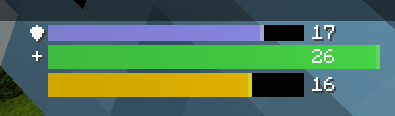
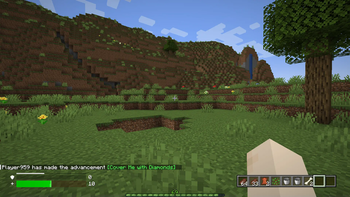
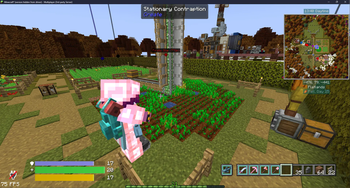
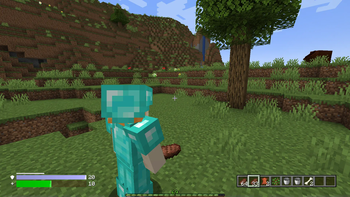
# Two Weeks *A Minecraft mod specifically made to replicate the Heads Up Display (HUD) of Minecraft to look like a popular third person shooter.* Work in Progress features: - Configuration - Air meter - Compatibility with mods like AppleSkin --- ### Please refrain from using the versions prior to 1.0.0. Any usage of said versions will not be supported if issues arise.
Achieve Count A small, tidy HUD panel that answers two questions at a glance: how many advancements have I earned , and which one did I get last . No commands. No config files to edit. No server-side installation. What it does Live counter — earned advancements in green, the total in grey. Latest advancement — the name of the one you just unlocked, so it stays on screen after the toast is gone. Drag to place — press F6 , grab the panel with your mouse, drop it in any corner. Text alignment flips automatically: right corners align right, left corners align left. Fully in-game settings — four toggles, a reset and a done button. Nothing to edit by hand. English and Russian — advancement names follow your game language and switch live, without a restart. How to use Press F6 to open the settings screen. That is the whole tutorial. The key can be changed in Options → Controls → Key Binds → Miscellaneous . There is a second, unbound keybind that toggles the panel without opening the menu. Client-side only This is a client mod . Do not install it on the server — you do not need to. Vanilla servers already send your full advancement progress to the client; that is how the vanilla advancements screen works. Achieve Count just reads what is already there. That also means it works on any vanilla-compatible server without asking the owner for anything. About the counter The total is not a fixed number, and that is a protocol limitation rather than a bug: a Minecraft server only sends the part of the advancement tree it has revealed to you, so the client genuinely does not know about the rest. Achieve Count handles this by using max(revealed, minTotal) , where minTotal defaults to 126 — the number of advancements with a display in vanilla. On a vanilla server the counter reads N / 126 from the first second. If a modded server or a datapack reveals more, the larger number is shown instead. The threshold is configurable if you play with a big advancement datapack. Configuration Everything on the settings screen is stored in config/geekfreak_achive_count.json . You only need to open it for the things the screen does not expose — colours, the fade timer and minTotal . Key Default Meaning anchor BOTTOM_RIGHT TOP_LEFT , TOP_RIGHT , BOTTOM_LEFT , BOTTOM_RIGHT marginX / marginY 4 distance from the screen edges fadeAfterSeconds 0 hide the panel N seconds after it last changed; 0 keeps it always visible minTotal 126 lower bound for the denominator colorDone 0x55FF55 earned count colour colorTotal 0xAAAAAA total and separator colour backgroundColor 0x60000000 panel backdrop, ARGB Known limitations Servers that strip advancement packets (some anticheats) will leave the counter at zero. Nothing can be done about that from the client side. If the server does not send criterion timestamps , the "Latest" line shows — until you earn your first advancement in the current session. Within a session it always works, because it is derived from what changed. Requirements Fabric Load
📊 Mod Details
- Game
- Minecraft Mods
- Author
- marie0llie
- Version
- 1.0.1
- Downloads
- 1,784
- Endorsements
- 47
- Category
- cursed
- Created
- 3/31/2023
- Updated
- 10/3/2023
- Game Versions
- 1.20.1
- Tags
- cursed
🔧 How to Install Minecraft Mods Mods
Download from Modrinth. Use Prism Launcher or drop into your mods folder.
📖 Full step-by-step install guide for Minecraft Mods →
Visit the official mod page for specific installation instructions for this mod.
🎮 Need cheat codes or console commands? Check ur gaming wiki for Minecraft Mods commands, item IDs, and more.
❓ Frequently Asked Questions
Which Minecraft Mods versions does Two Weeks HUD support?
The author lists 1.20.1. Other versions may work but are untested by the author.
What is the latest version of Two Weeks HUD?
Version 1.0.1, published 2023-10-03 with 1,784 downloads recorded at the source.
Keep browsing — more Minecraft Mods mods await