Traveler's Journal
🟠 Updated over a year ago⚠️ Install Order · 2 steps
Install in this order, then this mod last — most mods fail to load without their framework and dependencies in place.
🖼️ Gallery (1 images)
🔍 Analysis
- 🏆 #277 of 540 adventure mods in this game by downloads
📋 About This Mod
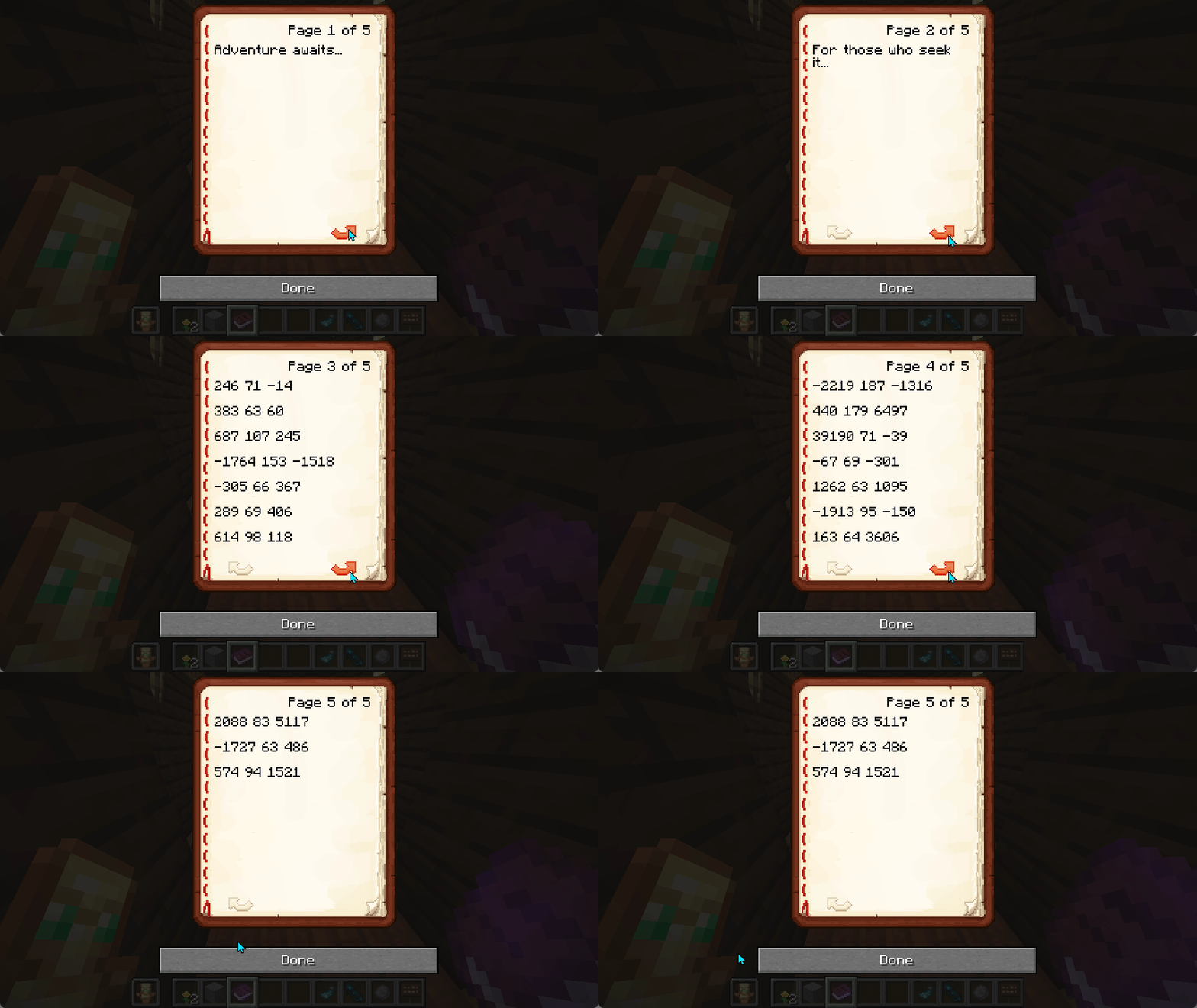
# Traveler's Journal The Travelers Journal can be given to a player on join and its contents can be managed by the server admin. This allows for welcome instructions as well as avenues for setting up adventures for your new players. ## Features - Dynamic journal content that updates when used - Automatic distribution to new players - Server-side implementation for multiplayer compatibility - Customizable content through configuration - Real-time preview system for journal formatting ## Configuration The mod can be configured through files in the `config/travelers-journal/` directory: ### Basic Settings (`config.txt`) ```properties title=Traveler's Journal author=Server give_at_spawn=true debug_logging=false legacy_titles=Traveller's Journal,Travelers Journal ``` ### Journal Content Create or edit `config/travelers-journal/travelers_journal.md` to set your journal's content. The mod supports standard Minecraft text formatting: - Markdown-style formatting: - Bold: `**text**` - Italic: `*text*` - Underline: `_text_` - Color codes: `<color>text<>` where color is one of: - `black`, `dark_blue`, `dark_green`, `dark_aqua` - `dark_red`, `dark_purple`, `gold`, `gray` - `dark_gray`, `blue`, `green`, `aqua` - `red`, `light_purple`, `yellow`, `white` - Page breaks: Use `` to start a new page ### Preview Your Journal After installing the mod, you can preview how your journal will look in-game: 1. Navigate to `config/travelers-journal/preview/` 2. Open `index.html` in your web browser 3. Edit your journal content in the left panel 4. See a real-time preview on the right This makes it easy to format and test your journal content before players see it in-game! ## Support ### Join the GBTI Network! The GBTI Network is a membership community: - Access to our private Minecraft server - Exclusive development tools and resources - Private repositories and code libraries - Discord community for collaboration - Member directory listing to showcase your work - Co-op opportunities and project partnerships - Early access to new features and tools Support our work by becoming a (https://gbti.network/membership/). ### Other ways to Support: - Star us on (https://github.com/gbti-network/minecraft-mod-travelers-journal) - Report issues on our (https://github.com/gbti-network/minecraft-mod-travelers-journal/issues) - Contribute through (https://github.com/gbti-network/minecraft-mod-travelers-journal/pulls) - Heart us on (https://modrinth.com/mod/travelers-journal/) ## License This project is licensed under the GNU General Public License v3.0
# Traveler's Journal
The Travelers Journal can be given to a player on join and its contents can be managed by the server admin. This allows for welcome instructions as well as avenues for setting up adventures for your new players.
## Features
- Dynamic journal content that updates when used
- Automatic distribution to new players
- Server-side implementation for multiplayer compatibility
- Customizable content through configuration
- Real-time preview system for journal formatting
## Configuration
The mod can be configured through files in the `config/travelers-journal/` directory:
### Basic Settings (`config.txt`) ```properties title=Traveler's Journal author=Server give_at_spawn=true debug_logging=false legacy_titles=Traveller's Journal,Travelers Journal ```
### Journal Content Create or edit `config/travelers-journal/travelers_journal.md` to set your journal's content. The mod supports standard Minecraft text formatting:
- Markdown-style formatting:
- - Bold: `text`
- - Italic: `text`
- - Underline: `_text_`
- Color codes: `
text<>` where color is one of: - - `black`, `dark_blue`, `dark_green`, `dark_aqua`
- - `dark_red`, `dark_purple`, `gold`, `gray`
- - `dark_gray`, `blue`, `green`, `aqua`
- - `red`, `light_purple`, `yellow`, `white`
- Page breaks: Use `` to start a new page
### Preview Your Journal
After installing the mod, you can preview how your journal will look in-game:
1. Navigate to `config/travelers-journal/preview/` 2. Open `index.html` in your web browser 3. Edit your journal content in the left panel 4. See a real-time preview on the right
This makes it easy to format and test your journal content before players see it in-game!
### Join the GBTI Network! The GBTI Network is a membership community:
- Access to our private Minecraft server
- Exclusive development tools and resources
- Private repositories and code libraries
- Discord community for collaboration
- Member directory listing to showcase your work
- Co-op opportunities and project partnerships
- Early access to new features and tools
Support our work by becoming a (https://gbti.network/membership/).
### Other ways to Support:
- Star us on (https://github.com/gbti-network/minecraft-mod-travelers-journal)
- Report issues on our (https://github.com/gbti-network/minecraft-mod-travelers-journal/issues)
- Contribute through (https://github.com/gbti-network/minecraft-mod-travelers-journal/pulls)
- Heart us on (https://modrinth.com/mod/travelers-journal/)
This project is licensed under the GNU General Public License v3. 0
📊 Mod Details
- Game
- Minecraft Mods
- Author
- GBTI
- Version
- 1.2.6
- Downloads
- 421
- Endorsements
- 6
- Category
- adventure
- Created
- 1/13/2025
- Updated
- 1/1/2025
- Game Versions
- 1.21.1
- Tags
- adventure, game-mechanics, management
🔧 How to Install Minecraft Mods Mods
Download from Modrinth. Use Prism Launcher or drop into your mods folder.
📖 Full step-by-step install guide for Minecraft Mods →
Visit the official mod page for specific installation instructions for this mod.
🎮 Need cheat codes or console commands? Check ur gaming wiki for Minecraft Mods commands, item IDs, and more.
❓ Frequently Asked Questions
Which Minecraft Mods versions does Traveler's Journal support?
The author lists 1.21.1. Other versions may work but are untested by the author.
What is the latest version of Traveler's Journal?
Version 1.2.6, published 2025-01-01 with 421 downloads recorded at the source.
Keep browsing — more Minecraft Mods mods await