Traveler's Chest
🟠 Updated over a year ago⚠️ Install Order · 2 steps
Install in this order, then this mod last — most mods fail to load without their framework and dependencies in place.
🖼️ Gallery (1 images)
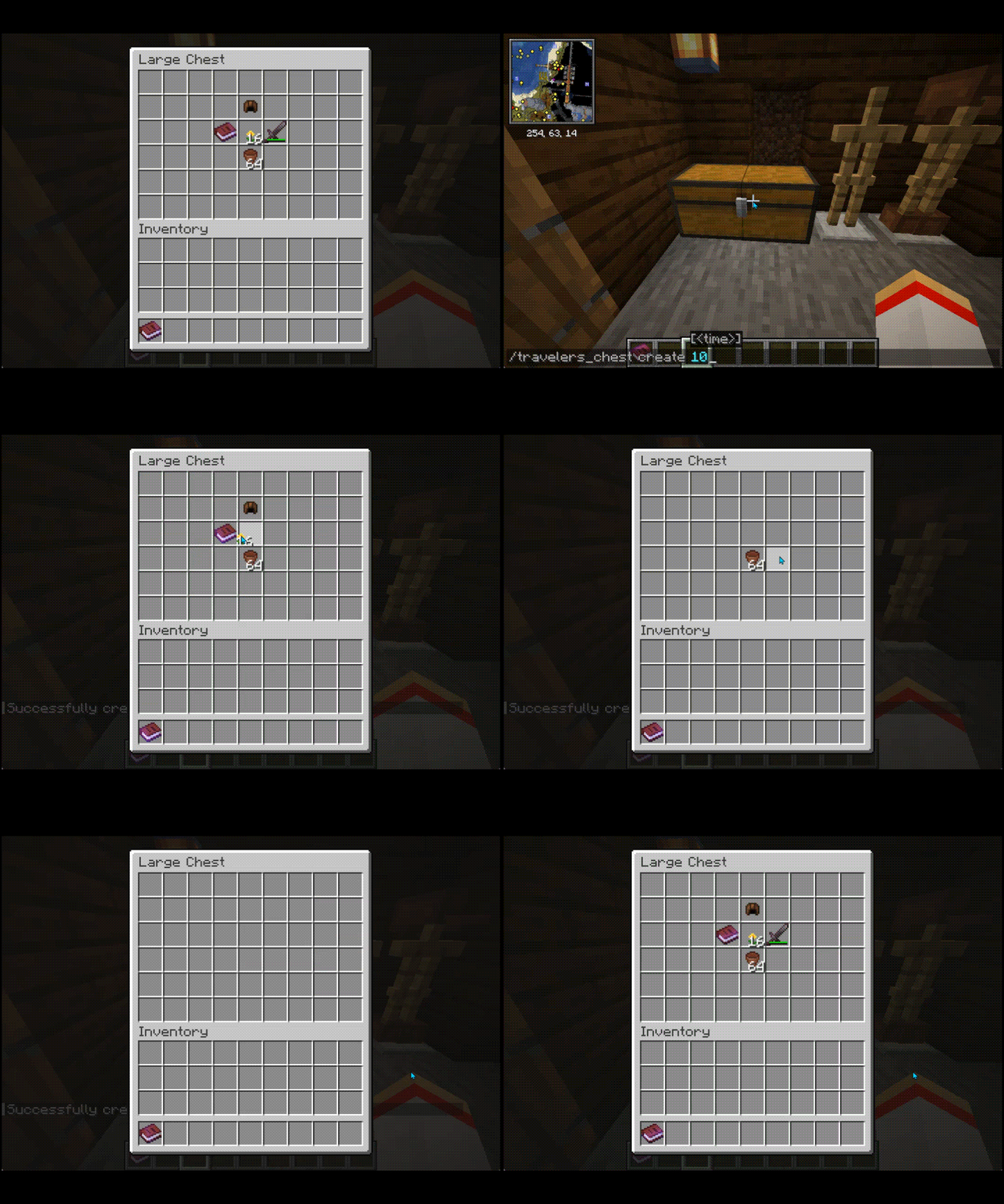
🔍 Analysis
- 👍 0.5% endorsement rate
- 🏆 #159 of 551 adventure mods in this game by downloads
📋 About This Mod
# Traveler's Chest A Minecraft mod that enables administrators to manage refillable chests dynamically. Designed for multiplayer servers using Fabric for Minecraft 1.21.1, the mod provides control over chest content, cooldowns, and interactions. ## Features - Refillable chests with customizable cooldowns - Administrator tools for creating, editing, and destroying refillable chests - Protected chests to prevent unauthorized modifications or destruction ## Installation 1. Install (https://fabricmc.net/use/) and (https://modrinth.com/mod/fabric-api). 2. Download the latest version of Traveler's Chest from the (https://github.com/gbti-network/minecraft-mod-travelers-chest/releases). 3. Place the `.jar` file in your server's `mods` folder. 4. Start your server to generate configuration files. ## Configuration ### Config Files - `config/travelers-chest/travelers_chest_config.txt` - **Example Contents**: ```properties debug_logging=false ``` - Enables or disables debug logging for detailed troubleshooting. - `config/travelers-chest/travelers_chests.json` - Stores data about all managed chests, including their cooldowns, items, and positions. ## Usage ### Commands Administrators can manage chests using commands: 1. **Create a Traveler's Chest**: - Command: `/travelers_chest create ` - Default cooldown: 30 minutes (1800 seconds) - Example: `/travelers_chest create 600` creates a chest with a 10-minute cooldown. 2. **Edit a Traveler's Chest**: - Command: `/travelers_chest edit ` - Updates the cooldown of an existing chest. - Example: `/travelers_chest edit 1200` sets the cooldown to 20 minutes. 3. **Destroy a Traveler's Chest**: - Command: `/travelers_chest destroy` - Removes a Traveler's Chest and its data. ### Chest Functionality - **Protected Chests**: Players without sufficient permissions cannot break or modify these chests. - **Refill Mechanism**: Automatically replenishes chest contents based on saved configurations after the cooldown period expires. - **Double Chest Support**: Handles single and double chests seamlessly. ### Debug Logging Enable debug logging in `travelers_chest_config.txt` for detailed logs of mod operations, such as chest refills and command execution: ```properties debug_logging=true ``` Logs are output to the server console. ## JSON Structure Chests are stored in `travelers_chests.json` with the following schema: - **lastRefreshed**: Timestamp of the last refill - **chestCooldown**: Cooldown in seconds - **worldKey**: World identifier - **items**: List of stored items - **itemPositions**: Item slot positions Example: ```json { "123456789": { "lastRefreshed": 12345678, "chestCooldown": 1800, "worldKey": "minecraft:overworld", "items": , "itemPositions": } } ``` ## Support To support the development of Traveler's Chest, please join the (https://gbti.network/) for access to: - Exclusive tools and resources - Development support - Private Minecraft Server ### Other Ways to Contribute - Star the project on (https://github.com/gbti-network/minecraft-mod-travelers-chest) - Report issues via the (https://github.com/gbti-network/minecraft-mod-travelers-chest/issues) - Submit improvements via (https://github.com/gbti-network/minecraft-mod-travelers-chest/pulls) ## License This project is licensed under the GNU General Public License v3.0. See the (LICENSE) file for details.
# Traveler's Chest
A Minecraft mod that enables administrators to manage refillable chests dynamically. Designed for multiplayer servers using Fabric for Minecraft 1. 21. 1, the mod provides control over chest content, cooldowns, and interactions.
## Features
- Refillable chests with customizable cooldowns
- Administrator tools for creating, editing, and destroying refillable chests
- Protected chests to prevent unauthorized modifications or destruction
## Installation
1. Install (https://fabricmc.net/use/) and (https://modrinth.com/mod/fabric-api). 2. Download the latest version of Traveler's Chest from the (https://github.com/gbti-network/minecraft-mod-travelers-chest/releases). 3. Place the `.jar` file in your server's `mods` folder. 4. Start your server to generate configuration files.
## Configuration
### Config Files
- `config/travelers-chest/travelers_chest_config.txt`
- - Example Contents:
- ```properties
- debug_logging=false
- ```
- - Enables or disables debug logging for detailed troubleshooting.
- `config/travelers-chest/travelers_chests.json`
- - Stores data about all managed chests, including their cooldowns, items, and positions.
### Commands Administrators can manage chests using commands:
1. Create a Traveler's Chest: - Command: `/travelers_chest create ` - Default cooldown: 30 minutes (1800 seconds) - Example: `/travelers_chest create 600` creates a chest with a 10-minute cooldown.
2. Edit a Traveler's Chest: - Command: `/travelers_chest edit ` - Updates the cooldown of an existing chest. - Example: `/travelers_chest edit 1200` sets the cooldown to 20 minutes.
3. Destroy a Traveler's Chest: - Command: `/travelers_chest destroy` - Removes a Traveler's Chest and its data.
### Chest Functionality
- Protected Chests: Players without sufficient permissions cannot break or modify these chests.
- Refill Mechanism: Automatically replenishes chest contents based on saved configurations after the cooldown period expires.
- Double Chest Support: Handles single and double chests seamlessly.
### Debug Logging
Enable debug logging in `travelers_chest_config.txt` for detailed logs of mod operations, such as chest refills and command execution: ```properties debug_logging=true ```
Logs are output to the server console.
## JSON Structure
Chests are stored in `travelers_chests.json` with the following schema: - lastRefreshed: Timestamp of the last refill - chestCooldown: Cooldown in seconds - worldKey: World identifier - items: List of stored items - itemPositions: Item slot positions
Example: ```json { "123456789": { "lastRefreshed": 12345678, "chestCooldown": 1800, "worldKey": "minecraft:overworld", "items": [{"nbt": "{id:\"minecraft:diamond\",Count:1b}"}], "itemPositions": } } ```
To support the development of Traveler's Chest, please join the (https://gbti.network/) for access to: - Exclusive tools and resources - Development support - Private Minecraft Server
### Other Ways to Contribute
- Star the project on (https://github.com/gbti-network/minecraft-mod-travelers-chest)
- Report issues via the (https://github.com/gbti-network/minecraft-mod-travelers-chest/issues)
- Submit improvements via (https://github.com/gbti-network/minecraft-mod-travelers-chest/pulls)
This project is licensed under the GNU General Public License v3. 0. See the (LICENSE) file for details.
📊 Mod Details
- Game
- Minecraft Mods
- Author
- GBTI
- Version
- 1.2.3
- Downloads
- 1,124
- Endorsements
- 6
- Category
- adventure
- Created
- 1/13/2025
- Updated
- 1/10/2025
- Game Versions
- 1.21.1, 1.21.2, 1.21.3, 1.21.4
- Tags
- adventure, equipment, storage
🔧 How to Install Minecraft Mods Mods
Download from Modrinth. Use Prism Launcher or drop into your mods folder.
📖 Full step-by-step install guide for Minecraft Mods →
Visit the official mod page for specific installation instructions for this mod.
🎮 Need cheat codes or console commands? Check ur gaming wiki for Minecraft Mods commands, item IDs, and more.
❓ Frequently Asked Questions
Which Minecraft Mods versions does Traveler's Chest support?
The author lists 1.21.1, 1.21.2, 1.21.3, 1.21.4. Other versions may work but are untested by the author.
What is the latest version of Traveler's Chest?
Version 1.2.3, published 2025-01-10 with 1,124 downloads recorded at the source.
Keep browsing — more Minecraft Mods mods await