Torch Optimizer
⚪ Last updated 2022⚠️ Install Order · 2 steps
Install in this order, then this mod last — most mods fail to load without their framework and dependencies in place.
Preview

🔍 Analysis
- 👍 0.2% endorsement rate
- 🏆 #306 of 401 forge mods in this game by downloads
📋 About This Mod
<p style="text-align: center;"><a href="https://discord.gg/ngNQjT5" rel="nofollow"><img src="https://discordapp.com/api/guilds/96753964485181440/widget.png?style=banner2" /></a> <a href="https://twitter.com/kreezxil" rel="nofollow"><img src="https://s12.directupload.net/images/200916/joj33k55.png" /></a> <a href="https://www.reddit.com/r/MinecraftModdedForge" rel="nofollow"><img src="https://s12.directupload.net/images/200916/efhmdjhg.png" /></a></p> <a href="https://bisecthosting.com/kreezxil"><img src="https://www.bisecthosting.com/images/logos/dark_text@1538x500.png" alt="Bisect Hosting" width="90%" /></a> <p style="text-align: center;">If you want a server setup for the Any mod pack with zero effort, get a <a href="https://bisecthosting.com/kreezxil">server with BisectHosting</a> and receive 25% off your first month as a new customer using the code kreezxil</p> <h2>Screens</h2> <img class="aligncenter size-full wp-image-5894" src="https://kreezcraft.com/wp-content/uploads/2022/05/NZvH5dE.png" alt="" width="854" height="480" /> <img class="aligncenter size-full wp-image-5895" src="https://kreezcraft.com/wp-content/uploads/2022/05/iuZ1O1G.png" alt="" width="622" height="510" /> <h2>Description</h2> Torch Optimizer shows numbers on the ground to help you to place torches or other light sources for maximum mob spawning blockage. <h2>Instructions</h2> The default shortcut key to turn on/off light level overlay is <strong>F7</strong>. You can change it in "Options -> Controls". You can use <strong>Shift + F7</strong> to toggle sky light calculation. <strong>Ctrl + F7</strong> to toggle overlay display (1.12.2 & below) Initial Version to 1.12.2-2.0.4 <div class="spoiler"> <strong>, (comma) </strong>to change the optimal torch position by plus one. <strong>. (period) </strong>to change the optimal torch position by minus one. </div> 1.12.2-2.1.5+ <div class="spoiler"> <strong> (Right Bracket) </strong>to change the optimal torch position by minus one. </div> <h2>Features</h2> If you enable <strong>optimizeEnable</strong> in the gui config you will get an asterisk placement on the ground at position number 2. However you can further change where the placement will be from 0 to 15. <h2>Licensing</h2> <div class="spoiler"> A derivative work based on the mod by oldjunyi known as Light level Overlay Reloaded which is also <strong>MIT </strong><b>LICENSED</b>. <pre>Original License by 4poc at https://github.com/4poc/lloverlay/blob/master/resources/LICENSE included here for posterity. </pre> The source code is available at: https://github.com/4poc/lloverlay Light Level Overlay is licensed 3-clause BSD. Copyright (c) 2012-2013, Matthias Hecker <apoc@sixserv.org> All rights reserved. Redistribution and use in source and binary forms, with or without modification, are permitted provided that the following conditions are met: * Redistributions of source code must retain the above copyright notice, this list of conditions and the following disclaimer. * Redistributions in binary form must reproduce the above copyright notice, this list of conditions and the following disclaimer in the documentation and/or other materials provided with the distribution. * Neither the name of the author nor the names of the contributors may be used to endorse or promote products derived from this software without specific prior written permission. THIS SOFTWARE IS PROVIDED BY THE COPYRIGHT HOLDERS AND CONTRIBUTORS "AS IS" AND ANY EXPRESS OR IMPLIED WARRANTIES, INCLUDING, BUT NOT LIMITED TO, THE IMPLIED WARRANTIES OF MERCHANTABILITY AND FITNESS FOR A PARTICULAR PURPOSE ARE DISCLAIMED. IN NO EVENT SHALL THE AUTHOR BE LIABLE FOR ANY DIRECT, INDIRECT, INCIDENTAL, SPECIAL, EXEMPLARY, OR CONSEQUENTIAL DAMAGES (INCLUDING, BUT NOT LIMITED TO, PROCUREMENT OF SUBSTITUTE GOODS OR SERVICES; LOSS OF USE, DATA, OR PROFITS; OR BUSINESS INTERRUPTION) HOWEVER CAUSED AND ON ANY THEORY OF LIABILITY, WHETHER IN CONTRACT, STRICT LIABILITY, OR TORT (INCLUDING NEGLIGENCE OR OTHERWISE) ARISING IN ANY WAY OUT OF THE USE OF THIS SOFTWARE, EVEN IF ADVISED OF THE POSSIBILITY OF SUCH DAMAGE. </div> <h2>Modpacks</h2> Don't ask, just add. Link back appreciated but not required. <h2>Help a Veteran Today</h2> I am a US Veteran. I am not disabled. However, I devote a lot of my time programming assets for your Minecraft experience. Any help you can spare is greatly appreciated at https://patreon.com/kreezxil <strong>This project is proudly powered by FORGE</strong>, without whom it would not be possible. Help FORGE get rid of Adfocus at <a href="https://www.patreon.com/LexManos" target="_blank" rel="noopener noreferrer">https://www.patreon.com/LexManos</a>. <h2></h2>



If you want a server setup for the Any mod pack with zero effort, get a server with BisectHosting and receive 25% off your first month as a new customer using the code kreezxil
Screens
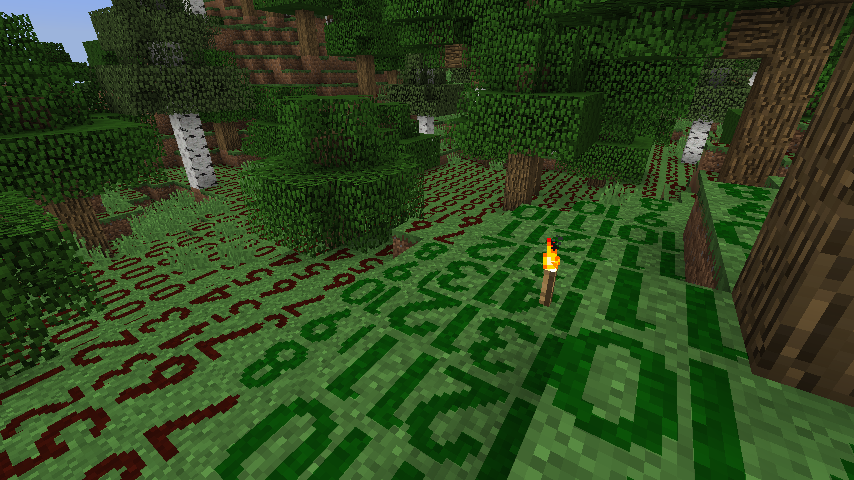
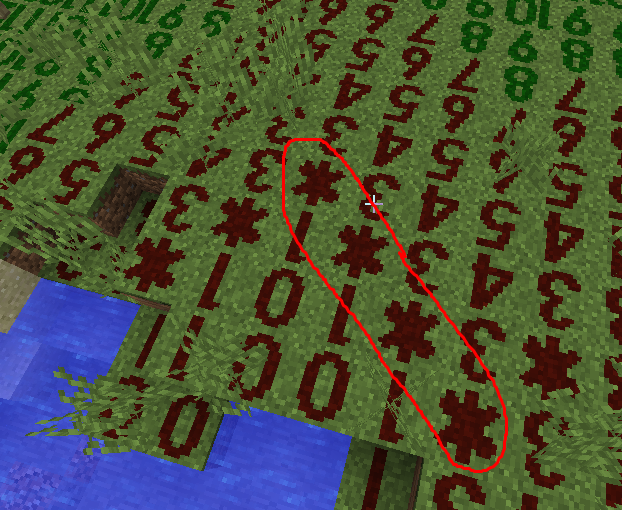
Description
Torch Optimizer shows numbers on the ground to help you to place torches or other light sources for maximum mob spawning blockage.Instructions
The default shortcut key to turn on/off light level overlay is F7. You can change it in "Options -> Controls".You can use Shift + F7 to toggle sky light calculation. Ctrl + F7 to toggle overlay display (1. 12. 2 & below)
Initial Version to 1. 12. 2-2. 0. 4
, (comma) to change the optimal torch position by plus one.
. (period) to change the optimal torch position by minus one.
[ (Left Bracket) to change the optimal torch position by plus one.
] (Right Bracket) to change the optimal torch position by minus one.
Features
If you enable optimizeEnable in the gui config you will get an asterisk placement on the ground at position number 2. However you can further change where the placement will be from 0 to 15.Licensing
A derivative work based on the mod by oldjunyi known as Light level Overlay Reloaded which is also MIT LICENSED.
Original License by 4poc at https://github.com/4poc/lloverlay/blob/master/resources/LICENSE included here for posterity.The source code is available at: https://github.com/4poc/lloverlay Light Level Overlay is licensed 3-clause BSD.
Copyright (c) 2012-2013, Matthias Hecker <apoc@sixserv.org> All rights reserved.
Redistribution and use in source and binary forms, with or without modification, are permitted provided that the following conditions are met: Redistributions of source code must retain the above copyright notice, this list of conditions and the following disclaimer. Redistributions in binary form must reproduce the above copyright notice, this list of conditions and the following disclaimer in the documentation and/or other materials provided with the distribution. * Neither the name of the author nor the names of the contributors may be used to endorse or promote products derived from this software without specific prior written permission.
THIS SOFTWARE IS PROVIDED BY THE COPYRIGHT HOLDERS AND CONTRIBUTORS "AS IS" AND ANY EXPRESS OR IMPLIED WARRANTIES, INCLUDING, BUT NOT LIMITED TO, THE IMPLIED WARRANTIES OF MERCHANTABILITY AND FITNESS FOR A PARTICULAR PURPOSE ARE DISCLAIMED. IN NO EVENT SHALL THE AUTHOR BE LIABLE FOR ANY DIRECT, INDIRECT, INCIDENTAL, SPECIAL, EXEMPLARY, OR CONSEQUENTIAL DAMAGES (INCLUDING, BUT NOT LIMITED TO, PROCUREMENT OF SUBSTITUTE GOODS OR SERVICES; LOSS OF USE, DATA, OR PROFITS; OR BUSINESS INTERRUPTION) HOWEVER CAUSED AND ON ANY THEORY OF LIABILITY, WHETHER IN CONTRACT, STRICT LIABILITY, OR TORT (INCLUDING NEGLIGENCE OR OTHERWISE) ARISING IN ANY WAY OUT OF THE USE OF THIS SOFTWARE, EVEN IF ADVISED OF THE POSSIBILITY OF SUCH DAMAGE.
Modpacks
Don't ask, just add. Link back appreciated but not required.Help a Veteran Today
I am a US Veteran. I am not disabled. However, I devote a lot of my time programming assets for your Minecraft experience. Any help you can spare is greatly appreciated at https://patreon.com/kreezxilThis project is proudly powered by FORGE, without whom it would not be possible. Help FORGE get rid of Adfocus at https://www.patreon.com/LexManos.
📊 Mod Details
- Game
- Minecraft Mods
- Author
- kreezxil
- Version
- 2.4.8+1.11.2
- Downloads
- 1,698
- Endorsements
- 3
- Category
- forge
- Created
- 5/26/2022
- Updated
- 5/26/2022
- Game Versions
- 1.11.2
- Tags
- utility
🔧 How to Install Minecraft Mods Mods
Download from Modrinth. Use Prism Launcher or drop into your mods folder.
📖 Full step-by-step install guide for Minecraft Mods →
Visit the official mod page for specific installation instructions for this mod.
🎮 Need cheat codes or console commands? Check ur gaming wiki for Minecraft Mods commands, item IDs, and more.
❓ Frequently Asked Questions
Which Minecraft Mods versions does Torch Optimizer support?
The author lists 1.11.2. Other versions may work but are untested by the author.
What is the latest version of Torch Optimizer?
Version 2.4.8+1.11.2, published 2022-05-26 with 1,698 downloads recorded at the source.
Keep browsing — more Minecraft Mods mods await