Tooltip Icons
🟠 Updated over a year ago⚠️ Install Order · 2 steps
Install in this order, then this mod last — most mods fail to load without their framework and dependencies in place.
🖼️ Gallery (7 images)
🔍 Analysis
- 👍 0.1% endorsement rate
- 🏆 #506 of 983 fabric mods in this game by downloads
📋 About This Mod
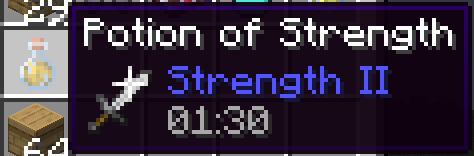
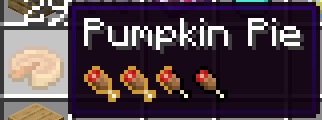
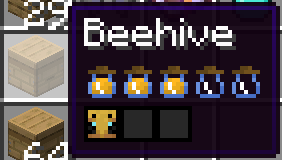
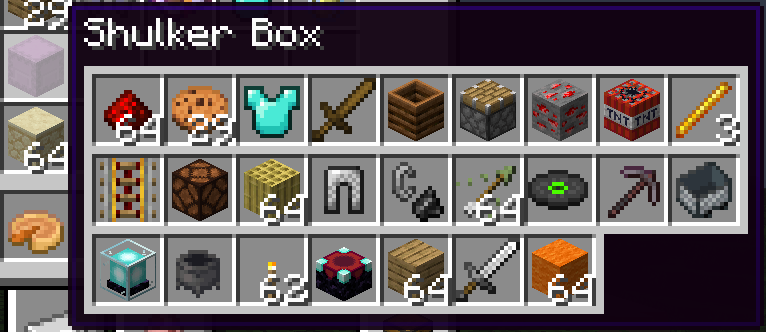
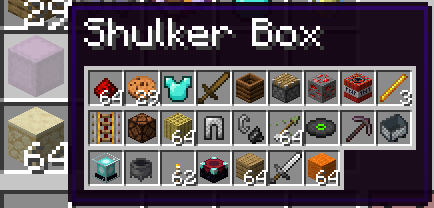
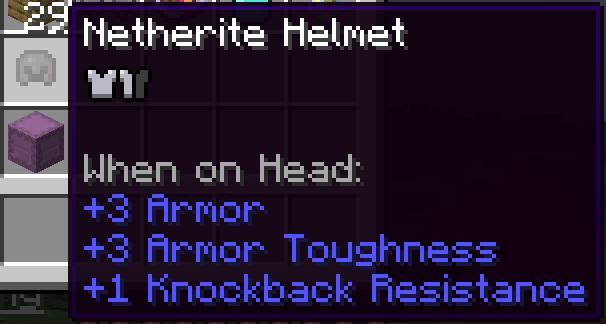
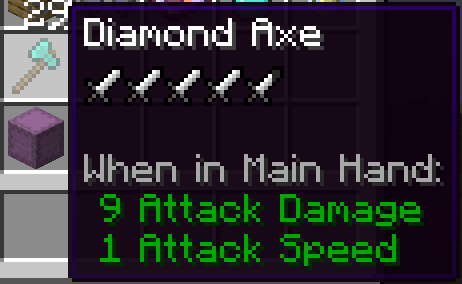
# **Tooltip Icons** This mod adds fancy icons to tooltips of some items in the game. ### Configuration: Configuration can be customized by editing the tooltipicons.json file located in the config folder. The settings allow for: * Enable or disable specific tooltips individually. * Adjust the rendering scale of shulker box tooltip. Some tooltips in this mod were inspired by Inspecio mod.
NSEW (North, South, East, West) Compass HUD adds a customizable QoL compass overlay that shows the direction of nearby players, passive mobs, and hostile mobs. It includes profile-style icons, per-mob filters, separate distance controls, and an in-game settings menu! To get to settings, click Esc, Options, and lastly NSEW! Settings: HUD Enabled = Turns the compass HUD on or off. Players = Shows nearby players on the compass. Player Faces = Replaces the normal player marker with that player s face icon. Passive Mobs = Shows passive mobs on the compass. Hostile Mobs = Shows hostile mobs on the compass. Show Distances = Shows the number of blocks away under each marker. Fade Far Targets = Makes markers fade more as they get closer to the edge of your tracking distance. Edge Clamping = Keeps markers pinned inside the compass instead of letting them disappear off the sides. Player Distance = Sets how far away players can be and still show on the compass. Passive Distance = Sets how far away passive mobs can be and still show on the compass. Hostile Distance = Sets how far away hostile mobs can be and still show on the compass. Update Speed = Controls how often the mod refreshes nearby entities. 1 = updates very often 25 = recommended 200 = updates less often, but uses fewer refresh checks Mob Filters = Opens the mob list where you can choose exactly which mobs are allowed to appear on the compass. Search Mobs = Lets you search the mob filter list by mob name or ID. / [ ] in Mob Filters = Enables or disables that specific mob from showing on the compass. Green Mob Names = Passive mob entries. Red Mob Names = Hostile mob entries. Done = Saves settings and closes the menu. Problems?? Post it on the official NSEW discord Fabric Api is required!
📊 Mod Details
- Game
- Minecraft Mods
- Author
- CGCM
- Version
- 1.0.4
- Downloads
- 52,891
- Endorsements
- 37
- Category
- fabric
- Created
- 4/25/2025
- Updated
- 7/30/2025
- Game Versions
- 1.21, 1.21.1
- Tags
- utility
🔧 How to Install Minecraft Mods Mods
Download from Modrinth. Use Prism Launcher or drop into your mods folder.
📖 Full step-by-step install guide for Minecraft Mods →
Visit the official mod page for specific installation instructions for this mod.
🎮 Need cheat codes or console commands? Check ur gaming wiki for Minecraft Mods commands, item IDs, and more.
❓ Frequently Asked Questions
Which Minecraft Mods versions does Tooltip Icons support?
The author lists 1.21, 1.21.1. Other versions may work but are untested by the author.
What is the latest version of Tooltip Icons?
Version 1.0.4, published 2025-07-30 with 52,891 downloads recorded at the source.
Keep browsing — more Minecraft Mods mods await