Toning│調色
🟡 Updated this year⚠️ Install Order · 2 steps
Install in this order, then this mod last — most mods fail to load without their framework and dependencies in place.
🖼️ Gallery (3 images)
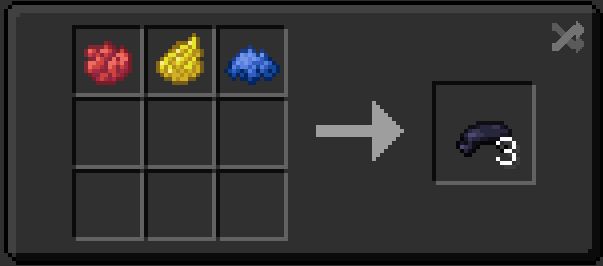
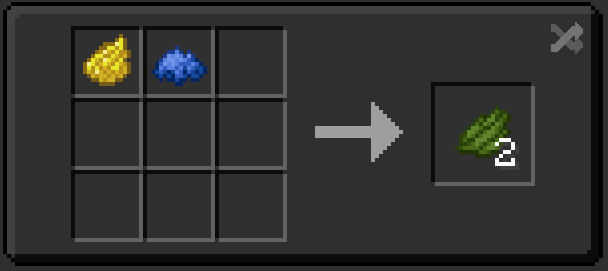
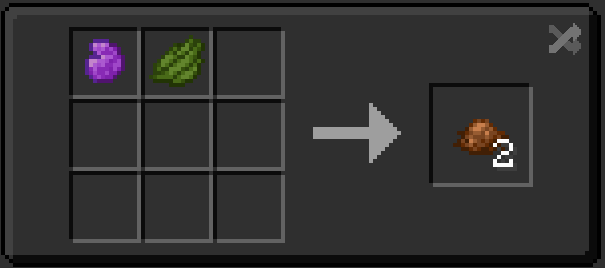
🔍 Analysis
- 👍 0.0% endorsement rate
- 🏆 #125 of 211 datapack mods in this game by downloads
📋 About This Mod
# Preface│前言 In Minecraft, some basic colors are not primary colors, such as green. These colors can theoretically be obtained through color mixing, but there is no such mechanism in Minecraft, which requires us to obtain more resources to craft dyes.│在Minecraft中,有些基本顏色並非色彩三原色,例如綠色。這些顏色理論上是可以透過調色取得,可是在Minecraft中卻沒有這樣的機制,這使得我們需要獲取更多資源來製作染料。 # Function│功能 This datapack adds recipes for green dye, brown dye, and black dye.│該資料包添加了綠色染料、棕色染料和黑色染料的配方。 **※你可以在"Gallery"中查看具體合成配方│You can check the specific craft recipe in "Gallery"**
The Redstone Resource Pack is a custom Minecraft texture pack designed to make building and debugging redstone circuits easier and more intuitive. It focuses on improving visual clarity by providing cleaner, more distinguishable textures for redstone components and related blocks. ⚙️ Purpose This pack helps players who frequently work with redstone to better identify: Power states (on/off) of components like repeaters, comparators, and redstone dust Input and output sides of redstone devices Visual signals for activation, timing, and connection paths 🎨 Design Approach Textures have been redesigned with functionality in mind: Clear color contrasts between powered and unpowered states Simplified icons and shapes for faster recognition Consistent shading and layout across all redstone-related blocks and items 💡 Compatibility Works with Minecraft 1. 21+ (Pack Format 34) Intended for vanilla gameplay no mods required GUI elements (like the hotbar) are also visually adjusted for better readability 🧠 Goal To make complex redstone builds easier to understand and more enjoyable to work with whether you re designing contraptions, debugging circuits, or teaching redstone mechanics.
📊 Mod Details
- Game
- Minecraft Mods
- Author
- Special_TT
- Version
- 1.1.0+1.21.9+mod
- Downloads
- 822
- Endorsements
- 0
- Category
- datapack
- Created
- 9/26/2024
- Updated
- 5/1/2026
- Game Versions
- 1.21.9, 1.21.10, 1.21.11
- Tags
- game-mechanics
🔧 How to Install Minecraft Mods Mods
Download from Modrinth. Use Prism Launcher or drop into your mods folder.
📖 Full step-by-step install guide for Minecraft Mods →
Visit the official mod page for specific installation instructions for this mod.
🎮 Need cheat codes or console commands? Check ur gaming wiki for Minecraft Mods commands, item IDs, and more.
❓ Frequently Asked Questions
Which Minecraft Mods versions does Toning│調色 support?
The author lists 1.21.9, 1.21.10, 1.21.11. Other versions may work but are untested by the author.
What is the latest version of Toning│調色?
Version 1.1.0+1.21.9+mod, published 2026-05-01 with 822 downloads recorded at the source.
Keep browsing — more Minecraft Mods mods await