TeamTasks: TodoList
🟡 Updated this year⚠️ Install Order · 2 steps
Install in this order, then this mod last — most mods fail to load without their framework and dependencies in place.
🖼️ Gallery (11 images)
🔍 Analysis
- 👍 0.0% endorsement rate
- 🏆 #411 of 983 fabric mods in this game by downloads
📋 About This Mod
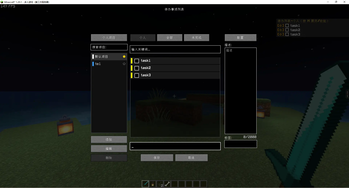
# Todo List Mod for Minecraft 一个简单而实用的 Minecraft 待办事项模组,支持单人、本地局域网和多人服务器协作。 A simple and practical todo list mod for Minecraft, built for single-player, LAN, and multiplayer collaboration. ## Features / 功能 ### v1.3.0 Capability Overview / 1.3.0 版本能力概览 - In-game GUI task management: create, edit, delete, complete, search, filter, drag-sort unfinished tasks, and organize tasks by priority and tags / 游戏内 GUI 任务管理:支持创建、编辑、删除、完成、搜索、筛选、拖拽排序未完成任务,以及按优先级和标签组织任务 - Personal and team projects: switch between personal and team workspaces, search projects with hints, and organize tasks by project / 个人与团队项目:支持在个人与团队工作区之间切换,提供项目搜索提示,并按项目维度组织任务 - Team collaboration upgrades: support claim, abandon, assign others, offline-member assignment, and optional all-player mode for team projects / 团队协作增强:支持领取、放弃、指派他人、离线成员指派,以及团队项目可选的全服任务模式 - HUD display and config: configurable HUD list with synchronized priority colors, hidden-count summary, view sync, and visibility state / HUD 显示与配置:可配置 HUD 列表,并同步优先级色块、隐藏数量提示、视图状态与显隐状态 - Safer persistence: tasks, projects, and config files now use backup-aware safe writes and automatic recovery after file corruption / 更安全的持久化:任务、项目与配置文件已切换到带备份与自动恢复的安全写盘机制 - Local singleplayer stability: local singleplayer personal-task storage keeps local and per-player copies in sync to avoid rollback-like restores / 本地单人稳定性:本地单人环境会同步维护本地与玩家任务副本,降低类似回滚的恢复问题 More details / 更多说明: - (FEATURES.md) / (FEATURES_EN.md) - (ROADMAP.md) / (ROADMAP_EN.md) - (CHANGELOG.md) / (CHANGELOG_EN.md) ## Screenshots / 截图 ### Singleplayer / 单人游戏 !(https://raw.githubusercontent.com/spacehouse/imgForBlog/master/img/image-20260426001802870.png) !(https://raw.githubusercontent.com/spacehouse/imgForBlog/master/img/image-20260426001843150.png) ### Multiplayer / 多人游戏 #### Op View / 管理员视角 !(https://raw.githubusercontent.com/spacehouse/imgForBlog/master/img/image-20260426002037797.png) !(https://raw.githubusercontent.com/spacehouse/imgForBlog/master/img/image-20260426002016832.png) !(https://raw.githubusercontent.com/spacehouse/imgForBlog/master/img/image-20260426002115214.png) !(https://raw.githubusercontent.com/spacehouse/imgForBlog/master/img/image-20260426002226500.png) #### Player View / 玩家视角 !(https://raw.githubusercontent.com/spacehouse/imgForBlog/master/img/image-20260426002311752.png) !(https://raw.githubusercontent.com/spacehouse/imgForBlog/master/img/image-20260426002345313.png) !(https://raw.githubusercontent.com/spacehouse/imgForBlog/master/img/image-20260426002437210.png) !(https://raw.githubusercontent.com/spacehouse/imgForBlog/master/img/image-20260426002500724.png) ## Installation / 安装 ### Requirements / 要求 - Minecraft 1.20.1 - Fabric Loader 0.15.11+ with Fabric API 0.86.1+1.20.1 / Fabric Loader 0.15.11+ 与 Fabric API 0.86.1+1.20.1 - Or the matching Forge release package from GitHub Releases / 或使用 GitHub Releases 中对应的 Forge 版本构建 ### Steps / 步骤 1. Download the latest mod JAR that matches your loader / 下载与你使用的加载器对应的最新模组 JAR 文件 2. Put it into your `mods` folder / 将文件放入 `mods` 文件夹 3. Launch Minecraft / 启动 Minecraft 4. Press `K` in game to open the todo list / 在游戏中按 `K` 打开待办列表 ## Usage / 使用说明 ### Key Bindings / 按键绑定 - `K`: Open Todo List / 打开待办列表 - `H`: Toggle HUD Expanded State / 展开或收起 HUD - `J`: Toggle HUD Visibility / 显示或隐藏 HUD ### Projects / 项目 - Tasks belong to the currently selected project in the left sidebar / 任务归属于左侧栏当前选中的项目 - Switch between personal and team projects from the sidebar header / 可在侧边栏顶部切换个人项目和团队项目 - Starred projects are sorted first and can be used as HUD sources / 星标项目会优先排序,也可作为 HUD 项目来源 - Search projects with prefixes and dropdown hints from the sidebar / 可在侧边栏中通过搜索前缀和下拉提示快速定位项目 - Add, edit, and delete projects from the sidebar actions / 可通过侧边栏按钮新增、编辑和删除项目 ### Tasks / 任务 - Unfinished tasks can be drag-sorted directly in the list / 未完成任务可直接在列表中拖拽排序 - The main screen now keeps a clearer split between todo and done sections / 主界面会更清晰地分开展示待办与已完成任务 - Deleting a task requires explicit confirmation / 删除任务前会弹出明确确认 - Task details and edits are handled in a dedicated detail area instead of crowding the list / 任务详情与编辑流程会在独立详情区中处理,减少列表区域拥挤感 ### Team Collaboration / 团队协作 - Team views include Unassigned, All Assigned, and Assigned to Me / 团队视图包含待分配、全部已分配和分配给我 - Team changes take effect after clicking Save, and the client will re-sync from server after Save or Cancel / 团队改动需要点击保存后生效,保存或取消后客户端会重新从服务端同步 - The Assign Others dialog now lists project members instead of online players, and offline members can still be assigned / “指派他人”弹窗现在展示项目成员而不是在线玩家,离线成员也可被正常指派 - Team projects can optionally enable an all-player task mode for broader shared workflows / 团队项目可按需开启全服任务模式,适配更宽
# Todo List Mod for Minecraft
一个简单而实用的 Minecraft 待办事项模组,支持单人、本地局域网和多人服务器协作。
A simple and practical todo list mod for Minecraft, built for single-player, LAN, and multiplayer collaboration.
## Features / 功能
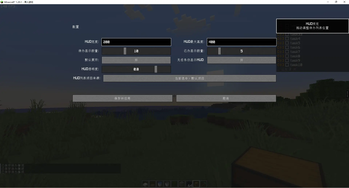
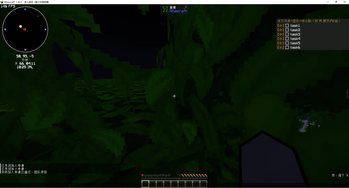
### v1. 3. 0 Capability Overview / 1. 3. 0 版本能力概览 - In-game GUI task management: create, edit, delete, complete, search, filter, drag-sort unfinished tasks, and organize tasks by priority and tags / 游戏内 GUI 任务管理:支持创建、编辑、删除、完成、搜索、筛选、拖拽排序未完成任务,以及按优先级和标签组织任务 - Personal and team projects: switch between personal and team workspaces, search projects with hints, and organize tasks by project / 个人与团队项目:支持在个人与团队工作区之间切换,提供项目搜索提示,并按项目维度组织任务 - Team collaboration upgrades: support claim, abandon, assign others, offline-member assignment, and optional all-player mode for team projects / 团队协作增强:支持领取、放弃、指派他人、离线成员指派,以及团队项目可选的全服任务模式 - HUD display and config: configurable HUD list with synchronized priority colors, hidden-count summary, view sync, and visibility state / HUD 显示与配置:可配置 HUD 列表,并同步优先级色块、隐藏数量提示、视图状态与显隐状态 - Safer persistence: tasks, projects, and config files now use backup-aware safe writes and automatic recovery after file corruption / 更安全的持久化:任务、项目与配置文件已切换到带备份与自动恢复的安全写盘机制 - Local singleplayer stability: local singleplayer personal-task storage keeps local and per-player copies in sync to avoid rollback-like restores / 本地单人稳定性:本地单人环境会同步维护本地与玩家任务副本,降低类似回滚的恢复问题
More details / 更多说明: - (FEATURES.md) / (FEATURES_EN.md) - (ROADMAP.md) / (ROADMAP_EN.md) - (CHANGELOG.md) / (CHANGELOG_EN.md)
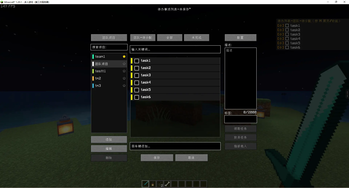
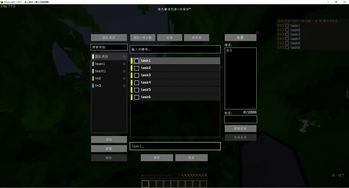
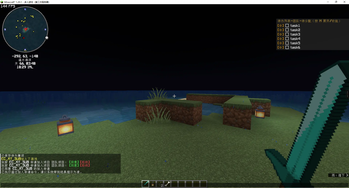
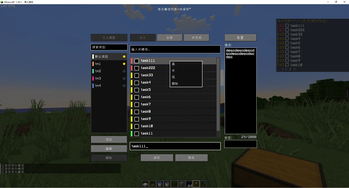
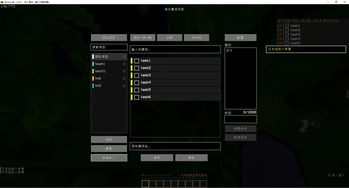
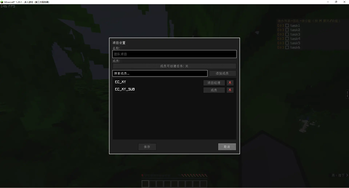
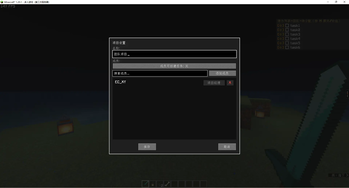
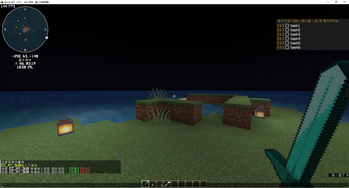
## Screenshots / 截图
### Singleplayer / 单人游戏
!(https://raw.githubusercontent.com/spacehouse/imgForBlog/master/img/image-20260426001802870.png) !(https://raw.githubusercontent.com/spacehouse/imgForBlog/master/img/image-20260426001843150.png)
### Multiplayer / 多人游戏
#### Op View / 管理员视角
!(https://raw.githubusercontent.com/spacehouse/imgForBlog/master/img/image-20260426002037797.png) !(https://raw.githubusercontent.com/spacehouse/imgForBlog/master/img/image-20260426002016832.png) !(https://raw.githubusercontent.com/spacehouse/imgForBlog/master/img/image-20260426002115214.png) !(https://raw.githubusercontent.com/spacehouse/imgForBlog/master/img/image-20260426002226500.png)
#### Player View / 玩家视角
!(https://raw.githubusercontent.com/spacehouse/imgForBlog/master/img/image-20260426002311752.png) !(https://raw.githubusercontent.com/spacehouse/imgForBlog/master/img/image-20260426002345313.png) !(https://raw.githubusercontent.com/spacehouse/imgForBlog/master/img/image-20260426002437210.png) !(https://raw.githubusercontent.com/spacehouse/imgForBlog/master/img/image-20260426002500724.png)
## Installation / 安装
### Requirements / 要求 - Minecraft 1. 20. 1 - Fabric Loader 0. 15. 11+ with Fabric API 0. 86. 1+1. 20. 1 / Fabric Loader 0. 15. 11+ 与 Fabric API 0. 86. 1+1. 20. 1 - Or the matching Forge release package from GitHub Releases / 或使用 GitHub Releases 中对应的 Forge 版本构建
### Steps / 步骤 1. Download the latest mod JAR that matches your loader / 下载与你使用的加载器对应的最新模组 JAR 文件 2. Put it into your `mods` folder / 将文件放入 `mods` 文件夹 3. Launch Minecraft / 启动 Minecraft 4. Press `K` in game to open the todo list / 在游戏中按 `K` 打开待办列表
## Usage / 使用说明
### Key Bindings / 按键绑定 - `K`: Open Todo List / 打开待办列表 - `H`: Toggle HUD Expanded State / 展开或收起 HUD - `J`: Toggle HUD Visibility / 显示或隐藏 HUD
### Projects / 项目 - Tasks belong to the currently selected project in the left sidebar / 任务归属于左侧栏当前选中的项目 - Switch between personal and team projects from the sidebar header / 可在侧边栏顶部切换个人项目和团队项目 - Starred projects are sorted first and can be used as HUD sources / 星标项目会优先排序,也可作为 HUD 项目来源 - Search projects with prefixes and dropdown hints from the sidebar / 可在侧边栏中通过搜索前缀和下拉提示快速定位项目 - Add, edit, and delete projects from the sidebar actions / 可通过侧边栏按钮新增、编辑和删除项目
### Tasks / 任务 - Unfinished tasks can be drag-sorted directly in the list / 未完成任务可直接在列表中拖拽排序 - The main screen now keeps a clearer split between todo and done sections / 主界面会更清晰地分开展示待办与已完成任务 - Deleting a task requires explicit confirmation / 删除任务前会弹出明确确认 - Task details and edits are handled in a dedicated detail area instead of crowding the list / 任务详情与编辑流程会在独立详情区中处理,减少列表区域拥挤感
### Team Collaboration / 团队协作 - Team views include Unassigned, All Assigned, and Assigned to Me / 团队视图包含待分配、全部已分配和分配给我 - Team changes take effect after clicking Save, and the client will re-sync from server after Save or Cancel / 团队改动需要点击保存后生效,保存或取消后客户端会重新从服务端同步 - The Assign Others dialog now lists project members instead of online players, and offline members can still be assigned / “指派他人”弹窗现在展示项目成员而不是在线玩家,离线成员也可被正常指派 - Team projects can optionally enable an all-player task mode for broader shared workflows / 团队项目可按需开启全服任务模式,适配更宽
📊 Mod Details
- Game
- Minecraft Mods
- Author
- spacehouse
- Version
- 1.4.1-mc1.21.1-neoforge
- Downloads
- 59,179
- Endorsements
- 14
- Category
- fabric
- Created
- 3/9/2026
- Updated
- 8/16/2026
- Game Versions
- 1.21.1
- Tags
- management, utility
🔧 How to Install Minecraft Mods Mods
Download from Modrinth. Use Prism Launcher or drop into your mods folder.
📖 Full step-by-step install guide for Minecraft Mods →
Visit the official mod page for specific installation instructions for this mod.
🎮 Need cheat codes or console commands? Check ur gaming wiki for Minecraft Mods commands, item IDs, and more.
❓ Frequently Asked Questions
Which Minecraft Mods versions does TeamTasks: TodoList support?
The author lists 1.21.1. Other versions may work but are untested by the author.
What is the latest version of TeamTasks: TodoList?
Version 1.4.1-mc1.21.1-neoforge, published 2026-08-16 with 59,179 downloads recorded at the source.
Keep browsing — more Minecraft Mods mods await