Tiers
🟡 Updated this year⚠️ Install Order · 2 steps
Install in this order, then this mod last — most mods fail to load without their framework and dependencies in place.
🖼️ Gallery (8 images)



🔍 Analysis
- 👍 0.0% endorsement rate
- 🏆 #100 of 196 equipment mods in this game by downloads
📋 About This Mod
<a href="https://pvptiers.com"><img src="https://raw.githubusercontent.com/Flavio6561/Gallery/refs/heads/main/PvPTiersLogo.webp" alt="PvPTiers Logo" width="70" align="right "></a> ## Tiers, Official tier display mod for (https://pvptiers.com) ### Mod showcase: >!(https://raw.githubusercontent.com/Flavio6561/Gallery/refs/heads/main/Tiers/NameTags.png) > `Switchable PvPTiers, classic and legacy icons and colors` > `Auto detect kit: press 'Y' to autodetect the current gamemode` >!(https://raw.githubusercontent.com/Flavio6561/Gallery/refs/heads/main/Tiers/SearchResultScreen.gif) > `The profile search result screen with PvPTiers icons on different GUI scales` > Tiers is still in beta. (https://github.com/Flavio6561/Tiers/issues) ### Mod features: - **`Auto detect kit:`** press **Y** (editable) to auto-detect the gamemode you are playing to easily switch and see opponent tiers in that gamemode - **`See nearest player stats:`** press **H** (editable) to open the closest player search result screen - **`Search screen:`** see all tiers, peaks, regions, points, global rankings and skin with **/tiers name** - **`Change gamemodes and their position:`** choose a gamemode for each ranking site and decide whether to display it on the left or right - **`Cycle keybinds:`** press **U** and **I** (editable) to easily cycle between the right and left displayed gamemodes - **`Change preset styles:`** you can change icons and colors presets in the config screen - **`Display gamemodes:`** whether to display selected mode, adaptive highest or absolute highest ### Screen config (ModMenu or /tiers -config): - **`Toggle Tiers`** toggles Tiers - **`Toggle Icons`** toggles the icons next to the tiers - **`Toggle Tab`** toggles Tiers on the tablist - **`Toggle Chat`** toggles Tiers in chat - **`Toggle Dynamic Separator`** decides if the separator | is the same color as the tier or gray - **`Displayed Tier`** decides whether to display selected mode, adaptive highest or absolute highest - **`Preview Switcher`** decides whether to preview the default profile (ItzRealMe) or your character - **`Left and Right gamemode switcher`** switches between gamemodes of the selected provider - **`Position Settings`** decides if the specific provider gamemodes are displayer on the right, left or neither - **`Icon and color presets:`** you can switch between classic, PvPTiers and MCTiers styled icons >!(https://raw.githubusercontent.com/Flavio6561/Gallery/refs/heads/main/Tiers/ConfigScreen.png) > `The config screen on 3 GUI scale` ### Other: > You can customize gamemodes icons and text colors, as well as choosing where and what gamemode to display; want to manually modify the icons or tiers colors? Edit and add in your pack folder the (https://github.com/PvPTiers/Tiers/tree/master/src/main/resources/resourcepacks) > Settings will be saved in your config folder and updated at runtime > The mod is client side (works on multiplayer) ### Links: > - (https://github.com/Flavio6561/Tiers) > - (https://modrinth.com/mod/tiers) > - (https://github.com/Flavio6561/Tiers/wiki/Version-changelogs) > - (https://github.com/Flavio6561/Tiers/issues)

Official tier display mod for (https://pvptiers.com)
### Mod showcase:
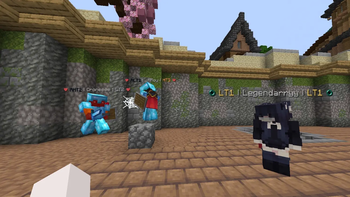
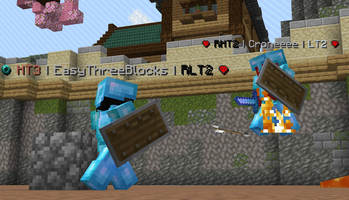
>!(https://raw.githubusercontent.com/Flavio6561/Gallery/refs/heads/main/Tiers/NameTags.png) > `Switchable PvPTiers, classic and legacy icons and colors` > `Auto detect kit: press 'Y' to autodetect the current gamemode`
>!(https://raw.githubusercontent.com/Flavio6561/Gallery/refs/heads/main/Tiers/SearchResultScreen.gif) > `The profile search result screen with PvPTiers icons on different GUI scales`
> Tiers is still in beta. (https://github.com/Flavio6561/Tiers/issues)
### Mod features:
- `Auto detect kit:` press Y (editable) to auto-detect the gamemode you are playing to easily switch and see opponent tiers in that gamemode
- `See nearest player stats:` press H (editable) to open the closest player search result screen
- `Search screen:` see all tiers, peaks, regions, points, global rankings and skin with /tiers name
- `Change gamemodes and their position:` choose a gamemode for each ranking site and decide whether to display it on the left or right
- `Cycle keybinds:` press U and I (editable) to easily cycle between the right and left displayed gamemodes
- `Change preset styles:` you can change icons and colors presets in the config screen
- `Display gamemodes:` whether to display selected mode, adaptive highest or absolute highest
### Screen config (ModMenu or /tiers -config):
- `Toggle Tiers` toggles Tiers
- `Toggle Icons` toggles the icons next to the tiers
- `Toggle Tab` toggles Tiers on the tablist
- `Toggle Chat` toggles Tiers in chat
- `Toggle Dynamic Separator` decides if the separator | is the same color as the tier or gray
- `Displayed Tier` decides whether to display selected mode, adaptive highest or absolute highest
- `Preview Switcher` decides whether to preview the default profile (ItzRealMe) or your character
- `Left and Right gamemode switcher` switches between gamemodes of the selected provider
- `Position Settings` decides if the specific provider gamemodes are displayer on the right, left or neither
- `Icon and color presets:` you can switch between classic, PvPTiers and MCTiers styled icons
>!(https://raw.githubusercontent.com/Flavio6561/Gallery/refs/heads/main/Tiers/ConfigScreen.png) > `The config screen on 3 GUI scale`
> You can customize gamemodes icons and text colors, as well as choosing where and what gamemode to display; want to manually modify the icons or tiers colors? Edit and add in your pack folder the (https://github.com/PvPTiers/Tiers/tree/master/src/main/resources/resourcepacks)
> Settings will be saved in your config folder and updated at runtime
> The mod is client side (works on multiplayer)
### Links: > - (https://github.com/Flavio6561/Tiers) > - (https://modrinth.com/mod/tiers) > - (https://github.com/Flavio6561/Tiers/wiki/Version-changelogs) > - (https://github.com/Flavio6561/Tiers/issues)
📊 Mod Details
- Game
- Minecraft Mods
- Author
- PvPTiers
- Version
- 0.8.3+1.21
- Downloads
- 1,190,261
- Endorsements
- 48
- Category
- equipment
- Created
- 3/19/2025
- Updated
- 6/24/2026
- Game Versions
- 1.21
- Tags
- equipment, social, utility
🔧 How to Install Minecraft Mods Mods
Download from Modrinth. Use Prism Launcher or drop into your mods folder.
📖 Full step-by-step install guide for Minecraft Mods →
Visit the official mod page for specific installation instructions for this mod.
🎮 Need cheat codes or console commands? Check ur gaming wiki for Minecraft Mods commands, item IDs, and more.
❓ Frequently Asked Questions
Which Minecraft Mods versions does Tiers support?
The author lists 1.21. Other versions may work but are untested by the author.
What is the latest version of Tiers?
Version 0.8.3+1.21, published 2026-06-24 with 1.2M downloads recorded at the source.
Keep browsing — more Minecraft Mods mods await