Text Animator
🟡 Updated this year⚠️ Install Order · 2 steps
Install in this order, then this mod last — most mods fail to load without their framework and dependencies in place.
🖼️ Gallery (3 images)
🔍 Analysis
- 👍 0.1% endorsement rate
- 🏆 #265 of 983 fabric mods in this game by downloads
📋 About This Mod
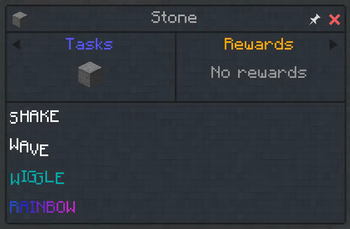
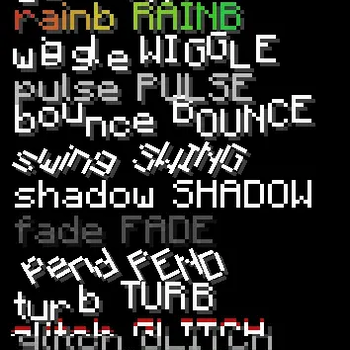
Text Animator is an extension of the text renderer. You can use tags to add animation to some words almost anywhere.
## Demo (with Blabber and Heracles mod)
```
!(https://cdn.modrinth.com/data/HBIG5nRf/images/e15e996bb6b5311bc0c0ae9e71d42a9d07ba9911.webp)
!(https://cdn.modrinth.com/data/HBIG5nRf/images/dcfca909c5d9c43d2817bf18f18d533d6e464083.webp)
### Basic usage
Add effect: `
### typewriter
Can only be used at the beginning of the text. Rendering characters or words one by one, simulating typing.
- Example: `
Make characters bounce back vertically.
- Parameters:
- - `a`: Amplitude (default `1. 0`)
- - `f`: Frequency (default `1. 0`)
- - `w`: Wave Size (default `1. 0`)
- Example: `
BOING!`
Periodically change opacity (breathing light).
- Parameters:
- - `a`: Minimum Opacity (default `0. 3`)
- - `f`: Frequency (default `1. 0`)
- - `w`: Wave Size (default `0. 0`)
- Example: `
Fading Text`
Create text slicing, and occasional flicker, generating additional layers in some cases.
- Parameters:
- - `f`: Frequency (default `1. 0`)
- - `j`: Character Jitter Chance (default `0. 015`)
- - `b`: Character Blink Chance (default `0. 003`)
- - `s`: Slicing/Shifting Chance (default `0. 08`)
- Example: `
ERROR`
### grad (Gradient)
Support linear gradient in RGB or HSV, can be flowing and segmented.
- Parameters:
- - `from`: Start Color (default `5BCEFA`)
- - `to`: End Color (default `F5A9B8`)
- - `hue`: Whether to interpolate in HSV space (default `false`)
- - `f`: Flow Speed (`0` for static, default `0. 0`)
- - `sp`: Span, affecting color distribution between characters (default `20. 0`)
- - `uni`: Whether to be unidirectional without swinging (default `false` for back-and-forth)
- Example: `
Flowing Gradient Text`
Draw multiple glowing outlines for characters.
- Parameters:
- - `p`: Sampling Count, at least `4` (default `10`)
- - `r`: Radius (default `2`)
- - `a`: Opacity Multiplier (default `0. 12`)
- Example: `
Neon Glow`
### pend (Pendulum/circular)
Characters swing around the top-middle, can plus small circular trajectories.
- Parameters:
- - `f`: Frequency (default `1. 0`)
- - `a`: Maximum Angle in degrees (default `30. 0`)
- - `r`: Circular Radius (default `0. 0`)
- Example: `
Swinging Around`
Overall brightness fluctuates over time (does not affect shadow layer).
- Parameters:
- - `base`: Minimum Brightness Multiplier (default `0. 75`)
- - `a`: Amplitude (default `1. 0`)
- - `f`: Frequency (default `1. 0`)
- - `w`: Wave Size (default `0. 0`)
- Example: `
Power Rising`
### rainb (Rainbow)
Cycle colors over HSV.
- Parameters:
- - `f`: Frequency (default `1. 0`)
- - `w`: Wave Size (default `1. 0`)
- Example: `
Colorful Text!`
Modify the offset and color of the text shadow.
- Parameters:
- - `x`: Horizontal Offset Delta (default `0. 0`)
- - `y`: Vertical Offset Delta (default `0. 0`)
- - `c`: Color in hex (e.g. `FF0000` for red) (default `000000`)
- - `r`,`g`,`b`: Color (default `0. 0`)
- - `a`: Opacity (default `1. 0`)
- Example: `
No Shadow Shadowed Text`
Randomly jitter in all directions, creating a sense of tension/energy.
- Parameters:
- - `a`: Amplitude (default `1. 0`)
- - `f`: Frequency (default `1. 0`)
- Example: `
WARNING!`
Characters spinning back and forth.
- Parameters:
- - `a`: Amplitude (default `1. 0`)
- - `f`: Frequency (default `1. 0`)
- - `w`: Wave Size (default `0. 0`)
- Example: `
Waving Text`
### turb (Turbulence)
Random displacement perturbation based on noise.
- Parameters:
- - `a`: Amplitude (default `1. 0`)
- - `f`: Frequency (default `1. 0`)
- Example: `
Windy Text`
Characters undulating up and down like waves.
- Parameters:
- - `a`: Amplitude (default `1. 0`)
- - `f`: Frequency (default `1. 0`)
- - `w`: Wave Size (default `1. 0`)
- Example: `
Flowing Text`
Each character wiggles along a fixed random direction.
- Parameters:
- - `a`: Amplitude (default `1. 0`)
- - `f`: Frequency (default `1. 0`)
- - `w`: Wave Size (default `1. 0`)
- Example: `
Wiggly Text!`
### Parameter Quick Reference
- `a`: Amplitude/Opacity (meaning varies slightly across effects)
- `f`: Speed/Frequency
- `w`: Wave Size
- `r`: Radius
- Multi-layer rendering: Effects like `glitch` and `neon` will generate additional layers or slice
📊 Mod Details
- Game
- Minecraft Mods
- Author
- Snownee
- Version
- 3.2.3+neoforge
- Downloads
- 67,329
- Endorsements
- 95
- Category
- fabric
- Created
- 6/29/2023
- Updated
- 6/21/2026
- Game Versions
- 1.21.1
- Tags
- utility
🔧 How to Install Minecraft Mods Mods
Download from Modrinth. Use Prism Launcher or drop into your mods folder.
📖 Full step-by-step install guide for Minecraft Mods →
Visit the official mod page for specific installation instructions for this mod.
🎮 Need cheat codes or console commands? Check ur gaming wiki for Minecraft Mods commands, item IDs, and more.
❓ Frequently Asked Questions
Which Minecraft Mods versions does Text Animator support?
The author lists 1.21.1. Other versions may work but are untested by the author.
What is the latest version of Text Animator?
Version 3.2.3+neoforge, published 2026-06-21 with 67,329 downloads recorded at the source.
Keep browsing — more Minecraft Mods mods await