Terrestria
🟡 Updated this year⚠️ Install Order · 2 steps
Install in this order, then this mod last — most mods fail to load without their framework and dependencies in place.
🖼️ Gallery (1 images)
🔍 Analysis
- 👍 0.0% endorsement rate
- 🏆 #233 of 618 adventure mods in this game by downloads
📋 About This Mod
<p><img src="https://i.imgur.com/UUmu4Yo.png" width="1125" height="422" /></p> <p style="text-align: center;">Terrestria is a detailed and vibrant biomes mod for Minecraft running on the Fabric mod loader. Terrestria enhances gameplay through the addition of 17 major biomes supported by 24 component biomes, 9 new wood types, as well as a healthy selection of foliage - providing a refreshing new selection of terrain.</p> <p style="text-align: center;"><a href="https://www.modrinth.com/mod/fabric-api"><strong><img src="https://i.imgur.com/Ol1Tcf8.png" alt="" width="149" height="50" /></strong></a></p> <p style="text-align: center;"><span style="font-size: 12px;"><strong>Terrestria requires <a href="https://fabricmc.net/use/">Fabric Loader</a> and <a href="https://www.modrinth.com/mod/fabric-api">Fabric API</a></strong> </span></p> <p style="text-align: center;"><strong>Check out the <a href="https://discord.gg/jEGF5fb">Terraformers Discord Server</a> to chat about Terrestria and other Fabric mods!</strong></p> <p style="text-align: center;"><strong style="font-size: 1.2rem;">Visit the <a href="https://github.com/TerraformersMC/Terrestria/wiki">Terrestria Wiki</a> to learn more about each biome</strong></p> <p>The goal of Terrestria is to be the most polished and visually appealing biomes mod available for Minecraft, and to this end there has been intense focus on selecting, detailing, and refining the biomes until they look absolutely amazing. Rather than add tons of different biomes, focus has been put into adding a rather small amount of biomes and then populating them with large amounts of detail and component biomes. This overall results in a more cohesive experience compared to existing biome mods.</p> <h4 style="text-align: left;"><span style="font-size: 18px;"><strong>Biomes:</strong></span></h4> <h5><span style="font-size: 14px;"><strong>v1.0.0 - Initial Release</strong></span></h5> <ul> <li style="text-align: left;"><span style="font-size: 14px;"><a href="https://github.com/TerraformersMC/Terrestria/wiki/Caldera">Caldera</a></span></li> <li style="text-align: left;"><span style="font-size: 14px;"><a href="https://github.com/TerraformersMC/Terrestria/wiki/Cypress-Forest">Cypress Forest</a></span></li> <li style="text-align: left;"><span style="font-size: 14px;"><a href="https://github.com/TerraformersMC/Terrestria/wiki/Cypress-Swamp">Cypress Swamp</a></span></li> <li style="text-align: left;"><span style="font-size: 14px;"><a href="https://github.com/TerraformersMC/Terrestria/wiki/Dense-Woodlands">Dense Woodlands</a></span></li> <li style="text-align: left;"><span style="font-size: 14px;"><a href="https://github.com/TerraformersMC/Terrestria/wiki/Hemlock-Rainforest">Hemlock Rainforest</a></span></li> <li style="text-align: left;"><span style="font-size: 14px;"><a href="https://github.com/TerraformersMC/Terrestria/wiki/Japanese-Maple-Forest">Japanese Maple Forest</a></span></li> <li style="text-align: left;"><span style="font-size: 14px;"><a href="https://github.com/TerraformersMC/Terrestria/wiki/Lush-Redwood-Forest">Lush Redwood Forest</a></span></li> <li style="text-align: left;"><span style="font-size: 14px;"><a href="https://github.com/TerraformersMC/Terrestria/wiki/Rainbow-Rainforest">Rainbow Rainforest</a></span></li> <li style="text-align: left;"><span style="font-size: 14px;"><a href="https://github.com/TerraformersMC/Terrestria/wiki/Redwood-Forest">Redwood Forest</a></span></li> <li style="text-align: left;"><span style="font-size: 14px;"><a href="https://github.com/TerraformersMC/Terrestria/wiki/Sakura-Forest">Sakura Forest</a></span></li> <li style="text-align: left;"><span style="font-size: 14px;"><a href="https://github.com/TerraformersMC/Terrestria/wiki/Snowy-Hemlock-Forest">Snowy Hemlock Forest</a></span></li> <li style="text-align: left;"><span style="font-size: 14px;"><a href="https://github.com/TerraformersMC/Terrestria/wiki/Volcanic-Island">Volcanic Island</a></span></li> </ul> <h5><span style="font-size: 14px;"><strong>v2.0.0 - The Dry Update</strong></span></h5> <ul> <li style="text-align: left;"><span style="font-size: 14px;"><a href="https://github.com/TerraformersMC/Terrestria/wiki/Canyon">Canyon</a></span></li> <li style="text-align: left;"><span style="font-size: 14px;"><a href="https://github.com/TerraformersMC/Terrestria/wiki/Dunes">Dunes</a></span></li> <li style="text-align: left;"><span style="font-size: 14px;"><a href="https://github.com/TerraformersMC/Terrestria/wiki/Lush-Desert">Lush Desert</a></span></li> <li style="text-align: left;"><span style="font-size: 14px;"><a href="https://github.com/TerraformersMC/Terrestria/wiki/Oasis">Oasis</a></span></li> <li style="text-align: left;"><span style="font-size: 14px;"><a href="https://github.com/TerraformersMC/Terrestria/wiki/Outback">Outback</a></span></li> </ul> <p><strong>Some biomes contain variants to increase variety</strong></p> <p><strong>Images of the biomes can be found on the <a href="https://www.curseforge.c

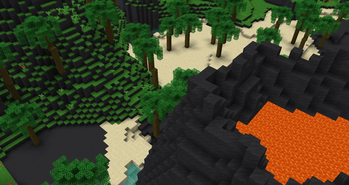
Terrestria is a detailed and vibrant biomes mod for Minecraft running on the Fabric mod loader. Terrestria enhances gameplay through the addition of 17 major biomes supported by 24 component biomes, 9 new wood types, as well as a healthy selection of foliage - providing a refreshing new selection of terrain.

Terrestria requires Fabric Loader and Fabric API
Check out the Terraformers Discord Server to chat about Terrestria and other Fabric mods!
Visit the Terrestria Wiki to learn more about each biome
The goal of Terrestria is to be the most polished and visually appealing biomes mod available for Minecraft, and to this end there has been intense focus on selecting, detailing, and refining the biomes until they look absolutely amazing. Rather than add tons of different biomes, focus has been put into adding a rather small amount of biomes and then populating them with large amounts of detail and component biomes. This overall results in a more cohesive experience compared to existing biome mods.
Biomes:
v1. 0. 0 - Initial Release
- Caldera
- Cypress Forest
- Cypress Swamp
- Dense Woodlands
- Hemlock Rainforest
- Japanese Maple Forest
- Lush Redwood Forest
- Rainbow Rainforest
- Redwood Forest
- Sakura Forest
- Snowy Hemlock Forest
- Volcanic Island
v2. 0. 0 - The Dry Update
Some biomes contain variants to increase variety
Images of the biomes can be found on the 🤖 AI-enhanced — based on mod data
📊 Mod Details
- Game
- Minecraft Mods
- Author
- Prospector
- Version
- 8.1.0-alpha.1
- Downloads
- 2,278,157
- Endorsements
- 720
- Category
- adventure
- Created
- 1/22/2021
- Updated
- 8/9/2026
- Game Versions
- 26.2
- Tags
- adventure, decoration, worldgen
🔧 How to Install Minecraft Mods Mods
Download from Modrinth. Use Prism Launcher or drop into your mods folder.
📖 Full step-by-step install guide for Minecraft Mods →
Visit the official mod page for specific installation instructions for this mod.
🎮 Need cheat codes or console commands? Check ur gaming wiki for Minecraft Mods commands, item IDs, and more.
❓ Frequently Asked Questions
Which Minecraft Mods versions does Terrestria support?
The author lists 26.2. Other versions may work but are untested by the author.
What is the latest version of Terrestria?
Version 8.1.0-alpha.1, published 2026-08-09 with 2.3M downloads recorded at the source.
Keep browsing — more Minecraft Mods mods await