TeamCommand
⚪ Last updated 2023⚠️ Install Order · 2 steps
Install in this order, then this mod last — most mods fail to load without their framework and dependencies in place.
🖼️ Gallery (2 images)
🔍 Analysis
- 👍 0.3% endorsement rate
- 🏆 #644 of 893 fabric mods in this game by downloads
📋 About This Mod
# TeamCommand This mod adds a new command to Minecraft which allows players to create and manage their own teams. The command is similar to factions which you might know from other mods but is based on the Vanilla `/team` command which only operators can use. !(https://i.ibb.co/HdxZjC3/players.png) ## Commands - `/t create <name> <color>` Create a new team and be its first member. - `/t list ` Lists all teams or the players in a specific team. - `/t invite <player>` Invite a new player to join your team. - `/t accept` Accept the last invitation and join the team. - `/t set` - `displayName <name>` Change the displayed name of your team. - `color <color>` Change the color of your team. - `friendlyFire <allowed>` Specify wether players in your team can inflict damage to each other or not. - `seeInvisibles <allowed>` Specify wether members of your team can see invisible teammates. - `/t leave` Leave your current team. Additionally, players can use every vanilla or modded feature integrated with teams like `/teammsg` to send a chat message to all teammates. ## Configuration The mods configuration file is located at `teamcommand.toml` in your servers config folder. - `commandName`: The name of the new team command _(default: `t`)_. - `allowDuplicateColors`: Specify wether there can be multiple teams with the same color _(default: `true`)_. - `allowDuplicateDisplaynames`: Specify wether there can be multiple teams with the same name _(default: `false`)_. - `prefixFormat`: A format string which will determine the team prefix based on the displayName _(default: ` `)_. - `prefixUseTeamColor`: Wether the prefix will be in the teams color or a secondary color. _(default: `false`)_ - `suffixFormat`: A format string which will determine the team suffix based on the displayName _(default: empty string)_ - `suffixUseTeamColor`: Wether the suffix will be in the teams color or a secondary color. _(default: `false`)_ ### Prefix & Suffix Format Strings The format string for prefix and suffix is passed the displayed name of the team. You can look up the official syntax for java format strings (https://docs.oracle.com/javase/8/docs/api/java/util/Formatter.html#syntax). Examples: - ` ` display the first letter of the displayed name in square brackets (default prefix) - (empty string) display nothing (default suffix) - `TEAM %s ` display the letters "TEAM", a whitespace and the team name - `%S ` the team name in uppercase characters - `%.3S ` the first three letters of the team name in uppercase characters It is recommeded to end the prefix and begin the suffix with a whitespace to prevent them from looking like a part of the players name. ## Limitations - There is no hierarchy in teams, everybody can invite new members. - It's not possible to change the actual name of a team, only the displayed name. - The amount of teams is limited at 16 if `allowDuplicateColors` is disabled as Minecraft only allows 16 colors.
# TeamCommand
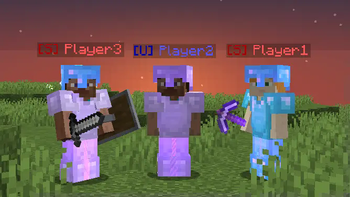
This mod adds a new command to Minecraft which allows players to create and manage their own teams. The command is similar to factions which you might know from other mods but is based on the Vanilla `/team` command which only operators can use.
!(https://i.ibb.co/HdxZjC3/players.png)
## Commands
- `/t create
` Create a new team and be its first member. - `/t list [
]` Lists all teams or the players in a specific team. - `/t invite
` Invite a new player to join your team. - `/t accept` Accept the last invitation and join the team.
- `/t set`
- - `displayName
` Change the displayed name of your team. - - `color
` Change the color of your team. - - `friendlyFire
` Specify wether players in your team can inflict damage to each other or not. - - `seeInvisibles
` Specify wether members of your team can see invisible teammates. - `/t leave` Leave your current team.
Additionally, players can use every vanilla or modded feature integrated with teams like `/teammsg` to send a chat message to all teammates.
## Configuration
The mods configuration file is located at `teamcommand.toml` in your servers config folder.
- `commandName`: The name of the new team command _(default: `t`)_.
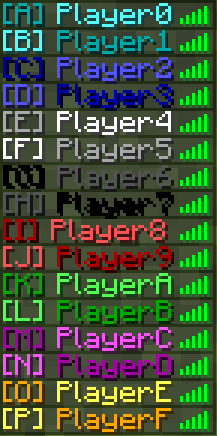
- `allowDuplicateColors`: Specify wether there can be multiple teams with the same color _(default: `true`)_.
- `allowDuplicateDisplaynames`: Specify wether there can be multiple teams with the same name _(default: `false`)_.
- `prefixFormat`: A format string which will determine the team prefix based on the displayName _(default: `[%. 1s] `)_.
- `prefixUseTeamColor`: Wether the prefix will be in the teams color or a secondary color. _(default: `false`)_
- `suffixFormat`: A format string which will determine the team suffix based on the displayName _(default: empty string)_
- `suffixUseTeamColor`: Wether the suffix will be in the teams color or a secondary color. _(default: `false`)_
### Prefix & Suffix Format Strings
The format string for prefix and suffix is passed the displayed name of the team. You can look up the official syntax for java format strings (https://docs.oracle.com/javase/8/docs/api/java/util/Formatter.html#syntax).
- `[%. 1s] ` display the first letter of the displayed name in square brackets (default prefix)
- (empty string) display nothing (default suffix)
- `TEAM %s ` display the letters "TEAM", a whitespace and the team name
- `%S ` the team name in uppercase characters
- `%. 3S ` the first three letters of the team name in uppercase characters
It is recommeded to end the prefix and begin the suffix with a whitespace to prevent them from looking like a part of the players name.
## Limitations
- There is no hierarchy in teams, everybody can invite new members.
- It's not possible to change the actual name of a team, only the displayed name.
- The amount of teams is limited at 16 if `allowDuplicateColors` is disabled as Minecraft only allows 16 colors.
📊 Mod Details
- Game
- Minecraft Mods
- Author
- beabfc
- Version
- 1.1.3
- Downloads
- 6,821
- Endorsements
- 22
- Category
- fabric
- Created
- 6/14/2022
- Updated
- 5/2/2023
- Game Versions
- 1.19, 1.19.1, 1.19.2, 1.19.3, 1.19.4
- Tags
- game-mechanics, management, social
🔧 How to Install Minecraft Mods Mods
Download from Modrinth. Use Prism Launcher or drop into your mods folder.
📖 Full step-by-step install guide for Minecraft Mods →
Visit the official mod page for specific installation instructions for this mod.
🎮 Need cheat codes or console commands? Check ur gaming wiki for Minecraft Mods commands, item IDs, and more.
❓ Frequently Asked Questions
Which Minecraft Mods versions does TeamCommand support?
The author lists 1.19, 1.19.1, 1.19.2, 1.19.3, 1.19.4. Other versions may work but are untested by the author.
What is the latest version of TeamCommand?
Version 1.1.3, published 2023-05-02 with 6,821 downloads recorded at the source.
Keep browsing — more Minecraft Mods mods await