Panorama
🟠 Updated over a year ago⚠️ Install Order · 2 steps
Install in this order, then this mod last — most mods fail to load without their framework and dependencies in place.
🖼️ Gallery (4 images)
🔍 Analysis
- 👍 0.2% endorsement rate
- 🏆 #449 of 1032 fabric mods in this game by downloads
📋 About This Mod
<p><img src="https://i.imgur.com/zTXfWdK.png" alt="" width="591" height="207" /></p> <h2>What is the Panorama mod?</h2> <p>The Panorama mod adds the ability to take panoramic screenshots into Minecraft. The mod also adds in an ability to view all your panoramic screenshots in game and select a specific one to use for the titlescreen background. You can also use this mod to take panoramic images to use in resourcepacks.</p> <p> </p> <h3>How to take a screenshot?</h3> <p>By default to take a screenshot press the F4 key. This will then generate the screenshot. Once the screenshot has been generated a message will popup in game.</p> <p> </p> <h3>How can I apply the panorama to the title screen?</h3> <p>To apply the panorama to the titlescreen, first goto the title screen and click the "Panorama" button in the top left. This will bring you to the panorama selection screen. From this screen you can search all your panoramas and select the one you wish to apply. If you want to return to the default Minecraft panorama click the "Reset" button in the top right.</p> <p> </p> <h3>Where are the panorama files saved?</h3> <p>The panorama files are saved in the mods folder under a folder called "panorama".</p> <p> </p> <h3>How can I use this in a resource pack?</h3> <p>To use a panorama in a resourcepack, goto the directory mentioned above. You can then extract the contents of one of the zip files to obtain the images which can be used in a resourcepack.</p> <p> </p> <h3>Can I share a panorama?</h3> <p>Yes. To share a panorama all you need to do is send the other user the .zip file form the panorama folder. You can also customise the file by adding a file called "icon.png". If this file is present the mod will use this as the defualt icon in the GUI rather than the default image.</p>

What is the Panorama mod?
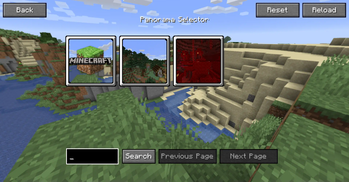
The Panorama mod adds the ability to take panoramic screenshots into Minecraft. The mod also adds in an ability to view all your panoramic screenshots in game and select a specific one to use for the titlescreen background. You can also use this mod to take panoramic images to use in resourcepacks.
How to take a screenshot?
By default to take a screenshot press the F4 key. This will then generate the screenshot. Once the screenshot has been generated a message will popup in game.
How can I apply the panorama to the title screen?
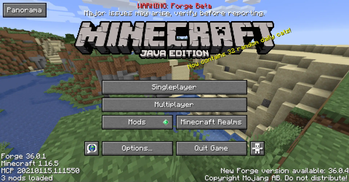
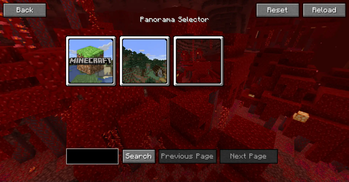
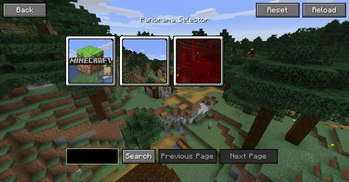
To apply the panorama to the titlescreen, first goto the title screen and click the "Panorama" button in the top left. This will bring you to the panorama selection screen. From this screen you can search all your panoramas and select the one you wish to apply. If you want to return to the default Minecraft panorama click the "Reset" button in the top right.
Where are the panorama files saved?
The panorama files are saved in the mods folder under a folder called "panorama".
How can I use this in a resource pack?
To use a panorama in a resourcepack, goto the directory mentioned above. You can then extract the contents of one of the zip files to obtain the images which can be used in a resourcepack.
Can I share a panorama?
Yes. To share a panorama all you need to do is send the other user the .zip file form the panorama folder. You can also customise the file by adding a file called "icon.png". If this file is present the mod will use this as the defualt icon in the GUI rather than the default image.
📊 Mod Details
- Game
- Minecraft Mods
- Author
- SWDTeam
- Version
- 1.3.0
- Downloads
- 195,082
- Endorsements
- 321
- Category
- fabric
- Created
- 11/25/2022
- Updated
- 1/30/2025
- Game Versions
- 1.21.4
- Tags
- game-mechanics
🔧 How to Install Minecraft Mods Mods
Download from Modrinth. Use Prism Launcher or drop into your mods folder.
📖 Full step-by-step install guide for Minecraft Mods →
Visit the official mod page for specific installation instructions for this mod.
🎮 Need cheat codes or console commands? Check ur gaming wiki for Minecraft Mods commands, item IDs, and more.
❓ Frequently Asked Questions
Which Minecraft Mods versions does Panorama support?
The author lists 1.21.4. Other versions may work but are untested by the author.
What is the latest version of Panorama?
Version 1.3.0, published 2025-01-30 with 195,082 downloads recorded at the source.
Keep browsing — more Minecraft Mods mods await