Suspicious Shapes
🟠 Updated over a year ago⚠️ Install Order · 2 steps
Install in this order, then this mod last — most mods fail to load without their framework and dependencies in place.
🖼️ Gallery (1 images)
🔍 Analysis
- 👍 0.5% endorsement rate
- 🏆 #46 of 280 decoration mods in this game by downloads
📋 About This Mod
# glTF models for everything Using frapi (the fabric-rendering API), this mod intercepts requests for block models, and if they refer to glTF files, provides them as static models that get baked into the chunk geometry as normal. Entirely clientside, this mod can be used to power "cursed" resource packs that replace existing blocks with non-cuboid shapes that vanilla can't make. It can also be used as an "included" mod to power non-cuboid blocks in your mods. # The Details The easiest way to create a compatible model is in Blockbench. - From the app, select "New -> Low Poly / Generic Model" and hit the "Create new model" button. - Any identifier, UV mode, or other settings are fine. - When you're satisfied with your model, hit "File -> Export -> Export glTF Model". - Blockbench ignores most of these settings, and the defaults are perfectly fine. - Find the file you exported and put it where you would normally put a json blockmodel (e.g. `assets/minecraft/models/block`) - make a child model which refers to the gltf model as a parent, with a root key-value pair of `"loader": "suspicious_shapes:gltf"`. You can fill-in texture references and set color indices here too. - Edit the text of the glTF model to replace the texture's data URL with a texture reference. The last part there is the hard part. In the file you'll see something like, ```json "images": ``` This is a base-64 encoded image of the texture you used. Since block models can't use random textures that aren't in the atlas, we'll have to fix that. Replace each of the unreadable strings marked "uri" with a minecraft texture reference, like this ```json "images": ``` Or, if you're making several models with this shape, you can use it as a parent with a texture up-reference like normal: ```json "images": ``` Your child model can look something like this: ```json { "parent": "minecraft:block/sphere_all.gltf", "loader": "suspicious_shapes:gltf", "textures": { "all": "minecraft:block/acacia_leaves" }, "colorIndexes": } ``` And that's it! Load up minecraft or reload resource packs and you should see your model!
# glTF models for everything
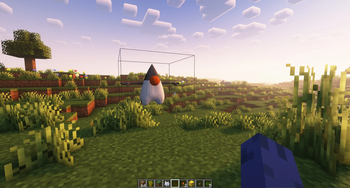
Using frapi (the fabric-rendering API), this mod intercepts requests for block models, and if they refer to glTF files, provides them as static models that get baked into the chunk geometry as normal. Entirely clientside, this mod can be used to power "cursed" resource packs that replace existing blocks with non-cuboid shapes that vanilla can't make.
It can also be used as an "included" mod to power non-cuboid blocks in your mods.
# The Details
The easiest way to create a compatible model is in Blockbench.
- From the app, select "New -> Low Poly / Generic Model" and hit the "Create new model" button.
- Any identifier, UV mode, or other settings are fine.
- When you're satisfied with your model, hit "File -> Export -> Export glTF Model".
- Blockbench ignores most of these settings, and the defaults are perfectly fine.
- Find the file you exported and put it where you would normally put a json blockmodel (e.g. `assets/minecraft/models/block`)
- make a child model which refers to the gltf model as a parent, with a root key-value pair of `"loader": "suspicious_shapes:gltf"`. You can fill-in texture references and set color indices here too.
- Edit the text of the glTF model to replace the texture's data URL with a texture reference.
The last part there is the hard part. In the file you'll see something like, ```json "images":[{"mimeType":"image/png","uri":"data:image/png;base64,iVBORw0KGgoAAAANSUhEUgAAABAAAAAQCAYAAAAf8/9hAAAAr0lEQVQ4y6WTMQrCQBBFt0xtk0YQL+QR0mpnYyk5QbDObTc84YVB0NnFgSGTyf7/5w+bUpJ4LMdaeuI6jzWC5/Vcm0kAAyAleE6Hd00vkn8Fq0oCJv32up9yEg6REPGEQDLemyYR6DS3y7ATp3tQTTCEWqH3U50DcQccRl0b9lKSuAvV0wXG+AQyRTOYiDughkB76bXVgiDr5gkEeYEAu8iuf0L/WiD/Iii94diZ+gZo3N9oOnqLFAAAAABJRU5ErkJggg=="}] ```
This is a base-64 encoded image of the texture you used. Since block models can't use random textures that aren't in the atlas, we'll have to fix that. Replace each of the unreadable strings marked "uri" with a minecraft texture reference, like this
```json "images":[{"mimeType":"image/png","uri":"minecraft:blocks/stone"}] ```
Or, if you're making several models with this shape, you can use it as a parent with a texture up-reference like normal:
```json "images":[{"mimeType":"image/png","uri":"#all"}] ```
Your child model can look something like this: ```json { "parent": "minecraft:block/sphere_all.gltf", "loader": "suspicious_shapes:gltf", "textures": { "all": "minecraft:block/acacia_leaves" }, "colorIndexes": [ 0 ] } ```
And that's it! Load up minecraft or reload resource packs and you should see your model!
📊 Mod Details
- Game
- Minecraft Mods
- Author
- falkreon
- Version
- 1.1.0-alpha.1+1.21.1
- Downloads
- 3,850
- Endorsements
- 19
- Category
- decoration
- Created
- 6/19/2023
- Updated
- 1/21/2025
- Game Versions
- 1.21.1, 1.21.2, 1.21.3, 1.21.4
- Tags
- decoration, library, utility
🔧 How to Install Minecraft Mods Mods
Download from Modrinth. Use Prism Launcher or drop into your mods folder.
📖 Full step-by-step install guide for Minecraft Mods →
Visit the official mod page for specific installation instructions for this mod.
🎮 Need cheat codes or console commands? Check ur gaming wiki for Minecraft Mods commands, item IDs, and more.
❓ Frequently Asked Questions
Which Minecraft Mods versions does Suspicious Shapes support?
The author lists 1.21.1, 1.21.2, 1.21.3, 1.21.4. Other versions may work but are untested by the author.
What is the latest version of Suspicious Shapes?
Version 1.1.0-alpha.1+1.21.1, published 2025-01-21 with 3,850 downloads recorded at the source.
Keep browsing — more Minecraft Mods mods await