Surrounding Indicators
🟢 Updated this month⚠️ Install Order · 2 steps
1🛠️ Forge — Minecraft Forge (mod loader) Download ↗
2🛠️ Fabric — Fabric Loader Download ↗
Install in this order, then this mod last — most mods fail to load without their framework and dependencies in place.
🖼️ Gallery (4 images)
🔍 Analysis
- 👍 1.4% endorsement rate — high engagement, a strong quality signal
- 🏆 #16 of 254 decoration mods in this game by downloads
📋 About This Mod
Surrounding Indicators







An interesting health indicators mod.
💞 What is this?
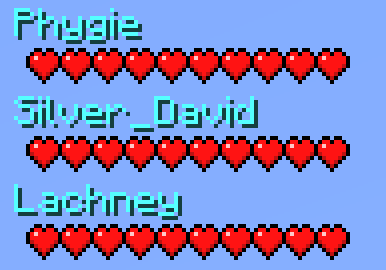
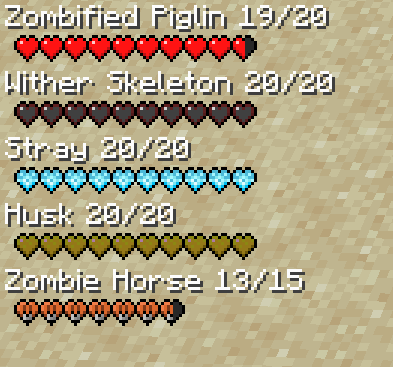
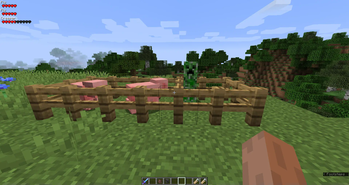
This is a simple lightweight client-side mod that adds health information from any mob within range in the corner of your screen. It should work with any mobs including ones from other mods. Also, it works on multiplayer and displays other Player health information as well!🧪 Latest Updates
- Updated to support Minecraft 1. 19
- Added custom heart visuals for illager mobs, Husks, Strays, Elder Guardians, and mounts in general
Displays Mob and Player Health Information
By default on the left side of your screen this mod will display health information of the mobs and players that are visible to you! You can modify how the hud looks in the config. Read the configuration guide down below.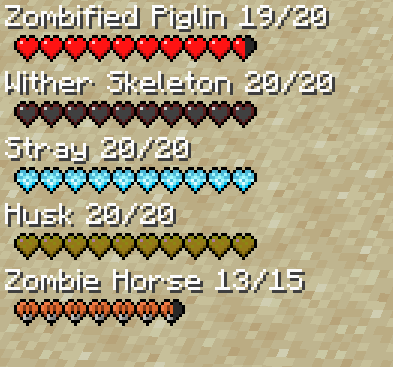
Team Information
Health information also displays on the right by default of those who are in your scoreboard team. This is useful for multiplayer games.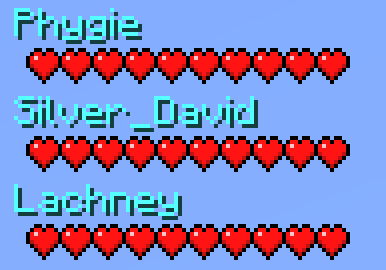
Configuration Guide
  #Max amount of health indicators that will be displayed.
   maxIndicatorsDisplayed = 5
   #Max amount of team health indicators that will be displayed.
   maxTeamIndicatorsDisplayed = 7
   #The starting point for the indicator on the x axis.
   indicatorX = 0
   #The starting point for the indicator on the y axis.
  indicatorY = 0
   #Distance the health indicator will detect entities.
   indicatorDistance = 7. 0
   #Enables the numerical indicators alongside the mob name.
   enableNumericalIndicator = false
   #The starting point for the team indicator on the x axis. (subtracted from right side)
   teamIndicatorX = 95
   #Determines weather or not only player health indicators should show.
   onlyPlayerIndicators = false
   #Determines weather or not only team health indicators should show.
   enableTeamIndicators = false
   #The starting point for the team indicator on the y axis.
   teamIndicatorY = 0
🤷 FAQ (Frequently Asked Questions)
Can I use this in my modpack?
Yes, you definitely can. Just make to provide credit to all the authors respectively and link back to the CurseForge page.Can I redistribute this mod onto other platforms?
Yes, but before doing so make sure that all downloads are directly linked to CurseForge and provide credit to all the authors respectively.🤚 Support: If you have questions or any issues with our mods, read the FAQ! You can
🤖 AI-enhanced — based on mod data
📊 Mod Details
- Game
- Minecraft Mods
- Author
- ModdingLegacy
- Version
- 26.1.2
- Downloads
- 577
- Endorsements
- 8
- Category
- decoration
- Created
- 5/22/2023
- Updated
- 8/30/2026
- Game Versions
- 1.19.4
- Tags
- decoration, utility
🔧 How to Install Minecraft Mods Mods
Download from Modrinth. Use Prism Launcher or drop into your mods folder.
📖 Full step-by-step install guide for Minecraft Mods →
Visit the official mod page for specific installation instructions for this mod.
🎮 Need cheat codes or console commands? Check ur gaming wiki for Minecraft Mods commands, item IDs, and more.
❓ Frequently Asked Questions
Which Minecraft Mods versions does Surrounding Indicators support?
The author lists 1.19.4. Other versions may work but are untested by the author.
What is the latest version of Surrounding Indicators?
Version 26.1.2, published 2026-08-30 with 577 downloads recorded at the source.
Keep browsing — more Minecraft Mods mods await