Playerautoma
🟡 Updated this year⚠️ Install Order · 2 steps
Install in this order, then this mod last — most mods fail to load without their framework and dependencies in place.
🖼️ Gallery (9 images)
🔍 Analysis
- 👍 0.2% endorsement rate
- 🏆 #178 of 983 fabric mods in this game by downloads
📋 About This Mod
# Playerautoma Record and replay player actions. Also, re-stack blocks when used up like Inventory tweaks. The mod works on servers but can be regarded as cheating by some. <iframe frameborder="0" allowfullscreen="true" src=https://www.youtube.com/embed/FE1yiPbejaU></iframe> The following actions are recorded: * movement * block placement and breaking * item interactions * moving items around in the inventory, chests and crafting tables as well as crafting itself The mod will not add support to record chat actions like commands or writing messages as it would allow for the creation of spam bots. ## Any troubles? This mod is still early in development. If you encounter any bugs or problems or you have a new feature request please let me know (https://github.com/jaszlo/Playerautoma/issues) and if you want to contribute feel free to create a (https://github.com/jaszlo/Playerautoma/pulls). Alternatively create an issue on (https://discord.com/invite/yBT2dbCPCv). ## Installation This mod requires Minecraft (https://fabricmc.net/). Simply put the playerautoma-vx.x.jar and (https://modrinth.com/mod/fabric-api) JAR in `.minecraft/mods`. ## Usage The mod has a menu which should be self-explanatory and can be opened using the `O` Key. Other than that the default keybindings are as follows. * `G` Start Recording * `H` Stop Recording * `J` Start Replay * `B` Pause Replay * `K` Cancel Replay * `L` Start looped Replay * `U` Store Recording * `I` Load Recording * `0` Menu Prevention * `CTRL + ` Store to QuickSlot * `ALT + ` Store to QuickSlot ### Commands From v0.4.3 and onwards commands are available and allow you to control the mod using them. The commands should be self-explanatory and are as follows. See (https://github.com/jaszlo/Playerautoma/blob/1.20.4/documentation/commands.md) for detailed documentation. ``` /record <start|stop|clear> /record <store> <name> <json|rec> /record <load> <name> /record quickslot <store|load> <slot> /replay <start|stop|loop|togglepause> ``` ### Recording Commands You can also record commands entered. This option is turned off by default. This specifies to track commands not to replay them. Meaning if you have a replay that contains commands they will be replayed regardless of the option specified. You can also black-list specific commands. Again this only black list them for the recording.
# Playerautoma Record and replay player actions. Also, re-stack blocks when used up like Inventory tweaks. The mod works on servers but can be regarded as cheating by some.
The following actions are recorded: movement block placement and breaking item interactions moving items around in the inventory, chests and crafting tables as well as crafting itself
The mod will not add support to record chat actions like commands or writing messages as it would allow for the creation of spam bots.
## Any troubles? This mod is still early in development. If you encounter any bugs or problems or you have a new feature request please let me know (https://github.com/jaszlo/Playerautoma/issues) and if you want to contribute feel free to create a (https://github.com/jaszlo/Playerautoma/pulls).
Alternatively create an issue on (https://discord.com/invite/yBT2dbCPCv).
## Installation This mod requires Minecraft (https://fabricmc.net/). Simply put the playerautoma-vx.x.jar and (https://modrinth.com/mod/fabric-api) JAR in `.minecraft/mods`.
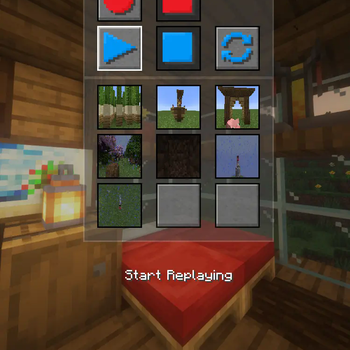
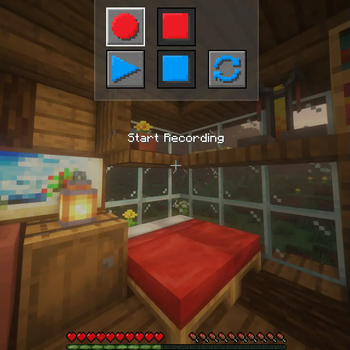
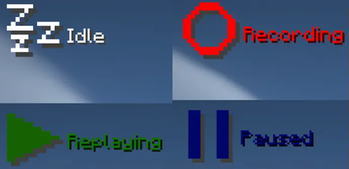
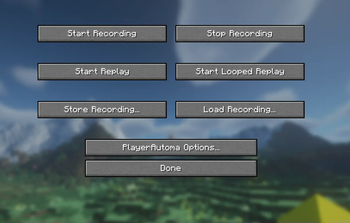
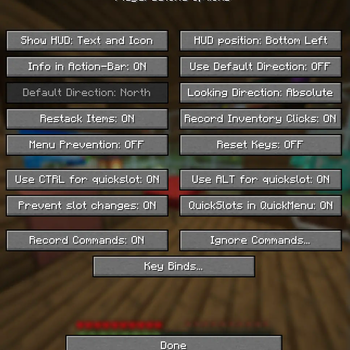
## Usage The mod has a menu which should be self-explanatory and can be opened using the `O` Key.
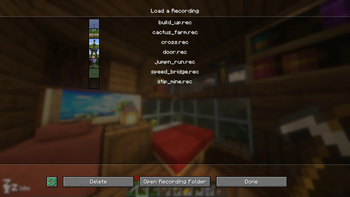
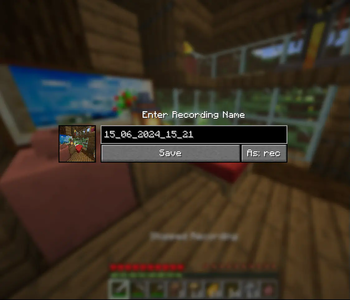
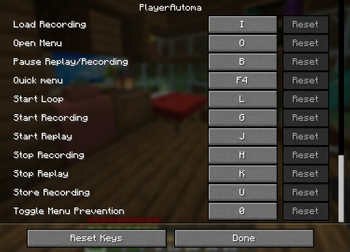
Other than that the default keybindings are as follows. `G` Start Recording `H` Stop Recording `J` Start Replay `B` Pause Replay `K` Cancel Replay `L` Start looped Replay `U` Store Recording `I` Load Recording `0` Menu Prevention `CTRL + ` Store to QuickSlot * `ALT + ` Store to QuickSlot
### Commands
From v0. 4. 3 and onwards commands are available and allow you to control the mod using them.
The commands should be self-explanatory and are as follows. See (https://github.com/jaszlo/Playerautoma/blob/1. 20. 4/documentation/commands.md) for detailed documentation.
```
/record
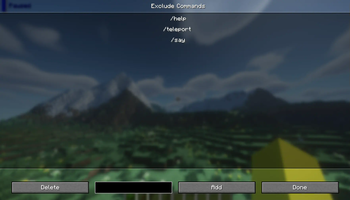
### Recording Commands You can also record commands entered. This option is turned off by default. This specifies to track commands not to replay them. Meaning if you have a replay that contains commands they will be replayed regardless of the option specified. You can also black-list specific commands. Again this only black list them for the recording.
📊 Mod Details
- Game
- Minecraft Mods
- Author
- jaszlo
- Version
- v1.0.2+1.21.11
- Downloads
- 74,623
- Endorsements
- 164
- Category
- fabric
- Created
- 10/26/2023
- Updated
- 2/26/2026
- Game Versions
- 1.21.11
- Tags
- game-mechanics, technology, utility
🔧 How to Install Minecraft Mods Mods
Download from Modrinth. Use Prism Launcher or drop into your mods folder.
📖 Full step-by-step install guide for Minecraft Mods →
Visit the official mod page for specific installation instructions for this mod.
🎮 Need cheat codes or console commands? Check ur gaming wiki for Minecraft Mods commands, item IDs, and more.
❓ Frequently Asked Questions
Which Minecraft Mods versions does Playerautoma support?
The author lists 1.21.11. Other versions may work but are untested by the author.
What is the latest version of Playerautoma?
Version v1.0.2+1.21.11, published 2026-02-26 with 74,623 downloads recorded at the source.
Keep browsing — more Minecraft Mods mods await